Control Screen Saver 2.0.0
Developed by gPhotoShow.com
-
Windows
-
setup file ControlSS.exe (2.69 MB)
-
Freeware
Select a download mirror:
- Developer Link 1 (ControlSS.exe)
- Download3k US (ControlSS.exe)
- Download3k EU (ControlSS.exe)
MD5: 9e3aa12cc38ec26a945041bdb7af065e
All files are original. Download3K does not repack or modify downloads in any way. Check MD5 for confirmation.
Developer Description
"Take control of your Windows screen savers"
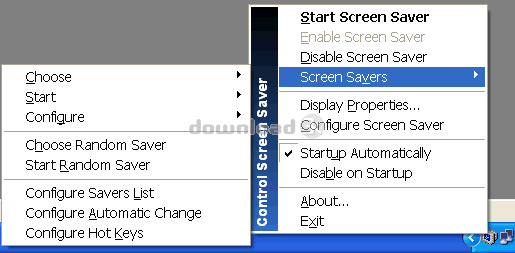
**Take control of your screen savers.**Control Screen Saver (ControlSS) is a small, free system-tray utility that lets
you start, enable, disable, choose and schedule your Windows screen savers with a
single click — without ever opening the Windows display settings.
ControlSS sits quietly next to the clock. Double-click to start the screen saver,
left-click to enable or disable it, and right-click for a full menu: choose the
active saver, start a random one, rotate savers automatically, assign global hot
keys and hot corners, keep the computer awake, lock the workstation and more.
**Why you'll like it**
- Manage screen savers from the tray instead of the Control Panel.
- Start your own idle timer that works even when an app has disabled the saver.
- Keep the screen awake during presentations, downloads and long tasks.
- Quick shortcuts to lock the PC or switch off the monitor.
- Clean, free, no adware and no bundled software.
It also integrates with **gPhotoShow**, switching slideshow sets automatically so
you can organize your photos and videos into categories.
Control Screen Saver runs on Windows 11, 10, 8.1 and 7 (SP1+), in both 32-bit and
64-bit editions, with a native 64-bit build and high-DPI support.
Requirements: windows
What's new in this version: Some bug fixes and new features
Antivirus information
Download3K has downloaded and tested Control Screen Saver on 29 Jun 2026 with some of Today's best antivirus engines and you can find below, for your convenience, the scan results:
-
Avast:
Clean -
Avira:
Clean -
Kaspersky:
Clean -
McAfee:
Clean -
NOD32:
Clean

Popular downloads in Desktop Enhancements
-
 Vista Transformation Pack 9.0.1
Transform Windows XP to Vista alike for free! -
 Universal Vista Inspirat Brico Pack Ultimate 2 1.0
An update for Vista Inspirat Brico Pack. -
 Vista Visual Styles Pack 6.0
Change your old Windows XP theme. -
 VistaMizer 4.3.1.0
Give your Windows XP the Vista look! -
 Licking Dog Screen Cleaner Screen Saver 2.0
Licking Dog Screen Cleaner Screen Saver -
 Acez Jump Start Screensaver 1.2
Activate your screen saver from your desktop! -
 UberIcon 1.0.4
Adds effects to your Desktop and Explorer. -
 Classic Shell 4.3.1
Enhance the usability of Windows! -
 RocketDock 1.3.5
Application launcher simliar to the OSX Dock. -
 free Image 2 Icon Converter 3.2
Convert from all images to transparent icons
User rating
1/5 (1 votes)
Poor
Your rating

-
OS
Win2000,WinXP,Win7 x32,Win7 x64,Windows 8,Windows 10,WinServer,WinOther,Windows2000,Windows2003,Wind -
License
Freeware -
Price
$0 -
Updated
6/29/2026 -
Downloads
387 (2 last week) -
Size
2.69 MB -
MD5
9e3aa12cc38ec26a945041bdb7af065e -
SHA1
080f4d3b75bbb8e3b416d8e0fa7318cc1514bfe1 -
Developer
gPhotoShow.com