Docklight RS232 Terminal - RS232 Monitor 2.4.5
Developed by Flachmann und Heggelbacher GmbH & Co. KG
-
Windows
-
setup file Docklight.zip (5.66 MB)
-
Shareware
Buy or select mirror:
- Buy $70
- Developer Link 1 (non https Docklight.zip)
- Developer Link 2 (non https Docklight.zip)
- Download3k US (Docklight.zip)
- Download3k EU (Docklight.zip)
MD5: 53797400306f2ee96b73528232ec2589
All files are original. Download3K does not repack or modify downloads in any way. Check MD5 for confirmation.
Developer Description
"RS232 Terminal / RS232 Monitor"
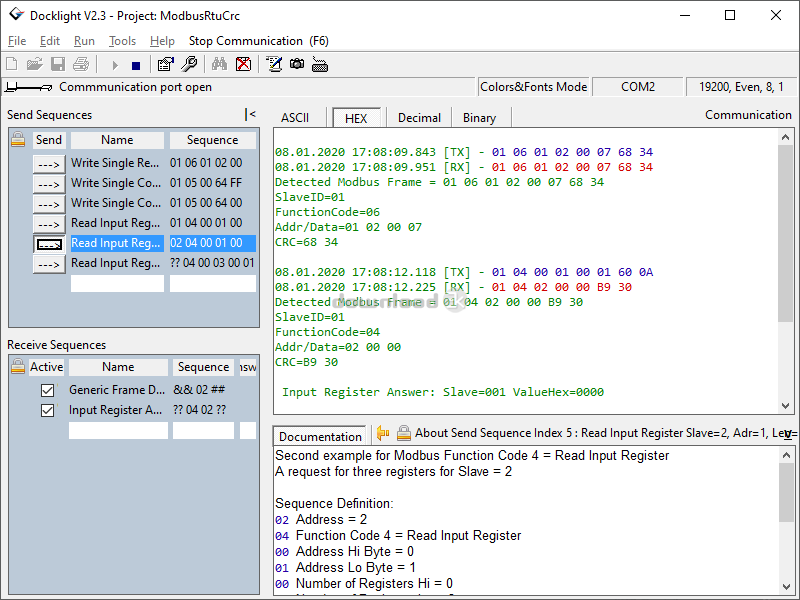
Docklight is a testing, analysis and simulation tool for serial communication protocols (RS232, RS485/422 and others). It allows you to monitor the communication between two serial devices or to test the serial communication of a single device. Docklight is easy to use and runs on almost any standard PC using Windows 10 / 8 / 7. Key functions include:* Simulating serial protocols - Docklight can send out user-defined sequences according to the protocol used and it can react to incoming sequences. This makes it possible to simulate the behavior of a serial communication device, which is particularly useful for generating test conditions that are hard to reproduce with the original device (e.g. problem conditions).
* Logging RS232 data - All serial communication data can be logged using two different file formats: use plain text format for fast logging and storing huge amounts of data. Or create a HTML file with styled text that lets you easily distinguish between incoming and outgoing data or additional information.
* Detecting specific data sequences - In many test cases you will need to check for a specific sequence within the RS232 data that indicates a problem condition. Docklight manages a list of such data sequences for you and is able to perform user-defined actions after detecting a sequence, e.g. taking a snapshot of all communication data before and after the error message was received.
* Responding to incoming data - Docklight lets you specify user-defined answers to the different communication sequences received. This allows you to build a basic simulator for your serial device within a few minutes. It can also help you to trace a certain error by sending out a diagnostics command after receiving the error message.
* Docklight has been successfully tested with many popular USB-to-RS232 converters, virtual null modem software, and many other Embedded Development tools that appear as a virtual COM port.
Requirements: COM port(s) available
What's new in this version: I/O error improvements, usbser.sys timing, cosmetics
Antivirus information
Download3K has downloaded and tested Docklight RS232 Terminal - RS232 Monitor on 25 Apr 2022 with some of Today's best antivirus engines and you can find below, for your convenience, the scan results:
-
Avast:
Clean -
Avira:
Clean -
Kaspersky:
Clean -
McAfee:
Clean -
NOD32:
Clean

Popular downloads in Software Development
-
 ASP windows registry editor 1.0
COM interface to windows registry in ASP/WSH -
 DOSBox 0.74-3
A free and useful DOS-emulator. -
 Bat To Exe Converter 3.0.9
Convert your batch-script files to exe files - Notepad++ 8.8.1
A free source code editor -
 Game Maker Lite 8.1
Hleps you to make your own games. -
 Kingo Android Root 1.5.0
KingoRoot best one-click android root tool. -
 VISCOM Video Media Player ActiveX SDK 10.0
video, audio playback activex control -
 plist Editor for Windows 1.0
Free Property List Editor for Windows. -
 Visual Studio Decompiler 7.3.8
Visual Studio .NET decompiler dll/exe -
 PSPad editor 5.5.2.852
PSPad editor is freeware programmer editor
User rating
3/5 (3 votes)
Good
Your rating

-
OS
Windows 11,Windows 10,Windows 8,Win7 x32,Win7 x64 -
License
Shareware -
Price
$70 Buy -
Updated
4/25/2022 -
Downloads
1905 (1 last week) -
Size
5.66 MB -
MD5
53797400306f2ee96b73528232ec2589 -
SHA1
11e60445e288fe8c07a58099bc0fa8bc5926c1b4 -
Developer
Flachmann und Heggelbacher GmbH & Co. KG