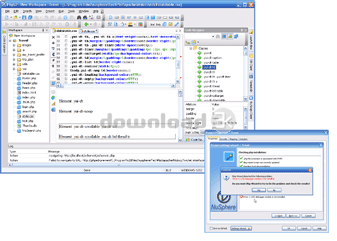
NuSphere PhpED 5.6 Build 5627
PhpED is a robust code editor.
| Details |
View: screenshot
Size: 68.00 MB
License: Freeware
OS: Windows All
Price: $119
Publisher: NuSphere Corporation
|
Date added: 3/13/2007
Date updated: 3/3/2009
Total Downloads: 1728
Downloads - Last Week: 16
|
|
NuSphere PhpED 5.6 Build 5627 Publisher's description
NuSphere PhpED IDE is a professional integrated development environment created mostly for building database-driven web-applications using php scripting language, although a lot of other popular languages such as HTML, XML, CSS, Perl, Javascript, Python are supported.
PhpED is a robust code editor, powerful php debugger, profiler and publisher - all-in-one. It also includes integrated database and CVS clients, SOAP services, HTML validator and Code Formatter tools, Terminal support.
PhpED is the leading PHP IDE with Advanced PHP Editor, PHP Debugger and PHP Profiler, Code Insight, Database Client, Integrated Help System, full support for HTML, CSS, XML, SMARTY, XHTML and other. The features available in PhpED bring you unmatched number of great PHP Tools
Advanced Editor
* Dynamic Syntax Highlighting Flash Demo
The editor will automatically switch the syntax highlighting dependant on the position in the file. The strength of PHP is in ability to embed it in the other documents, like HTML. However, sometimes the document becomes too crowded with the lines of code from multiple languages. Auto-switch feature will let you focus on the code and the language that you are currently working on. It will only highlight those parts of the document, which are written in the same language as the current position of the cursor and deem the rest of the text. The editor will switch between php, html, smarty, css and javascript, depending on the type of the file.
* Multiple Language Syntax Highlighting Flash Demo
Code sensitive syntax color highlighter gives you the ability to have separate highlighting for different languages in the same file. Highlighting for each language is of course fully configurable in PhpED's settings.
* Code Folding Flash Demo
Selectively hide and display sections of a currently-edited file. PHP IDE displays the collapsible regions of the code with folding marks.
* Smarty Highlighter
PhpED comes with Syntax Highlighter for Smarty's .tpl files. This feature, combined with Dynamic Syntax Highlighting and Multiple Language Syntax Highlighting provides for unmatched convenience and productivity of PHP developers using Smarty templates in their work.
* True Unicode editing. Create web pages in several natural languages simultaneously.
* Code templates allow you to type whole code fragments at once by a single key press. You can add new templates and change existing ones.
* Fully customizable shortcuts, advanced editor features such as brace matching, context-sensitive auto-indent and smart-home speed up your work significantly.
* Search and replace scope. Now find and replace works in multiple files and directories as well as in all opened files! Regular expressions allow you to find text using complex conditions.
* Drag-n-drop operations support. Try to drag an image from the file browser or project manager in to your HTML page directly. Database explorer supports drag operations too.
Debugging and Profiling Flash Demo
* Commercial versions of PHP DBG Debugger - the most powerful debugger currently available provides unmatched debugging productivity and safety in both local and remote debugging modes. Learn more
* PhpED advanced php profiler shows executing time for each line, function or module of the code with tenth millisecond's precision. You can locate all the bottlenecks quickly and efficiently. Profiler saves all the timings among multiple sessions so your can compare them and evaluate the improvements. Learn more
Code Insight Flash Demo
* Code Completion. Dynamically provides the available properties and methods for a given variable or class, and automatically concludes partially typed keywords. Code completion works for HTML and CSS too. It shows properties for tags, classes and attributes.
* Tool tips and Instant error analysis for both Php and HTML make coding an easy task - no more simple mistakes and typos.
* Project-wide code explorer in PhpED IDE shows all php classes, methods, properties, functions and variables in every detail and facilitates object-oriented programming.
* Hints show you arguments and returning value for a just typed function, as well as a short description for them.
* Fast functions reference shows you all the PHP functions as they are available from PHP extensions. Nested calls are supported with unlimited nesting level.
Project and File Management
* Quick deployment. Once publishing is set up according to your needs, you can upload your PHP projects with a single click!
* Project-wide code explorer in PhpED IDE shows all php classes, methods, properties, functions and variables in every detail and facilitates object-oriented programming.
* Secure deployment. Support for SFTP, FTPS (TLS/SSL) and WebDAV/HTTPS (SSL) protocols make deployment and data transfer secure now.
* Enhanced integration. Integrate PhpED IDE with 3rd party tools like Tortoise SVN or Tortoise CVS.
* Terminal connections (Telnet and SSH) are supported. Perform your remote administration tasks from within PhpED
* Embedded tools for more effective coding, editing and code management. PhpED IDE includes a number of pre-configured tools like PHP documentor, HTML Tidy, Code Formatter, Html Validator and CVS client.
Database client
* SQLite, MySQL, MSSQL, Oracle, PostgreSQL and InterBase support. Quick access to multiple types of databases through a GUI tool boosts up your productivity. Browse the tables, drag and drop fields, tables names, views, stored procedures, triggers etc. and run any sql statement to manipulate the data and the metadata stored in the database - all without leaving the IDE.
* NuSoap wizard and NuSoap connection client let you easily enhance your code with WDSL services. Drag-n-drop is fully supported Flash Demo
Integrated help system
* Embedded manuals. PhpED is delivered with several most needed manuals, including manuals and references for php, css2, html4.01, html3.2, mysql, postgresql, smarty and others. You can customize the list of manuals adding other resources you may need for your work.
* Context help for Php, HTML and CSS. Pressing F1 invokes context sensitive help for the code under cursor (php functions, html tags and attribute and css classes).
Supported platforms for NuSphere PhpED 5.6:
* Windows 98, ME, 2000, 2003, XP, Vista
|
| Antivirus information |
|
Download3K did not scan NuSphere PhpED for viruses, adware, spyware or other badware. For your own safety, we recommend that you always have an antivirus, with virus definitions up to date, installed on your computer when downloading and installing programs from the web.
|
| Related press releases |
NuSphere Corporation Announces Release of PhpED IDE v3.3.1 with unique support f... [2004-09-05 00:00:00]
NuSphere Corporation announces the availability of PhpED v3.3.1. New version of PhpED Integrated Development Environment for PHP provides unique support for PHP5.
Bedford, MA May 8, 2004--NuSphere a...
|
|
NuSphere PhpED 4.0 is released [2005-08-29 00:00:00]
NuSphere PhpED 4.0 is released!
NuSphere Corporation announces the availability of PhpED 4. New version of PhpED Integrated Development Environment for PHP provides unique support for PHP5, SFTP, Tel...
|
|
SQLite and Firebird are supported by the latest PhpED from NuSphere [2006-03-23 00:00:00]
NuSphere released PhpED 4.5, the next version of the innovative PHP Development Environment. New features are:
- Customizable Multi-Level Highlighting now supporting PHP4, PHP5, XML, XHTML, HTML, C...
|
|
|
|
|