Pixelformer 0.9.6.3 RC3
Developed by Qualibyte Software
-
Windows
-
setup file Pixelformer.Setup.exe (0.86 MB)
-
Freeware
Select a download mirror:
- Developer Link 1 (non https Pixelformer.Setup.exe)
- Download3k US (Pixelformer.Setup.exe)
- Download3k EU (Pixelformer.Setup.exe)
MD5: a3c1b91fb1dc81b322a1294e7ce6bc25
All files are original. Download3K does not repack or modify downloads in any way. Check MD5 for confirmation.
Developer Description
"Designed to be an advanced icon editor."
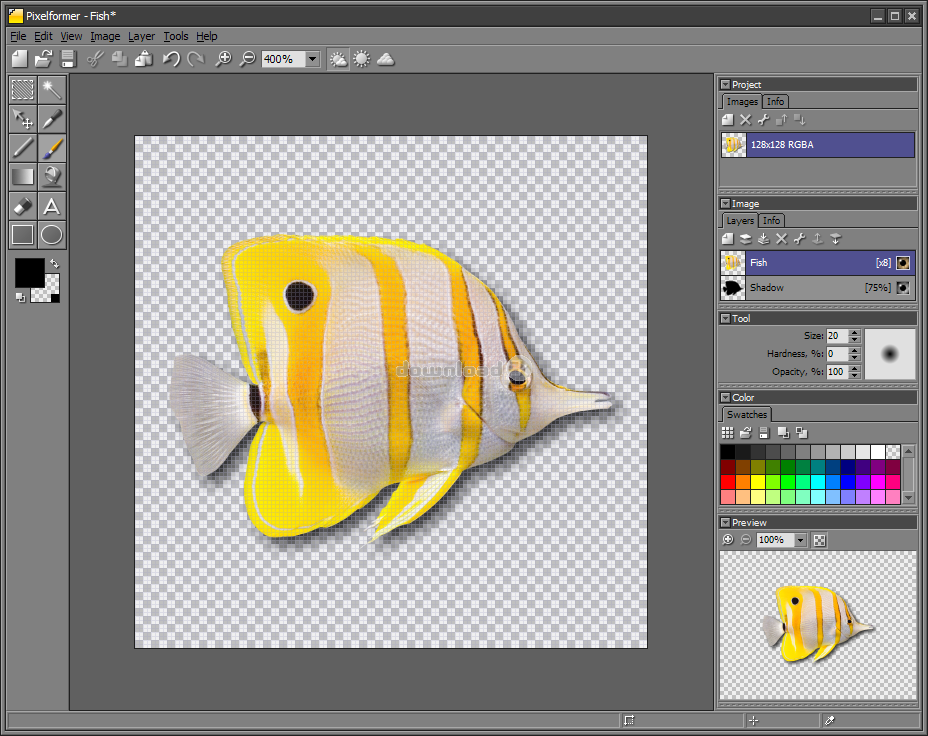
The Pixelformer application was designed to be an advanced icon editor that will give you full control over every pixel of your images. With its predictability and subpixel precision you can easily create professional quality icons and bitmaps.The main features of Pixelformer are:
• no restrictive limits for image dimensions
• support for different color depths up to 32-bit RGB with alpha channel
• semi-transparent colors
• multiple layer support
• free-form masking
• in-place supersampling
• lossless target color depth switching
• independent access to color and alpha channels
• dynamic palette generation
• multiple file format support
• extensible architecture
• icon extraction capability
• PNG size optimization
• Vista icon optimization
• alpha premultiplication
• deep undo buffer
No restrictive limits for image dimensions
Pixelformer does not limit you to icon-specific image sizes. In particular, this means that you generally would not need any additional tools while making an icon from a multi-megapixel photo.
Support for different color depths up to 32-bit RGB with alpha channel
When using Pixelformer, you can always work in a 32-bit RGBA color space. If you need another format, just tag your image with desired output color depth, and Pixelformer will generate appropriate palette, preview, and data for export.
Semi-transparent colors
In addition to semi-transparent layers and soft-drawing tools, Pixelformer allows you to use semi-transparent colors, offering more control over transparency effects.
Multiple layer support
Any image in a Pixelformer project can be composed of an unlimited number of layers. The layering greatly simplifies working with complex images.
Free-form masking
Using the selection tools available in Pixelformer, you can create a region of any arbitrary form and use it for constraining the drawing operations or for manipulating specific pixels.
In-place supersampling
With Pixelformer, you can draw at a much higher resolution than that of the output image - the drawing will be instantly resampled and mapped to the output. This method combines the benefits of raster and vector graphics and gives you antialiased but still editable image, which can never be produced by classic 1:1 raster editors. The supersampling also helps to convert photos to icons by simplifying the edge trimming process and retaining a possibility to refine the result and align it to pixel grid.
Lossless target color depth switching
As the working color space in Pixelformer is always 32-bit RGBA, changing the color depth of output images is very easy and non-destructive.
Independent access to color and alpha channels
Using Pixelformer, you can independently view and edit color and alpha channels of your images; this feature may be useful for fixing edge artifacts in imported icons, or for creating unusual blending effects.
Dynamic palette generation
Pixelformer frees you from having to worry about color palettes for non-truecolor images - highly optimized ones can be automatically generated in real time.
Multiple file format support
At the moment, Pixelformer is able to import BMP, PNG, ICO, CUR, JPEG/JPG, TGA, and PSD image files, as well as EXE, DLL, or ICL multiple image containers; BMP, PNG, ICO, and TGA file formats are available for export. You can freely convert images between these formats.
Extensible architecture
The file format support can be extended with appropriate plugins. The SDK will be available shortly.
Icon extraction capability
Pixelformer is able to extract icons, cursors, and bitmaps from executable files and ICL icon libraries.
PNG size optimization
Pixelformer includes a PNG optimizer, which finds optimal PNG compressor parameters during export, and thus losslessly minimizes size of PNG image files.
Vista icon optimization
Since Windows Vista icons contain PNG-compressed subimages, the PNG optimizing engine reduces the icon file sizes as well.
Alpha premultiplication
When necessary, images containing an alpha channel can be exported from Pixelformer with premultiplied alpha.
Deep undo buffer
Pixelformer efficiently compresses undo data, keeping a long history of operations while maintaining a low memory footprint.
Antivirus information
Download3K has downloaded and tested Pixelformer on 4 May 2012 with some of Today's best antivirus engines and you can find below, for your convenience, the scan results:
-
Avira:
Clean -
Kaspersky:
Clean -
NOD32:
Clean

Popular downloads in Desktop Enhancements
-
 Vista Transformation Pack 9.0.1
Transform Windows XP to Vista alike for free! -
 Universal Vista Inspirat Brico Pack Ultimate 2 1.0
An update for Vista Inspirat Brico Pack. -
 Vista Visual Styles Pack 6.0
Change your old Windows XP theme. -
 VistaMizer 4.3.1.0
Give your Windows XP the Vista look! -
 Licking Dog Screen Cleaner Screen Saver 2.0
Licking Dog Screen Cleaner Screen Saver -
 Acez Jump Start Screensaver 1.2
Activate your screen saver from your desktop! -
 UberIcon 1.0.4
Adds effects to your Desktop and Explorer. -
 Classic Shell 4.3.1
Enhance the usability of Windows! -
 RocketDock 1.3.5
Application launcher simliar to the OSX Dock. -
 free Image 2 Icon Converter 3.2
Convert from all images to transparent icons
User rating
3/5 (4 votes)
Good
Your rating

-
OS
Windows All -
License
Freeware -
Updated
3/3/2009 -
Downloads
424 (3 last week) -
Size
0.86 MB -
MD5
a3c1b91fb1dc81b322a1294e7ce6bc25 -
SHA1
adc429d8e7f10ac0abd2b693efd2aa4573d799b3 -
Developer
Qualibyte Software