Alarm++ 8.0.12
Developed by 12noon
-
Windows
-
setup file alarm-setup.exe (4.09 MB)
-
Shareware
Buy or select mirror:
- Buy $24.99
- Developer Link 1 (non https alarm-setup.exe)
- Download3k US (ver 8.0.12, alarm-setup.exe)
- Download3k EU (ver 8.0.12, alarm-setup.exe)
MD5: 33e734d742f79cfadd62c9c078b62dce
All files are original. Download3K does not repack or modify downloads in any way. Check MD5 for confirmation.
Developer Description
"Alarms repeat in simple to complex intervals"
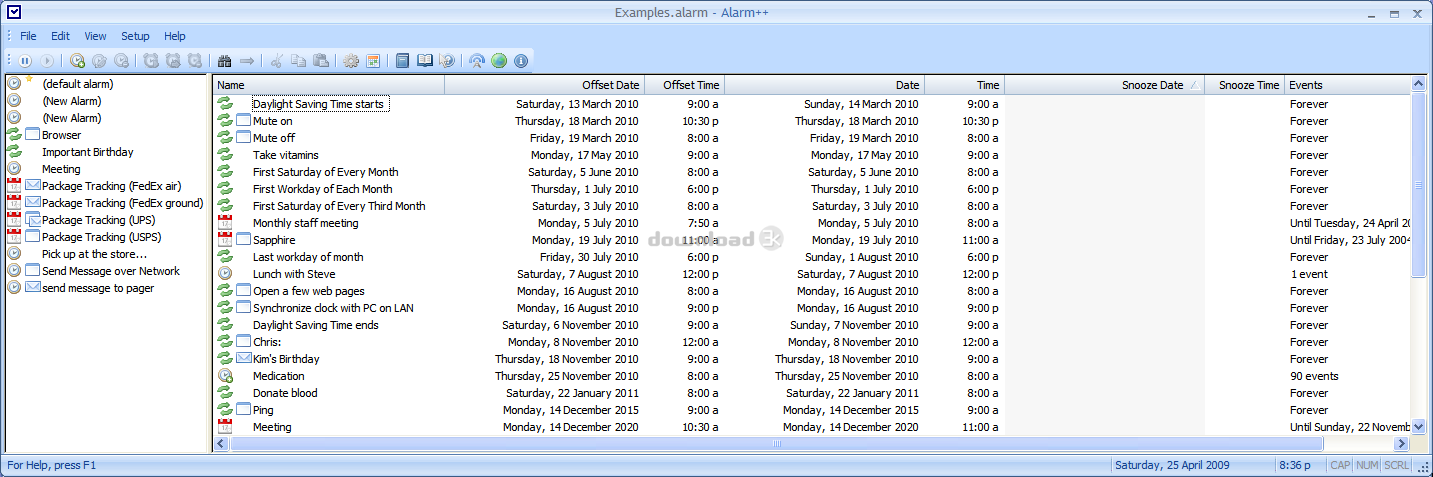
Alarm++ fulfills your reminder and scheduling needs. Create multiple alarmsto:
* remind you of events -- meetings, birthdays, deadlines, TV shows
* visit web pages -- read the news every morning or check your stocks weekly
* send e-mail to your pager -- get reminders anywhere
* send messages over the network -- help others remember
* use speech and animation -- have animated characters talk and gesture
* execute scripts and batch files -- for even more complex tasks
* open folders in Explorer -- check a LAN server folder every month
* send e-mail (with or without attachments) -- send reminders to a group or
files to someone on certain dates
* play sounds or music -- wake up in the morning to your favorite CD
* run applications -- begin writing a status report every Friday morning or
backup every night *
Each alarm can repeat at many different intervals, such as every few
minutes, hours, days, months, or years. They can repeat any number of times,
from once to forever or until a specific date. Alarms can also be restricted
to specific weekdays, weeks, months, weeks of the month, and time ranges.
You can set alarms for every Tuesday, every other week, Friday the 13th, the
second Thursday of every third month, etc. Events can be ignored if they
occur a specific number of minutes, hours, or days in the past.
You can create templates for creating new alarms. For example, have a
"Meeting" template, a "Grocery store on the way home" template, and an
"Important Birthday" template. This greatly simplifies entering values for
the types of alarms that you create often.
Alarm++ has a well-designed and easy-to-use interface. It stays
unobtrusively in your system tray or can be minimized on your taskbar. The
autosave feature means that you never have to worry about losing your alarms
to a Windows system crash. Alarm++ is powerful, flexible, easy to use, and
simple to install.
Requirements: Windows 7, Vista, or later
What's new in this version: Fix delay when resuming from sleep
Antivirus information
Download3K has downloaded and tested Alarm++ on 8 Aug 2013 with some of Today's best antivirus engines and you can find below, for your convenience, the scan results:
-
Avast:
Clean -
Avira:
Clean -
Kaspersky:
Clean -
NOD32:
Clean

Popular downloads in Desktop Enhancements
-
 Vista Transformation Pack 9.0.1
Transform Windows XP to Vista alike for free! -
 Universal Vista Inspirat Brico Pack Ultimate 2 1.0
An update for Vista Inspirat Brico Pack. -
 Vista Visual Styles Pack 6.0
Change your old Windows XP theme. -
 VistaMizer 4.3.1.0
Give your Windows XP the Vista look! -
 Licking Dog Screen Cleaner Screen Saver 2.0
Licking Dog Screen Cleaner Screen Saver -
 Acez Jump Start Screensaver 1.2
Activate your screen saver from your desktop! -
 UberIcon 1.0.4
Adds effects to your Desktop and Explorer. -
 Classic Shell 4.3.1
Enhance the usability of Windows! -
 RocketDock 1.3.5
Application launcher simliar to the OSX Dock. -
 free Image 2 Icon Converter 3.2
Convert from all images to transparent icons
User rating
2/5 (1 votes)
Medium
Your rating