

ShiftN 5.0
Developed by Marcus Hebel
-
Windows
-
setup file ShiftN_Setup.exe (6.83 MB)
-
Freeware
Select a download mirror:
- Developer Link 1 (non https ShiftN_Setup.exe)
- Developer Link 2 (non https ShiftN_Setup.exe)
- Developer Link 3 (non https ShiftN_Setup.exe)
- Download3k US (ShiftN_Setup.exe)
- Download3k EU (ShiftN_Setup.exe)
MD5: 8c8d0a90cd4a992124d64590a1da73a1
All files are original. Download3K does not repack or modify downloads in any way. Check MD5 for confirmation.
Developer Description
"Automatic correction of converging lines"
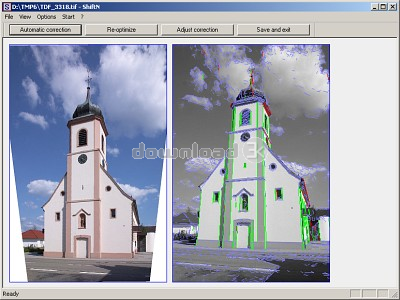
Converging lines in photographs, particularly of buildings, can often spoil the desired effect: vertical edges appear slanted, although we perceive buildings as having vertical and horizontal lines. Converging lines occur when the image plane (film or sensor) is tilted relative to the subject. They can be avoided optically with a shift lens or with a medium or large format view camera with movements. With a shift lens, the lens is shifted perpendicular to its optical axis, so that the image plane can remain parallel to the subject. Shift lenses are mechanically and optically more complex than standard lenses, which is why they are comparatively expensive, and most cameras - compact cameras and smartphones in particular - do not allow lens changes at all. Digital photography, and the scanning of existing photos, opens up new possibilities for correcting the picture afterwards. This is where ShiftN comes in.ShiftN corrects converging lines, and most of the work is done automatically by the program. In most cases, the command "Automatic correction" is sufficient to produce a satisfying result. Both converging lines and a rotation of the camera are corrected automatically.
ShiftN first searches the image for straight lines and edges and considers only those that are sufficiently vertical to be likely architectural elements. Based on these line segments, an optimization process determines the perspective transformation that makes the lines as parallel to each other as possible (shift) and aligns them with the edges of the image (rotation).
Requirements: Windows 10 or 11 (64-bit), 512 MB RAM, 16 MB free disk space
What's new in this version: 64-bit Unicode version, compiled with Visual Studio 2026 Community Edition. Parts of the software were refactored and modernized with assistance from AI-based development tools (Claude).
Antivirus information
Download3K has downloaded and tested ShiftN on 8 May 2013 with some of Today's best antivirus engines and you can find below, for your convenience, the scan results:
-
Avira:
Clean -
Kaspersky:
Clean -
NOD32:
Clean

Popular downloads in Photo & Graphic
-
 Bandicam Screen Recorder 27.0.7.2687
Best Game, Video, Screen Recording Software -
 PhotoScape 3.7
A fun and easy photo editing software. -
 Magic Photo Editor 7.5
Easilly blend photo onto another picture. -
 SketchUp Make 16.1.1450 32-bit / 17.2.2555 64-bit
An easy-to-learn 3D modeling program. -
 jAlbum 40
Highly customizable web galleries for any site. -
 Shipping Container House Plans 1.1
Shipping Container House Plans Software -
 Corel PaintShop Pro 2023 25.2.0.58 Update 2
All you need to create fantastic photos! -
 Just Color Picker 6.3
Free colour picker and colour-editing tool. - JR Split File 1.2
Split a large file into smaller files -
 progeCAD Smart! free DWG CAD 9.0.28.8
progeCAD Smart! free personal CAD software
User rating
4.5/5 (7 votes)
Excellent
Your rating

-
OS
WinOther -
License
Freeware -
Price
$0.00 -
Updated
10/25/2026 -
Downloads
810 (10 last week) -
Size
6.83 MB -
MD5
8c8d0a90cd4a992124d64590a1da73a1 -
SHA1
00792f38bf6d24a6a7c81fe3e0ff9fa990e874d8 -
Developer
Marcus Hebel