

Volume Serial Number Editor Command Line 3.0.2
- Buy $12.95
- Developer Link 1 (volsnsetup.exe)
- Download3k US (volsnsetup.exe)
- Download3k EU (volsnsetup.exe)
MD5: 06de49f520d6ec3b4a1f62c42e65edb4
All files are original. Download3K does not repack or modify downloads in any way. Check MD5 for confirmation.
Developer Description
"Change a disk's volume serial from the console"
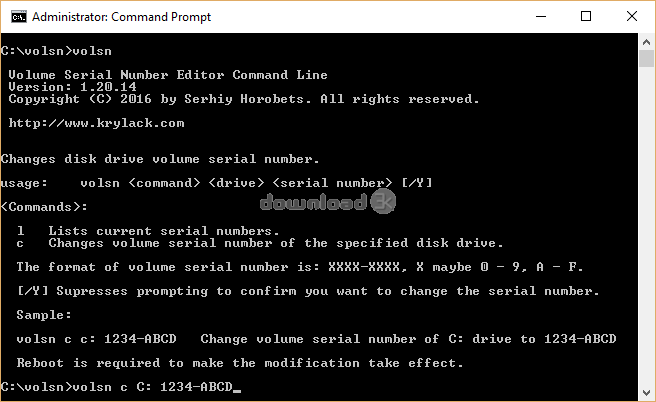
Volume Serial Number Editor Command Line (volsn) is a Windows console tool that views and changes the Volume Serial Number of your disks and drives, for scripting and automation across many machines. The Volume Serial Number is a short ID, shown as XXXX-XXXX, that Windows assigns to a volume when it is formatted. It is the value you see with the vol command or in a drive's Properties, and it belongs to the file system, separate from the drive's physical hardware serial. volsn changes it directly, without reformatting. List volumes with volsn list, read one with volsn get, set a value with volsn set, or restore a saved backup with volsn restore, and every command supports --json output for scripts. Use it to restore a serial after reformatting or reinstalling, to fix duplicate serials left by disk cloning or imaging, or to standardize serials across a fleet for IT asset tracking and inventory. It supports FAT, FAT32, exFAT and NTFS, including the full 64-bit NTFS serial, and works with BitLocker-encrypted drives, including the Windows drive, while they are unlocked, writing through BitLocker without touching the encryption. It backs up the boot sector before every change and verifies the result, rolling back automatically if anything fails, and the installer and application are code-signed. The setup installs volsn per user into C:\volsn on PATH, or with /ALLUSERS into Program Files\Krylack\volsn. It runs on Windows 7 through 11, in 32-bit, 64-bit and ARM64 editions. It changes only the file-system Volume Serial Number, not the drive's physical hardware serial. Use it only on drives you own or are authorized to manage.Requirements: Windows 7 SP1, 8, 8.1, 10 and 11, and Windows Server 2012 R2 or later (x86, x64 and ARM64).
What's new in this version: Volume Serial Number Editor Command Line (volsn) views, changes, backs up and restores the Volume Serial Number of FAT, FAT32, exFAT and NTFS drives from the console, including the full 64-bit NTFS serial and unlocked BitLocker drives. Commands: volsn list, get, set, random, backups, restore, with --json output for scripts. Backs up and verifies every change with automatic rollback. Windows 7 to 11, x86, x64 and ARM64. Code-signed.
Antivirus information
-
Avast:
Clean -
Avira:
Clean -
Kaspersky:
Clean -
McAfee:
Clean -
NOD32:
Clean

Popular downloads in System Utilities
-
 Realtek AC'97 Drivers A4.06
Realtek AC 97 sound driver. -
 Windows 7 Service Pack 1 (SP1) 32-bit & 64-bit (KB976932)
The first service pack for Windows 7. -
 Realtek High Definition Audio Driver for Vista, Win7, Win8, Win8.1, Win10 32-bit R2.82
High definition audio driver from Realtek. -
 .NET Framework 2.0
The programming model of the .NET -
 Driver Cleaner Professional 1.5
Improved version of Driver Cleaner -
 RockXP 4.0
Allows you to change your XP product key -
 Realtek AC'97 Drivers for Vista/Win7 6305
Multi-channel audio CODEC designed for PC. -
 DAEMON Tools Lite 12.3.0.2297
The FREE Virtual CD/DVD-ROM-EMULATOR. -
 AutoCorect 4.1.5
Diacritice la comanda, punctuatie automata. -
 SIW 16.16.1014
SIW - System Information for Windows