Open Hardware Monitor 0.9.6
- Developer Link 1 (openhardwaremonitor-v0.9.6.zip)
- Download3k US (openhardwaremonitor-v0.9.6.zip)
- Download3k EU (openhardwaremonitor-v0.9.6.zip)
MD5: 6f649c4615a01a4911283f2fecc00211
All files are original. Download3K does not repack or modify downloads in any way. Check MD5 for confirmation.
Review & Alternatives
"A monitoring application."
Overview
Open Hardware Monitor is a free open-source utility that is designed to provide a centralized interface in which you can easily monitor various aspects of hardware performance, including fan speeds, temperature sensors, voltage usage, resource load, and processor clock speeds. This software is compatible with the majority of hardware monitoring chips found in modern main boards.
Installation
At a strikingly small file size of only about 250 kB, Open Hardware Monitor typically downloads and installs in under 2 to 3 minutes. It is compatible with Windows XP, Vista, 7, 8, 8.1, and 10. It is capable of running on both 32-bit and 64-bit versions of Windows, and it is also compatible with all x86-based Linux operating systems. In this review we'll focus on the Windows version.
Interface
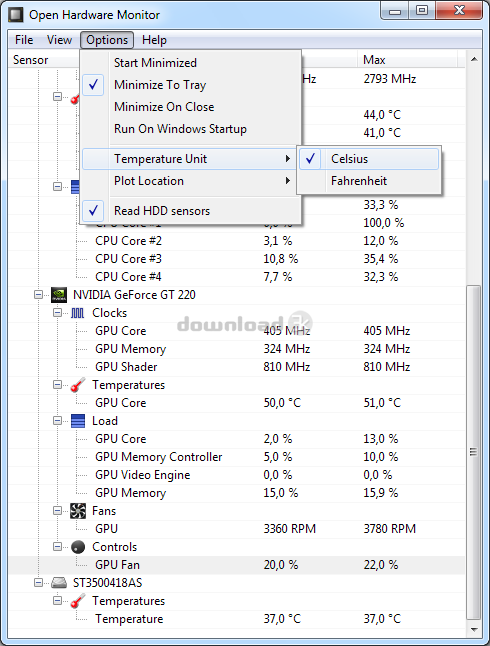
The user interface itself is relatively simple, with only four menus located at the top of the main window (File, View, Options, and Help). All of the computer attributes are displayed in a neatly organized list that categorizes statistics based on the operating system and the name of the monitor device. You can click on a device to expand its report and view the current value, as well as the minimum and maximum values. For a more expeditious and continuous monitoring of attributes you can utilize the customizable desktop gadget option, or set the software to provide input via the system tray.
Pros
-
Can be launched on system startup
-
Compatible with the majority of monitoring chips found in modern main boards, including those made by Winbond, ITE, and Fintek.
-
Gives you the ability to display monitored values in three different ways – within the main interface window, a personalized desktop gadget that can be adjusted to your preferences, and within the system tray.
-
Monitors and displays the CPU temperature of Intel and AMD processors
-
Monitors and displays ATI and Nvidia video card sensors
-
Provides continuous S.M.A.R.T (Self-Monitoring, Analysis, and Reporting Technology) feedback for almost all computer hard drives
-
Provides CPU Vcore and Battery voltage values
-
Displays both system and CPU temperatures, in both Celsius or Fahrenheit, as well as the fan speeds of the upper front, lower front, power supply, and upper back fans
Cons
-
It can be difficult for the average computer user to figure out what the various statistics mean. Thus, you may need the assistance of a computer professional to effectively analyze the results of the reports generated by the software.
-
Being that this is a beta release, there may be a few minor bugs that need to be worked out, although I have not encountered any during testing.
Alternatives
Software that is similar to Open Hardware Monitor includes SpeedFan, HWMonitor, Core Temp, AIDA64 Extreme Edition, Real Temp, and Fan Control. Of these alternatives, Speed Fan is the most popular, with HWMonitor being the second most commonly used alternative. Although SpeedFan is slightly more popular than Open Hardware Monitor, both of these applications contain highly similar feature sets and you should test both to see which ones better fits your needs.
Conclusion
If you're looking for a free way to monitor all of the attributes for your computer's attached hardware, Open Hardware Monitor provides an extremely useful analytical tool that can be used to quickly diagnose existing problems and help you maintain optimal performance.

Antivirus information
-
Avast:
Clean -
Avira:
Clean -
Kaspersky:
Clean -
McAfee:
Clean -
NOD32:
Clean

Popular downloads in System Utilities
-
 Realtek AC'97 Drivers A4.06
Realtek AC 97 sound driver. -
 Windows 7 Service Pack 1 (SP1) 32-bit & 64-bit (KB976932)
The first service pack for Windows 7. -
 Realtek High Definition Audio Driver for Vista, Win7, Win8, Win8.1, Win10 32-bit R2.82
High definition audio driver from Realtek. -
 .NET Framework 2.0
The programming model of the .NET -
 Driver Cleaner Professional 1.5
Improved version of Driver Cleaner -
 RockXP 4.0
Allows you to change your XP product key -
 Realtek AC'97 Drivers for Vista/Win7 6305
Multi-channel audio CODEC designed for PC. -
 DAEMON Tools Lite 12.1.0.2155
The FREE Virtual CD/DVD-ROM-EMULATOR. -
 SIW 14.2.0508
SIW - System Information for Windows -
 AutoCorect 4.1.5
Diacritice la comanda, punctuatie automata.


-
OS
Windows XP / Vista / XP X64 / Vista64 / 7 / 7 x64 -
License
Freeware -
Updated
12/27/2020 -
Downloads
1392 (1 last week) -
Size
491.48 KB -
MD5
6f649c4615a01a4911283f2fecc00211 -
SHA1
be8214de9ebe3b9dc7470f3f10321aa2043f20f0 -
Developer
Michael Möller