Core Temp 1.18.1
- Developer Link 1 (Core-Temp-setup.exe)
MD5: 7f82025579aef878dbdc7d1916961e6a
All files are original. Download3K does not repack or modify downloads in any way. Check MD5 for confirmation.
Review & Alternatives
"A small program to monitor CPU temperature."
Overview
Perhaps just off your head, you might be thinking that the Core Temp application would essentially be just another CPU temperature monitoring program, but several of the options integrated into it have upgraded the innate potential of this software utility and made it significantly more capable. One of the prerogatives gained by users of Core Temp resides in the ability to monitor not only the overall temperature of the CPU, but also the individual cores it incorporates.
Quite recently, both leading CPU manufacturers (AMD and Intel) made public details regarding the DTS, which is said to increase the precision and relevancy of the temperature readings by comparison to the standard temperature measurement sensor based on the thermal diode. As you will soon find out, Core Temp can make good use of those readings when recording and displaying temperature related statistics.
Installation
Core Temp is a freeware software utility with a minimal system footprint and with an installation kit that takes less than 0.59MB of your hard drive. A noteworthy aspect is that the 32-bit operating systems will need the 32-bit version of the program to function, whereas the 64-bit operating systems can utilize both versions, but the 64-bit native version of the program will help it function more smoothly, rapidly and efficiently. Users have the option of installing the standard version or customize the installation (adding in an extra language, etc.).
Important: During installation, you are presented with offers for several third-party software. Choose carefully - you can "Decline" the install of these additional offers and, finally, the install process will begin.
After the Core Temp is installed, you will be redirected to the webpage from which you can download and integrate add-ons that would increase its functionality (remote control, over-network monitoring, mobile device control, MIRC script, graphic display, etc.). Adding these extra features is not mandatory for the functioning of the program.
Interface
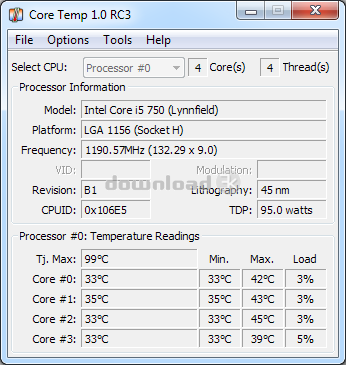
Virtually clean and clear, the main window of the Core Temp application displays a list of statistics on the processor currently in use. In the upper sections, you will be able to view details, like the number of cores, threads, the model of the processor and the platform it runs on, VID, revisions or ID of the CPU. The lower subsection of the main window presents the maximum temperature allowed for the CPU (measured in Tj), the power usage as well as the temperature details for each core (current, minimum and maximum) and the individual load for the cores.
Pros
Core Temp is not a simple temp monitoring application and it also permits users to turn on an “overheating protection” (it does not come enabled by default) when the temperature of one or more cores reaches a preset threshold. In the 1.0 version, the user can set the computer to enter hibernate mode, as well as standby, shutdown or execute a certain program.
Cons
The program will not display dual core readings for older processors with a singular thermal sensor (e.g. Athlon II, Turion II or the Sempron II, etc.).
Alternatives
Similar temperature monitoring solutions include Real Temp, SIV, Open Hardware Monitor, HWiNFO32, etc.
Conclusion
Core Temp is an efficient and accurate solution for monitoring the temperature of the CPU and its individual cores. Its functionality and versatility can be greatly improved by the available add-ons. In essence, it provides the user not only with readings, but also with the ability to take action automatically when the core temperature hits a dangerous threshold.

Antivirus information
-
Avast:
Clean -
Avira:
Clean -
Kaspersky:
Clean -
McAfee:
Clean -
NOD32:
Clean

Popular downloads in System Utilities
-
 Realtek AC'97 Drivers A4.06
Realtek AC 97 sound driver. -
 Windows 7 Service Pack 1 (SP1) 32-bit & 64-bit (KB976932)
The first service pack for Windows 7. -
 Realtek High Definition Audio Driver for Vista, Win7, Win8, Win8.1, Win10 32-bit R2.82
High definition audio driver from Realtek. -
 .NET Framework 2.0
The programming model of the .NET -
 Driver Cleaner Professional 1.5
Improved version of Driver Cleaner -
 RockXP 4.0
Allows you to change your XP product key -
 Realtek AC'97 Drivers for Vista/Win7 6305
Multi-channel audio CODEC designed for PC. -
 DAEMON Tools Lite 12.0.0.2126
The FREE Virtual CD/DVD-ROM-EMULATOR. -
 SIW 14.1.0417
SIW - System Information for Windows -
 AutoCorect 4.1.5
Diacritice la comanda, punctuatie automata.



-
OS
Windows All -
License
Adware -
Updated
9/25/2023 -
Downloads
12450 (10 last week) -
Size
1.23 MB -
MD5
7f82025579aef878dbdc7d1916961e6a -
SHA1
47ddf320f03eb786c66af4560240a09ca7e861a8 -
Developer
Arthur Liberman