Actual Window Menu 5.1
| Details |
View: screenshot
Size: 4.10 MB
License: Shareware
OS: Win95,Win98,WinME,WinNT 4.x,WinXP,Windows2000,Windows2003,Windows Tablet PC Edition 2005,Windows Med
Price: $19.95
Publisher: Actual Tools
|
Date added: 8/18/2005
Date updated: 6/23/2008
Total Downloads: 180
Downloads - Last Week: 2
|
|
Actual Window Menu 5.1 Publisher's description
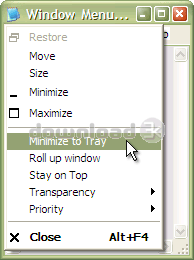
Actual Window Menu is a suite of the most popular innovative tools letting users operate windows on the desktop in some advanced ways: alternatively minimize to Windows notification area (system tray) or to a floating icon on the screen, alter the execution priority of Windows processes on-the-fly, apply semi-transparency effect, roll up/unroll, resize, align, easily move windows between different displays in a multiple display environment, etc.
Installation, as well as the use of the program, is extremely easy and does not require much time. After installation, the application embeds its extra commands into each window's system menu. These new commands are as easy to use as common Move/Size/Minimize/Close ones, and they significantly enhance windows management abilities. The set of commands can be customized for particular applications so that you can select just features which are really necessary there and, thus, form a convenient and flexible working environment.
Actual Window Menu is irreplaceable when you have to work with numerous applications at once switching from one to another, which is very annoying and frustrating. Moreover, it becomes quite difficult to distinguish between minimized programs as they get the taskbar piled up. Actual Window Menu enables you to forget that chaos and proceed with your work not being disturbed by windows mess on the desktop. System window menu is the standard windows management facility - it's simple, handy and functional. Enhancing it with Actual Window Menu will turn it into a magic wand - powerful and unobtrusive.
What's new in this version: ---------------------------------------------------------------------------
Actual Window Menu 5.1 (23.06.2008)
---------------------------------------------------------------------------
[+] Now you can edit multiple specific settings at once in the Configuration
Module (use Ctrl+<left mouse click> to select several items).
[+] Now you can specify a custom icon for a window minimized
either to the system tray or on the screen.
[+] The custom hotkeys for standard Windows "Minimize"/"Maximize" commands are
added (by default Win+<Down arrow>/Win+<Up arrow> accordingly).
[+] The compatibility mode for moving maximized windows between monitors is
added: if you have troubles when trying to move a maximized window to
another monitor then try to activate this mode to fix the problems.
[*] Window menu is slightly improved: additional options of AltMin and Roll Up
actions are grouped into a separate submenu.
[*] Now you can remove or reposition special "Pin to desktop" and
"Restrict placement" window menu items as well as any other menu items.
[-] The compatibility with applications written in Visual Basic is improved
(in particular, with WorkCentrics and NCSS 2007).
[-] The bug is fixed: enabling the Command Prompt Windows Support
when Tiny Personal Firewall is running led to system crash.
[-] Now window size can exceed the size of a single monitor in multi-monitor
configurations when resizing window in pixels and the "Keep window within
the desktop boundaries after resizing" option is enabled.
|
| Antivirus information |
| Download3K has downloaded and tested Actual Window Menu on 25 Jun 2008 with some of Today's best antivirus engines and you can find below, for your convenience, the scan results: |
| Bitdefender: |
Clean |
| NOD 32: |
Clean |
| Kaspersky: |
Clean |
|
| Complete antivirus report |
|
|
|
| Related press releases |
Go Beyond the Limits of Standard Windows Functionality and Have Better Control o... [2005-09-07 00:00:00]
Actual Tools announces Actual Window Guard 2.7
For immediate release
July 28, 2004
Contact: Michael Tretyakov
Company: Actual Tools
Go Beyond the Limits of Standard Windows Functionality and Have B...
|
|
Actual Transparent Window Opens a New Way to Handle Windows [2005-08-23 00:00:00]
Actual Tools announces Actual Transparent Window 3.7
For immediate release
August 23, 2005
Contact: Michael Tretyakov
Company: Actual Tools
Innovative Windows transparency shell enhancement releas...
|
|
Is the Windows Start Menu redundant? [2006-07-23 14:14:10]
A recent innovation in software has brought us StartMenuEx.
StartMenuEx replaces your normal Start Menu with a new, better looking, easier to use, and much more configurable menu.
StartMenuEx ha...
|
|
Actual Title Buttons 3.7 extends window manipulationg capabilities by means of a... [2005-09-15 00:00:00]
Actual Tools announces Actual Title Buttons 3.7
For immediate release
September 15, 2005
Contact: Michael Tretyakov
Company: Actual Tools
Extended window manipulation capabilities by means of addi...
|
|
Actual Windows Manager v. 2.6 Turns the Classic Windows Formula Upside-Down and ... [2004-09-04 00:00:00]
Actual Tools announced today the release of version 2.6 of Actual Windows Manager, a revolutionary windows enhancement application for Windows 95/98/ME/NT/2000/XP. The program dramatically expands Win...
|
|
New Age of Command Prompt Windows [2008-02-20 22:01:16]
The old "command prompt windows problem" is finally resolved by new Actual Window Manager 5.0 first!
VANCOUVER, Canada: Actual Tools, the leading provider of desktop productivity software, today ...
|
|
Actual Window Manager helpa stock traders improve business efficiency [2005-08-18 00:00:00]
For immediate release
August 18, 2005
Contact: Michael Tretyakov
Company: Actual Tools
ACTUAL WINDOW MANAGER
TO HELP STOCK TRADERS IMPROVE BUSINESS EFFICIENCY
Actual Tools today announced th...
|
|
Enjoy Easy Ride with Lan's Menubar 1.1 [2005-09-07 00:00:00]
One Click Is What It Takes To Launch Applications, Open Folders, Files and More
If you crave for innovative software that improves computational habits, then Lan's Menubar is worth of giving a proper...
|
|
VIPaint - a drawings maker for your photos and pictures [2007-07-24 16:19:53]
Drawings maker for your photos and pictures
- you can make a drowings from your photos and pictures
- the photo file formats can be: jpg, bmp, gif, tif, png, wmf, emf, cur, ico
- you can show a...
|
|
VIPaint - It makes a drawings (water color etc) from your photos [2007-06-13 20:35:04]
Drawings maker for your photos and pictures
- you can make a drowings from your photos and pictures
- the photo file formats can be: jpg, bmp, gif, tif, png, wmf, emf, cur, ico
- you can show a...
|
|
|
|
| Directory Report |
Directory printer. Print to a Printer, Text, Excel, XML or HTML file. Find duplicate files. Find duplicate directories. Multiple file rename. Multiple file change date. Multi file change owner. Shows file owner. Print cyclic redundancy checksum CRC |
|
| NoClone Home - Find Duplicate Files, Emails |
NoClone - Find and Delete TRUE duplicate files by byte-to-byte comparison. Smart Marker helps to clean up hard drive. |
|
| Filedoyen |
Filedoyen is a single or dual-pane file and archive (zip) manager with integrated text, code and hex editors, file and folder compare and search. By combining these separate tools into one, Filedoyen makes file management both convenient and easy. |
|
| Selkie Rescue Data Recovery |
Computer crash nightmare? Get the best file migration and data recovery software for under $100. Selkie Rescue Data Recovery is do-it-yourself fast data recovery for your PC or laptop. Simple secure software for recovering all your files. |
|
| Super Flexible File Synchronizer |
This software defines a new standard of file synchronization of laptop, PCs, servers, and backup storage. Multiple profiles, FTP (with SSL), SSH, WebDAV, Amazon S3, http, partial file updating, ZIP and encryption support and a Windows Service. |
|
| DigiMode My Notes |
This programs gives you 10 note pads at your fingertips so that you can auto save and recall your notes quicly, it has complet notpad open text menu and can be easily switched to be on top or minimize to tray. |
|
| FileMonkey |
FileMonkey automates common time consuming file operations. FileMonkey can copy, move, split, search, replace, rename, alter case, list or delete duplicates, trim, truncate, crop, chop, set attributes, encypt, decrypt, wipe, delete, extract and more. |
|
|