VMware Workstation Pro 17.6.3 Build 24583834
- Developer Link 1 (VMware-workstation-full-17.6.3-24583834.exe)
- Download3k US (ver 17.0.2 Build 21581411, VMware-workstation-full-12.5.7-5813279.exe)
- Download3k EU (ver 17.0.2 Build 21581411, VMware-workstation-full-12.5.7-5813279.exe)
MD5: 70c07e575d3ce6cc04dd881f1d25bb4d
All files are original. Download3K does not repack or modify downloads in any way. Check MD5 for confirmation.
Review & Alternatives
"A powerful virtual machine software"
Overview
Virtual PC Images are extremely relevant in the IT world today, and VMWare Workstation is arguably the leader of that revolution. Essentially this program is able to take an installation .ISO file for an Operating System and create a brand new virtual PC with that OS. There are many uses for this, including testing new software, or questionable software that you're worried may harm your PC. VMWare Workstation also allows users to save at any time, and then revert back to the exact setup the virtual system had when it was saved.
Installation
Since this is a rather heavy program in regards to file size, the installation is a bit bulky and can take a bit of time depending on your system. However, you don't need to worry about any bundled software, and everything required to run VMWare Workstation is included or will automatically download during VMWare's installation process.
Interface
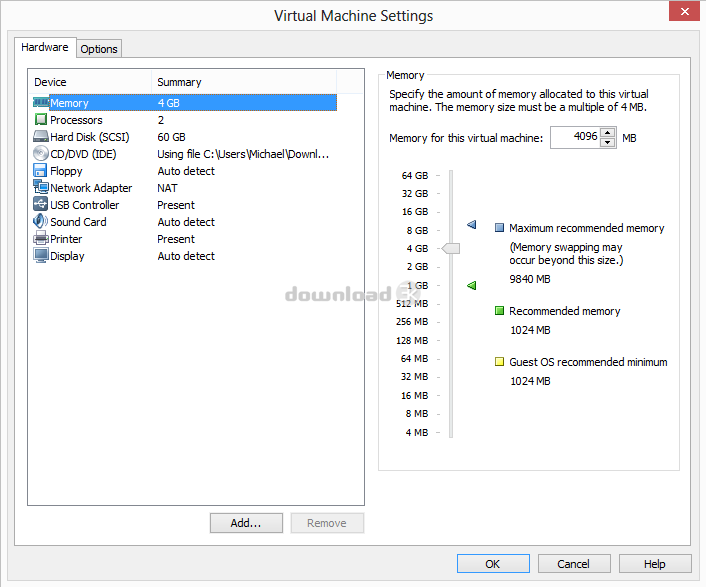
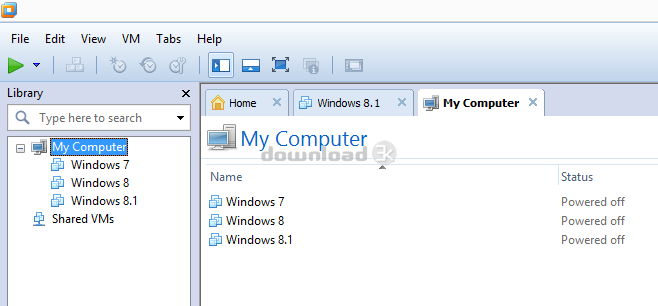
VMWare Workstation 10 uses a very modern interface that is easy to navigate for experienced users as well as people who are new to the software. Users are able to create a "New Virtual Machine" which will open a setup guide walking them through the steps required to get their VM running. Hardware for each VM can easily be changed from the Virtual Machine Settings menu, this includes changing RAM Size, HD Size, Processors, and more.
Pros
There are a lot of things that VMWare Workstation does right, and this is why they are typically the first name that comes to mind when Virtual Imaging is brought up. The sleek, easy to use interface coupled with the extensive customization of each and every machine makes this product so inviting for almost any PC user.
Beyond how accessible VMWare Workstation is, the biggest factor as to why this product is so popular is that its just so useful. Not only does it allow you to try out other Operating Systems without having to change your setup, it also can help lower the risk of viruses, be used for product testing with different hardware specifications, and allow you to revert to a previous time without using system restore.
Cons
There isn't a whole lot of cons with VMWare Workstation that you can really count against them. However, there is quite a large HD Space required as well as high recommended system requirements due to the fact you're running an OS within an OS. The price is a bit high compared to other programs, and just in general for home users, but it is a high quality product.
Other than that, the program can be a bit buggy and unresponsive, and even crash for no apparent reason. This usually is a result of specific hardware that the Host PC is using, so in most cases this is not relevant.
Alternatives
VMWare offers a free version of Workstation with similar features, but a lot of features are removed as well. It's called VMWare Player.
For those avoiding the VMWare brand, check out VirtualBox which is very similar.
Conclusion
Pricing and lack of 100% compatibility are the only real things that set VMWare Workstation back. For those with money to spare and the right setup, this product is a must-buy. But, even those who don't meet those pre-requisites will likely find VMWare Workstation to be a solid program.

Antivirus information
-
Avast:
Clean -
Avira:
Clean -
Kaspersky:
Clean -
McAfee:
Clean -
NOD32:
Clean

Popular downloads in System Utilities
-
 Realtek AC'97 Drivers A4.06
Realtek AC 97 sound driver. -
 Windows 7 Service Pack 1 (SP1) 32-bit & 64-bit (KB976932)
The first service pack for Windows 7. -
 Realtek High Definition Audio Driver for Vista, Win7, Win8, Win8.1, Win10 32-bit R2.82
High definition audio driver from Realtek. -
 .NET Framework 2.0
The programming model of the .NET -
 Driver Cleaner Professional 1.5
Improved version of Driver Cleaner -
 RockXP 4.0
Allows you to change your XP product key -
 Realtek AC'97 Drivers for Vista/Win7 6305
Multi-channel audio CODEC designed for PC. -
 DAEMON Tools Lite 12.3.0.2297
The FREE Virtual CD/DVD-ROM-EMULATOR. -
 AutoCorect 4.1.5
Diacritice la comanda, punctuatie automata. -
 SIW 15.11.1119
SIW - System Information for Windows


-
OS
Windows All/Unix -
License
Shareware -
Price
$249.99 -
Updated
3/14/2025 -
Downloads
58432 (2 last week) -
Size
404.92 MB -
MD5
70c07e575d3ce6cc04dd881f1d25bb4d -
SHA1
972cc16deb66855fa21da288b6a68df835b0bd0b -
Developer
VMware, Inc.