NetCatcher 1.2.0
Developed by anseko
-
Windows
-
setup file netcatcher_installsig.exe (0.66 MB)
-
Freeware
Select a download mirror:
- Developer Link 1 (non https netcatcher_installsig.exe)
- Download3k US (ver 1.2.0, netcatcher_installsig.exe)
- Download3k EU (ver 1.2.0, netcatcher_installsig.exe)
MD5: d2b69fcb918e67d2ac08b311f496e9fe
All files are original. Download3K does not repack or modify downloads in any way. Check MD5 for confirmation.
Developer Description
"Add/delete network route when VPN esablishes"
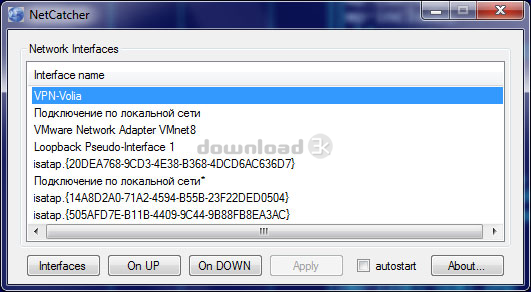
Do you use VPN? So surely you had cases when it was necessary to perform some action after the VPN-connection has been established, for example to run some programs. If you are a system administrator, than from time to time you have to add or to remove routes when VPN-connection is going up or down.With the new Anseko NetCatcher it has become easy just like never before!
Try Anseko NetCatcher:
- Simple and clear interface;
- Run any commands in network interface(s) up/down event;
- Autostart;
- Does not require special knowledge;
- It's free!
Example of use
Let's say you work in your home network and you need to establish VPN-connection to access the corporate network of your company. However, you want to use an access to the internet through your ISP, and use a VPN only to access the corporate network.
Assume that your PC in your ISP has got 10.10.20.5 IP-address, and a corporate network of your company uses 10.50.50.9 and 192.168.112.32 IP-adresses correspondently. Assume also that 1.1.1.1 is your VPN-gateway and 1.1.1.2 is your VPN-connection IP-address.
If you specify "use as default route" in VPN-connections settings window, then access to the Internet will be through the VPN, a corporate network of your company. If you do not enable this option, you can not get to the above addresses of the computers in your corporate network.
So what should you do? With Anseko NetCatcher it could be solved very easily:
- Turn off the option "use as default route" in the settings of VPN-connections
- Choose the name of your VPN-connection in a window NetCatcher "Network Interfaces"
- Write commands
route add 10.10.20.5 mask 255.255.255.255 $IP
route add 10.50.50.9 mask 255.255.255.255 1.1.1.1
in a window NetCatcher "onUP"
- Press "Apply" button
That's it! Now, routes will be added automatically when VPN-connection is established. Instead of IP you can use $IP and $GW - NetCatcher will replace them with actual value.
Requirements: 10 Mb HDD, 512 Mb RAM
What's new in this version: 1.2.0 *** [*] very slow starting/closing application has been fixed
Antivirus information
Download3K has downloaded and tested NetCatcher on 23 May 2012 with some of Today's best antivirus engines and you can find below, for your convenience, the scan results:
-
Avira:
Clean -
Kaspersky:
Clean -
NOD32:
Clean

Popular downloads in Network tools
-
 SoftPerfect Network Scanner 26.5
Fast multipurpose IP, SNMP, NetBIOS scanner. -
 Netman 6.41
Netman - PC Remote Access & Control Software -
 TeamViewer 11.0.64630
Remote control and online meetings -
 Ammyy Admin 3.0
Ammyy Admin - Free Remote Desktop Sharing -
 Free IP Scanner 3.5
A very fast IP scanner and port scanner. -
 Tiny DHCP Server 1.3.5616
Tiny Dhcp Service for Windows. -
 Angry IP Scanner 3.9.1
A very fast and small IP scanner. -
 uTorrent 3.6.0 Build 47196
Efficient and feature rich BitTorrent client. -
 Internet TV & Radio Player 5.5.2
Watch TV and listen radio stations on your PC -
 StrongDC++ 2.42
Client for sharing in Direct Connect network.
User rating
0/5 (0 votes)
Your rating

-
OS
WinVista,WinVista x64,Win7 x32,Win7 x64,Win2000,WinOther,Windows2000,Windows2003,WinServer -
License
Freeware -
Price
$0 -
Updated
4/20/2015 -
Downloads
139 (1 last week) -
Size
0.66 MB -
MD5
d2b69fcb918e67d2ac08b311f496e9fe -
SHA1
17a94a43559a9029ff46648b22f257009656de28 -
Developer
anseko