ScreenViewer 2.1.0
- Buy $34.95
- Developer Link 1 (non https ScreenViewerSetup.zip)
- Download3k US (ver 2.1.0, ScreenViewerSetup.zip)
- Download3k EU (ver 2.1.0, ScreenViewerSetup.zip)
MD5: 834a61d125f479cdfad4a7f9a5994fb0
All files are original. Download3K does not repack or modify downloads in any way. Check MD5 for confirmation.
Review & Alternatives
"View remote screenshot easily"
Overview
ScreenViewer is a virtual screen viewing package that lets the user connect to a remote computer and view their screen, but not directly control it.
The software can be used by employers wanting to see what is happening on an employees' computer, a teacher checking that students are truly working on the assignment, or parents looking over a child's computer usage.
The software comes in two packages: the server and the client. The server application is installed on each computer that the user wishes to monitor. The client application is installed on the single computer that will act as the watchdog so to speak. Once installed, the server program stays in the background and so is not obvious to basic users that it is there.
ScreenViewer is not the typical remote access system where the secondary system can be controlled from a distance or viewed on a video stream in real-time. Instead, this software can take periodic screenshots and send these to the client software to be viewed. Therefore, there is a low overhead on the bandwidth and CPU which makes the software less noticeable. Screenshots can also be saved.
One of the more advanced features is that the software can access multiple monitors on a single PC. Depending on the speed of the connection, it is also possible to make more than one connection at the same time.
Installation
The installation completed without any issues.
There was no adware, toolbars, malware or spyware included with the setup program.
ScreenViewer requires Windows 2000, Vista, XP, 7 or Windows Server.
Interface
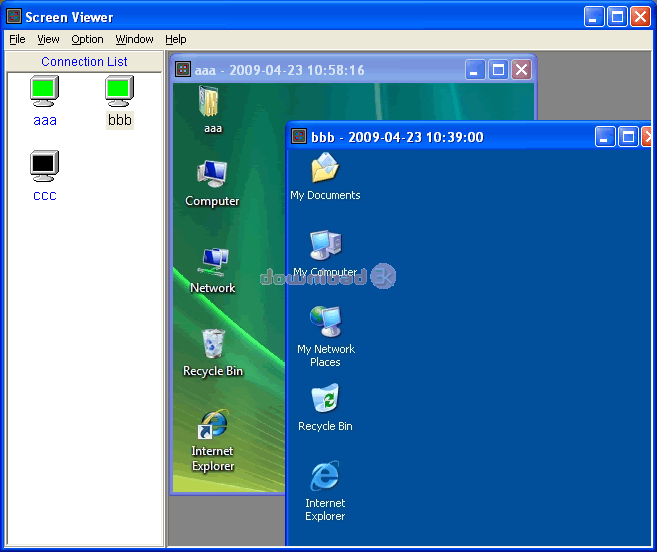
The interface is simple for anyone to understand quickly.
There is a menu system at the top with options for File, View, Option, Window, and Help.
Below this is the Connection list which shows the different computers that have been wired up to the system and can be connected to.
To the right are any computer connections that has already been made virtually and their semi-live screens from the other computer.
Pros
- Virtual software to connect to multiple computers at the same time
- See updating screen shots of the desktop for each connected computer
- Save screen shots periodically
- Simple interface which is easy to start using quickly
- 21 day trial period
Cons
- No video for each connected computer; only screenshots
- No way to use the software to control the other computer remotely
Alternatives
Chrome Remote Desktop allows another user to connect to your PC to either look at the desktop or render remote assistance. Other similar software include: TeamViewer, CrossLoop, Radmin Remote Control, and Ammyy Admin.
Conclusion
ScreenViewer is a handy remote viewing application that can take screen shots on regular intervals of the desktop activity. The application is limited to screen shots and not video in order to reduce bandwidth and CPU usage. There are no remote control options.

Antivirus information
-
Avira:
Clean -
Kaspersky:
Clean -
NOD32:
Clean

Popular downloads in Network tools
-
 SoftPerfect Network Scanner 26.5
Fast multipurpose IP, SNMP, NetBIOS scanner. -
 Netman 6.41
Netman - PC Remote Access & Control Software -
 TeamViewer 11.0.64630
Remote control and online meetings -
 Ammyy Admin 3.0
Ammyy Admin - Free Remote Desktop Sharing -
 Free IP Scanner 3.5
A very fast IP scanner and port scanner. -
 Tiny DHCP Server 1.3.5615
Tiny Dhcp Service for Windows. -
 Angry IP Scanner 3.9.1
A very fast and small IP scanner. -
 uTorrent 3.6.0 Build 47196
Efficient and feature rich BitTorrent client. -
 Internet TV & Radio Player 5.5.2
Watch TV and listen radio stations on your PC -
 StrongDC++ 2.42
Client for sharing in Direct Connect network.