VIPcam 1.2
Developed by Valeri Vlassov
-
Windows
-
setup file Setup_VIPcam.zip (4.61 MB)
-
Demo
Buy or select mirror:
- Buy $33
- Developer Link 1 (non https Setup_VIPcam.zip)
- Download3k US (Setup_VIPcam.zip)
- Download3k EU (Setup_VIPcam.zip)
MD5: 4532e9c9c3c109d3745568f1c617d22f
All files are original. Download3K does not repack or modify downloads in any way. Check MD5 for confirmation.
Developer Description
"Alarms monitor with many cameras"
- start the Program and a windows for all installed cameras will be open.- close not needed cameras if you want;
- change a size and position of the main window;
- use Menu Window/Tile to place all opened Windows tiled if you want;
- press a button "Camera's Properties" to change settings for camera in active window if you want;
- press a button "Show Cross" to start alarm watching for active camera (a camera whose window is in focus)
- you will see a red cross appearing on a moving objects
- press a button "Play beeps on Alarm" to make "beeps" on / off;
- press a button "Play sounds on Alarm" to make "sounds" on / off;
- press a left mouse button and drag a mouse right-down to draw a "Watching Area" rectangle;
- you can later move or change a size of any created "Watching Area" rectangle by you mouse;
- use a right mouse button double click inside an Area to remove it (if you want);
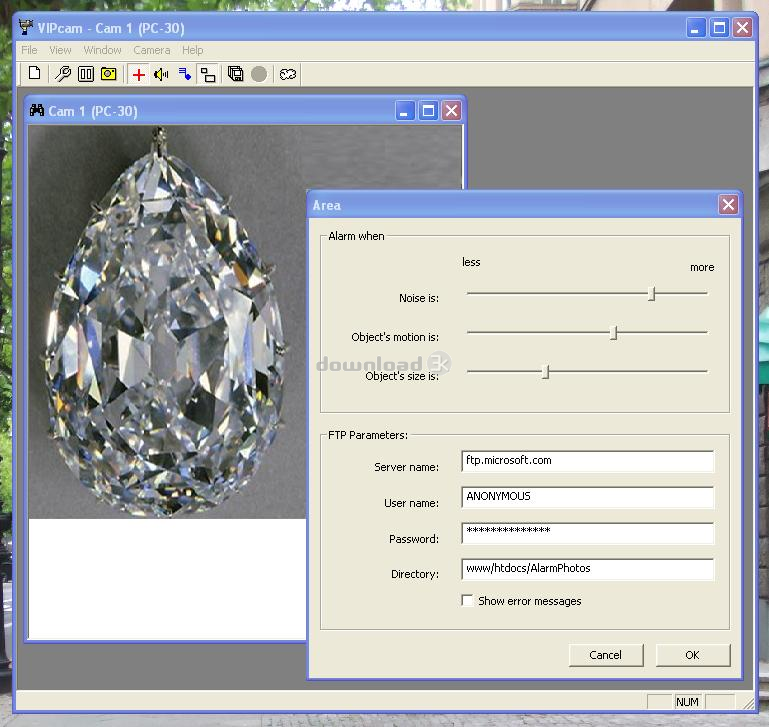
- make a left mouse button double click inside "Watching Area" rectangle to show an "Area Dialog";
- change "Noise is" pointer so that there was no response to motion of tree branches, drip of a rain, solar dazzles etc;
- change "Object motion is" pointer to catch more or less moving objects;
- change "Object size is" pointer to catch smallest or biggest objects;
- press a button "Save Photos on Alarm";
- now at each Alarm (a red cross appearing) the picture (photo) file will be written.
Hints:
- photos are being written as a *.jpg files;
- photos are being written in a directory "DATA" inside the native directory of VIPcam (typically at c:\Program Files\Valeri Vlassov\VIPcam);
- directories for current year, month, day are created automatically, for example:
\DATA\YEAR_2010\MONTH_09_2010\DAY_30_09_2010\
- photo file names are like: "Cam_02__Time_16_46_12.jpg" (for camera 2, snap shot was made at 16:46:12 hh::mm:ss);
- you can set real time copy of alarm photos to your FTP site;
- you can hide the program (make it invisible);
What's new in this version: No changes
Antivirus information
Download3K has downloaded and tested VIPcam on 29 Aug 2023 with some of Today's best antivirus engines and you can find below, for your convenience, the scan results:
-
Avast:
Clean -
Avira:
Clean -
Kaspersky:
Clean -
McAfee:
Clean -
NOD32:
Clean

Popular downloads in Internet
-
 Google Talk 1.0.0.105
Google chat messenger with voice. -
 Motorola Phone Tools 5.0
Motorola Phone Tools kit. -
 Download Accelerator Plus 10.0.6.0
DAP 10: For the fastest downloads. -
 Opera Mini for Java 8.0.35626
A fast and tiny Web browser. -
 Firefox 138.0.3 / 139.0b7 Beta 7
The award winning Web browser. -
 YMulti Messenger 2.0.0.100
Multiple Yahoo Messenger instances - same pc. - Skype 8.150.0.125 / 7.41.0.101 Classic / 8.138.0.214 MS
Talk with your friends for free. -
 InternetDownload Manager 6.42.64
Accelerate, resume and schedule web downloads -
 Google Chrome 136.0.7103.114 / 137.0.7151.15 Beta / 138.0.7166.3
Minimal design with sophisticated technology. -
 UC Browser for Java 9.5.0.449
A Web and WAP browser.
User rating
0/5 (1 votes)
Bad
Your rating

-
OS
WinME,Windows2000,WinXP,Windows2003,Windows Vista Home Basic -
License
Demo -
Price
$33 Buy -
Updated
8/29/2023 -
Downloads
431 (7 last week) -
Size
4.61 MB -
MD5
4532e9c9c3c109d3745568f1c617d22f -
SHA1
804269b3fdd9f8c9771b3530bd187b21be0ccc23 -
Developer
Valeri Vlassov