Network Assistant 4.5
Developed by Gracebyte Software
-
Windows
-
setup file nassi.zip (3.22 MB)
-
Shareware
Buy or select mirror:
- Buy $25
- Developer Link 1 (non https nassi.zip)
- Download3k US (nassi.zip)
- Download3k EU (nassi.zip)
MD5: 30524d10b34982dcc7cedf2fbc66c234
All files are original. Download3K does not repack or modify downloads in any way. Check MD5 for confirmation.
Developer Description
"Real-time network communication utility"
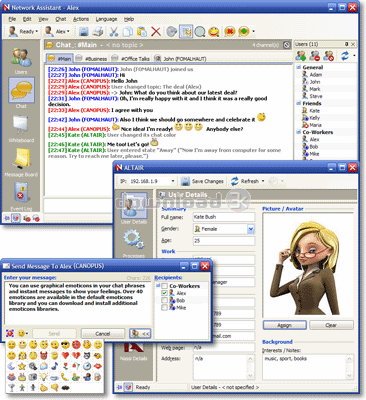
Network Assistant is a real-time communication utility for the office environment, including channels-based chat, shared whiteboard, message board and instant messaging. It is intended to be used in small office or home office (SOHO) local networks. Network Assistant does not require an Internet connection or a dedicated server and supports IP Multicast technology that allows traffic-friendly group messages. Key features:- Serverless technology. Network Assistant does not require an Internet connection or a dedicated server.
- Channels-based chat. There are four types of chat channels: general, announcer, password protected and private (person-to-person). Channels help to support discussions on different subjects. You can post pictures directly to chat channels.
- Shared whiteboard. You and your friends or coworkers can draw on a shared whiteboard. Using the whiteboard, you can explain concepts by diagramming information, using a sketch, or displaying graphics.
- Message board. You can post messages to common shared board. For each message you can specify its priority, life length.
- User details. You can view details of remote users and specify your own details: full name, gender, age, work/contact information and picture (photo).
- Instant messaging. Network Assistant supports its own instant messages and WinPopup/Messenger messages as well.
- File transfers. You can easily send and receive files. You can even resume file transfers.
- Remote processes control. You can view processes on a remote computer and create/terminate remote processes.
- Remote screenshots and clipboard view.
- Computer usage statistics tracking. Network Assistant tracks the usage of the computer when it is online. You can view usage statistics of your own and remote computer as well.
- Remote alerts. You can define alerts on some remote events for a particular remote computer and specify different actions for them.
Requirements: Windows 9x/Me/NT/2000/2003/XP/Vista
What's new in this version: + Ability to insert pictures into chat channels. + New serverless messageboard mode. + Ability to refresh whiteboard content. * Whiteboard size has been increased. * Registration now affects all computer users not only the current one. + Current state overlay icon in the tray icon.
Antivirus information
Download3K has downloaded and tested Network Assistant on 4 Feb 2019 with some of Today's best antivirus engines and you can find below, for your convenience, the scan results:
-
Avast:
Clean -
Avira:
Clean -
Kaspersky:
Clean -
McAfee:
Clean -
NOD32:
Clean

Popular downloads in Internet
-
 Google Talk 1.0.0.105
Google chat messenger with voice. -
 Motorola Phone Tools 5.0
Motorola Phone Tools kit. -
 Download Accelerator Plus 10.0.6.0
DAP 10: For the fastest downloads. -
 Opera Mini for Java 8.0.35626
A fast and tiny Web browser. -
 Firefox 138.0.3 / 139.0b7 Beta 7
The award winning Web browser. -
 YMulti Messenger 2.0.0.100
Multiple Yahoo Messenger instances - same pc. - Skype 8.150.0.125 / 7.41.0.101 Classic / 8.138.0.214 MS
Talk with your friends for free. -
 InternetDownload Manager 6.42.64
Accelerate, resume and schedule web downloads -
 Google Chrome 136.0.7103.114 / 137.0.7151.15 Beta / 138.0.7166.3
Minimal design with sophisticated technology. -
 UC Browser for Java 9.5.0.449
A Web and WAP browser.
User rating
3.5/5 (4 votes)
Good
Your rating


-
OS
WinXP,WinVista,WinVista x64,Win7 x32,Win7 x64,Win2000,Windows2000,Windows2003,WinServer,Windows Vist -
License
Shareware -
Price
$25 Buy -
Updated
2/1/2019 -
Downloads
1405 (1 last week) -
Size
3.22 MB -
MD5
30524d10b34982dcc7cedf2fbc66c234 -
SHA1
fa39e022b507d9081cc3a74a6712dd89f649d17b -
Developer
Gracebyte Software