Classic Menu for Outlook 2010 5.00
Developed by Addintools
-
Windows
-
setup file OutlookMenu2010.exe (6.67 MB)
-
Shareware
Buy or select mirror:
- Buy $15.00
- Developer Link 1 (non https OutlookMenu2010.exe)
- Download3k US (OutlookMenu2010.exe)
- Download3k EU (OutlookMenu2010.exe)
MD5: 9c7222fa0eb4965df4d62efdb002d67a
All files are original. Download3K does not repack or modify downloads in any way. Check MD5 for confirmation.
Developer Description
"Classic Menu for Outlook 2010"
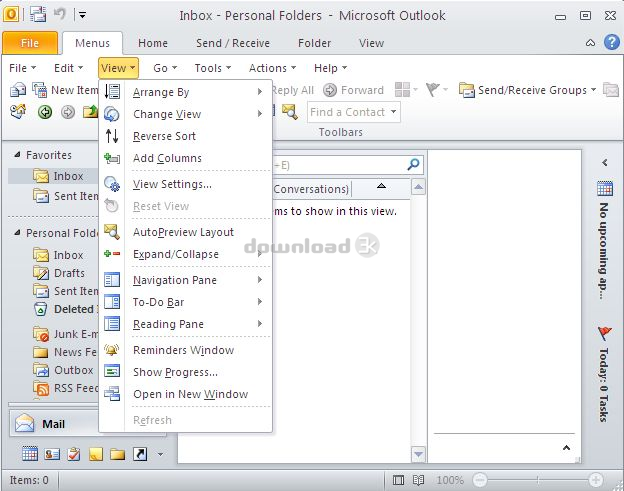
Can you imagine one can work with Outlook 2010 like in Microsoft Outlook 2003? All features and commands of Microsoft Outlook 2003 can be executed in Microsoft Outlook 2010. Indeed, Classic Menu for Outlook 2010 brings the classic menus and toolbars of Outlook 2003 to the Ribbon of Outlook2010.Classic Menu for Outlook 2010, an Office add-in designed for Microsoft Outlook 2010, not only adds a "Menus" tab at the far left of the menu bar in the Ribbon of Outlook 2010, with its normal toolbars of Outlook 2003, but also keeps all new feature items of Microsoft Outlook 2010 in the classic style interface.
The software provides classic interface for all ribbons of Outlook 2010, includes Read Mail, Compose Mail, Contact, Meeting, Task, Distributing List...
With Classic Menu for Outlook 2010, you can have more options to execute commands, easily get a keyboard shortcut and enrich the Ribbon of Outlook 2010. It also helps edit your mails, tasks and notes as easily as editing documents in Microsoft Outlook 2003.
The software allows you to work with Outlook 2010 as if it were Outlook 2003. It shows the familiar classic menus and toolbars on the ribbon in Microsoft Outlook 2010. If you were using Outlook 2003 before, you don't need training or tutorials after upgrading to Microsoft Outlook 2010 with this add-in now.
The software supports all languages that are supported by Microsoft Outlook 2010: English, French, German, Italian, Spanish, Portuguese, Japanese, Dutch, Chinese, and more. It automatically shows the menus and toolbars in the language of your Microsoft Office 2010.
Fully compatible with Windows 7, Windows 7 x64, Vista, Vista x64, XP, XP x64, Windows 2003 Server and 2008 Server. Combine 32-bit and 64-bit Classic Menu into one single Exe installation package, so that users don't need to know whether they are using 32-bit or 64-bit of Microsoft Office 2010.
You can enable or disable the classic menu and toolbar in an easy way.
Requirements: Microsoft Outlook 2010 or Office 2010 installed
What's new in this version: Combine 32-bit and 64-bit Classic Menu into one single Exe installation package, so that users don't need to know whether they are using 32-bit or 64-bit of Microsoft Office 2010.
Antivirus information
Download3K has downloaded and tested Classic Menu for Outlook 2010 on 23 May 2012 with some of Today's best antivirus engines and you can find below, for your convenience, the scan results:
-
Avira:
Clean -
Kaspersky:
Clean -
NOD32:
Clean

Popular downloads in Internet
-
 Google Talk 1.0.0.105
Google chat messenger with voice. -
 Motorola Phone Tools 5.0
Motorola Phone Tools kit. -
 Download Accelerator Plus 10.0.6.0
DAP 10: For the fastest downloads. -
 Opera Mini for Java 8.0.35626
A fast and tiny Web browser. -
 Firefox 138.0.3 / 139.0b7 Beta 7
The award winning Web browser. -
 YMulti Messenger 2.0.0.100
Multiple Yahoo Messenger instances - same pc. - Skype 8.150.0.125 / 7.41.0.101 Classic / 8.138.0.214 MS
Talk with your friends for free. -
 InternetDownload Manager 6.43.2
Accelerate, resume and schedule web downloads -
 Google Chrome 136.0.7103.114 / 137.0.7151.15 Beta / 138.0.7166.3
Minimal design with sophisticated technology. -
 UC Browser for Java 9.5.0.449
A Web and WAP browser.
User rating
0/5 (0 votes)
Your rating

-
OS
WinXP,WinVista,WinVista x64,Win7 x32,Win7 x64,WinOther,WinServer -
License
Shareware -
Price
$15.00 Buy -
Updated
3/27/2012 -
Downloads
168 (1 last week) -
Size
6.67 MB -
MD5
9c7222fa0eb4965df4d62efdb002d67a -
SHA1
d5909a4f8733db0f5c78a12e3184adf5ba693ae2 -
Developer
Addintools