BackRex Outlook Backup 2.8.178
Developed by BackRex Software
-
Windows
-
setup file bro_demo.exe (1.10 MB)
-
Demo
Buy or select mirror:
- Buy $29.95
- Developer Link 1 (non https bro_demo.exe)
- Developer Link 2 (bro_demo.exe)
- Download3k US (bro_demo.exe)
- Download3k EU (bro_demo.exe)
MD5: 943a00fb0155b4eb0a67adef7ff7be6b
All files are original. Download3K does not repack or modify downloads in any way. Check MD5 for confirmation.
Developer Description
"MS Outlook & Internet Explorer backup tool"
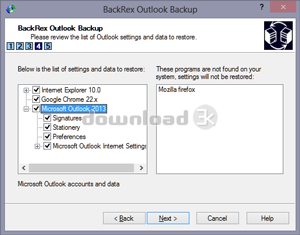
BackRex Outlook Backup is a backup and restore tool for Microsoft Outlook, Internet Explorer and Mozilla Firefox. It allows you to save your current configuration and Outlook data (mail folders, address book, account settings, tasks, notes, calendar, journal, contacts, signatures, stationery, message rules, and all custom preferences). In addition, BackRex Outlook Backup saves all Internet Explorer settings, including favorites, history, proxy settings, fonts, etc.BackRex Outlook Backup can help you to migrate or transfer Outlook settings and data from one computer to another, even with different version of Windows and/or Outlook (for example from Outlook 2003 to Outlook 2007).
How does it work? Install and run BackRex Outlook Backup on the computer from which you wish to save the Outlook settings and data, then choose the Backup option, and finally choose a folder to save all the data in. When BackRex Outlook Backup finishes, keep the results in a safe place - you'll need them to restore your Outlook data. To restore, run BackRex Outlook Backup from the folder from which you have saved the Outlook settings and data, and in a few minutes all your personal information will be restored.
Requirements: PC Computer, Windows XP or later
What's new in this version: Added Firefox support up to version 38; Added Chrome browser support up to version 42
Antivirus information
Download3K has downloaded and tested BackRex Outlook Backup on 19 May 2015 with some of Today's best antivirus engines and you can find below, for your convenience, the scan results:
-
Avast:
Clean -
Avira:
Clean -
Kaspersky:
Clean -
NOD32:
Clean

Popular downloads in Internet
-
 Google Talk 1.0.0.105
Google chat messenger with voice. -
 Motorola Phone Tools 5.0
Motorola Phone Tools kit. -
 Download Accelerator Plus 10.0.6.0
DAP 10: For the fastest downloads. -
 Opera Mini for Java 8.0.35626
A fast and tiny Web browser. -
 Firefox 138.0.3 / 139.0b7 Beta 7
The award winning Web browser. -
 YMulti Messenger 2.0.0.100
Multiple Yahoo Messenger instances - same pc. - Skype 8.150.0.125 / 7.41.0.101 Classic / 8.138.0.214 MS
Talk with your friends for free. -
 InternetDownload Manager 6.43.10
Accelerate, resume and schedule web downloads -
 Google Chrome 136.0.7103.114 / 137.0.7151.15 Beta / 138.0.7166.3
Minimal design with sophisticated technology. -
 UC Browser for Java 9.5.0.449
A Web and WAP browser.
User rating
4/5 (2 votes)
Very good
Your rating

-
OS
WinXP,WinVista,WinVista x64,Win7 x32,Win7 x64,Win2000,Windows2000,Windows2003,WinServer,Windows Vist -
License
Demo -
Price
$29.95 Buy -
Updated
5/19/2015 -
Downloads
1056 (1 last week) -
Size
1.10 MB -
MD5
943a00fb0155b4eb0a67adef7ff7be6b -
SHA1
b98fdb53d100f5f654e9042a1cffa6fd8a06bb70 -
Developer
BackRex Software