Map Export 2.7.1.0
Developed by Offlinesoft
-
Windows
-
setup file MapExportSetup_2_7_1_0.zip (2.20 MB)
-
Shareware
Buy or select mirror:
- Buy $499.95
- Developer Link 1 (non https MapExportSetup_2_7_1_0.zip)
- Developer Link 2 (non https MapExportSetup_2_7_1_0.zip)
- Download3k US (MapExportSetup_2_7_1_0.zip)
- Download3k EU (MapExportSetup_2_7_1_0.zip)
MD5: 2d39eae0e34da9d7ef6c266488c8e346
All files are original. Download3K does not repack or modify downloads in any way. Check MD5 for confirmation.
Developer Description
"Map Export is a GIS developer oriented tool."
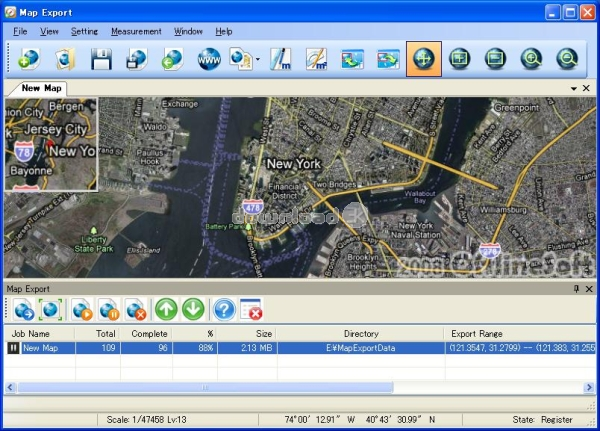
Map Export is a GIS developer oriented tool for downloading and exporting background image.For a long time, as a GIS developer, It’s well known that to find perfect background images is a suffering and painful task. But since the growing up of Google Map, things have been changed. Google Map provides a wonderful resource of background images so that only one problem is left: How to get background images from Google Map? That’s why we now introduce the Map Export.
Map Export can export both satellite imagery and street maps from Google Map. It can export in many kinds of bmp format as you like. Since it has a map explorer with it, you can very easily specify which areas you want to export.
Key Features:
1. Multiple kinds of background image’s export
According to the different demands of GIS system, you can choose which to be exported satellite imagery or street maps.
2. Multi-task support
You can create multiple exporting task. Each can download and export background images at the same time.
3. kinds of exporting formats’ support
It can export in kinds of image formats such as bmp, jpg, png, gif. Also it can export in the form of ESRI World File
4. Auto-redial function
For those dial-up connection users( like ADSL, DSL), it has auto-redial function. When the connection to the internet is cut during the exporting, it can redial automatically so that the exporting is free of being broken up.
5. Built-in map explorer
The Map Export has a built-in map explorer, so that just by dragging a rectangle on the map explorer, you can easily specify the areas to be exported.
Requirements: P4 1.6 512M Microsoft.Net Framework 2.0
Antivirus information
Download3K has downloaded and tested Map Export on 15 Apr 2013 with some of Today's best antivirus engines and you can find below, for your convenience, the scan results:
-
Avira:
Clean -
Kaspersky:
Clean -
NOD32:
Clean

Popular downloads in Internet
-
 Google Talk 1.0.0.105
Google chat messenger with voice. -
 Motorola Phone Tools 5.0
Motorola Phone Tools kit. -
 Download Accelerator Plus 10.0.6.0
DAP 10: For the fastest downloads. -
 Opera Mini for Java 8.0.35626
A fast and tiny Web browser. -
 Firefox 138.0.3 / 139.0b7 Beta 7
The award winning Web browser. -
 YMulti Messenger 2.0.0.100
Multiple Yahoo Messenger instances - same pc. - Skype 8.150.0.125 / 7.41.0.101 Classic / 8.138.0.214 MS
Talk with your friends for free. -
 InternetDownload Manager 6.42.64
Accelerate, resume and schedule web downloads -
 Google Chrome 136.0.7103.114 / 137.0.7151.15 Beta / 138.0.7166.3
Minimal design with sophisticated technology. -
 UC Browser for Java 9.5.0.449
A Web and WAP browser.
User rating
3/5 (4 votes)
Good
Your rating

-
OS
Win2000,Win7 x32,Win7 x64,WinVista,WinVista x64,WinXP -
License
Shareware -
Price
$499.95 Buy -
Updated
4/15/2013 -
Downloads
372 (1 last week) -
Size
2.20 MB -
MD5
2d39eae0e34da9d7ef6c266488c8e346 -
SHA1
4e1609f89d8bdd7a5257968a0c5c09cc912f695a -
Developer
Offlinesoft