Acmeta Fragmento 1.0
Developed by Acmeta
-
Windows
-
setup file AF_Setup.exe (393.42 KB)
-
Shareware
Buy or select mirror:
- Buy $19.95
- Developer Link 1 (non https AF_Setup.exe)
- Developer Link 2 (non https AF_Setup.zip)
- Download3k US (AF_Setup.exe)
- Download3k EU (AF_Setup.exe)
MD5: 55c021291aa5c38a664ccb857adc6d0b
All files are original. Download3K does not repack or modify downloads in any way. Check MD5 for confirmation.
Developer Description
"Tool for extracting portions of web pages"
If your professional activities involve using the Internet, then you have probably experienced times when you need to print, save, transfer to your handheld, or otherwise use some information from a web page. And, usually you do not need the entire page, with its navigation, banners and advertising, and other stuff. These unnecessary parts of the web page are sometimes harmful by making the page so wide that it does not even fit the paper in your printer, or the screen of your handheld, etc.A common solution to this problem is to select the necessary part of the page, copy it to the clipboard and paste it into some other application like Microsoft Word or Notepad where it can be printed or saved. If you have ever done this, then you know that selecting a part of the page with the mouse is often inconvenient (especially if this part is large and spanning several screen lengths), copying and pasting is annoying, and in most cases, the result loses its original formatting.
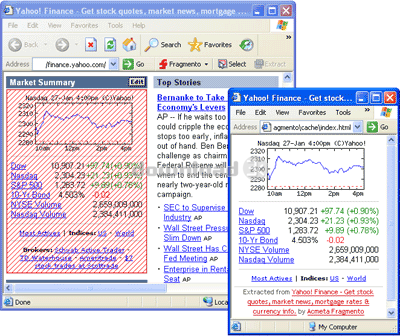
Acmeta Fragmento allows you to visually select a part of a web page, transform the selected part into a new page (preserving the original formatting), and open it in a new browser window. You can continue to use the extracted fragment just like you would any other web page.
Fragmento is easy-to-use and integrates into your browser (currently Microsoft Internet Explorer 6.0 and higher are supported).
Requirements: MS Internet Explorer 6.0
Antivirus information
Download3K has downloaded and tested Acmeta Fragmento on 20 Jan 2022 with some of Today's best antivirus engines and you can find below, for your convenience, the scan results:
-
Avast:
Clean -
Avira:
Clean -
Kaspersky:
Clean -
McAfee:
Clean -
NOD32:
Clean

Popular downloads in Internet
-
 Google Talk 1.0.0.105
Google chat messenger with voice. -
 Motorola Phone Tools 5.0
Motorola Phone Tools kit. -
 Download Accelerator Plus 10.0.6.0
DAP 10: For the fastest downloads. -
 Opera Mini for Java 8.0.35626
A fast and tiny Web browser. -
 Firefox 138.0.3 / 139.0b7 Beta 7
The award winning Web browser. -
 YMulti Messenger 2.0.0.100
Multiple Yahoo Messenger instances - same pc. - Skype 8.150.0.125 / 7.41.0.101 Classic / 8.138.0.214 MS
Talk with your friends for free. -
 InternetDownload Manager 6.42.50
Accelerate, resume and schedule web downloads -
 Google Chrome 136.0.7103.114 / 137.0.7151.15 Beta / 138.0.7166.3
Minimal design with sophisticated technology. -
 UC Browser for Java 9.5.0.449
A Web and WAP browser.