DAF/FAF Assistant for Windows 1.1
Developed by ArtefactSoft
-
Windows
-
setup file setup.exe (0.67 MB)
-
Shareware
Buy or select mirror:
- Buy $19.95
- Developer Link 1 (non https setup.exe)
- Download3k US (setup.exe)
- Download3k EU (setup.exe)
MD5: 282a10b8e21f2d3e58046c0720e98b3e
All files are original. Download3K does not repack or modify downloads in any way. Check MD5 for confirmation.
Developer Description
"Anti-stuttering DAF/FAF software"
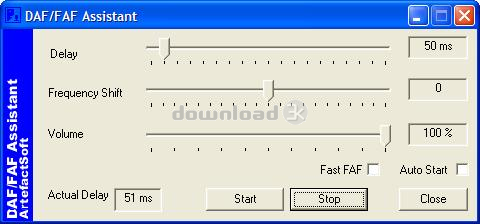
DAF/FAF Assistant can be used by people who have stuttering problem to control their speech fluency, increase their confidence level and develop carryover fluency when techniques are used on a regular basis.Delayed auditory feedback (DAF) delays your voice to your ears a fraction of a second. The application provides delay range from 40 to 220 milliseconds. The delay increment step is 10 milliseconds. A short delay (50-80 milliseconds) almost instantly reduces stuttering without changing the speech speaking rate. A longer delay (90-220 milliseconds) makes you stretch your vowels and talk slower. This can help with even severe stuttering, but requires training, mental effort, and may sound abnormal.
Frequency Altered Feedback (FAF) shifts the pitch of your voice. The application provides the pitch shift in the range from one-half octave down to one-half octave up. The FAF enhances the effectiveness of the application when is used simultaneously with DAF.
Additional frequency shifting algorithm (Fast FAF option). The standard FAF algorithm provides best sound quality but it requires a powerful processor. The Fast FAF option when enabled turns on the simplified frequency shifting algorithm that can work better on less powerful computers.
The application saves the configured settings when it is closed and restores them when it is restarted.
The Auto Start feature when enabled will start the sound playback immediately after the program starts. You can assign a Windows shortcut key to the DAF/FAF Assistant application and start the DAF/FAF by pressing a single shortcut key.
The application can run in the background or in minimized state allowing you to work in another programs while you are using DAF/FAF.
Easy to install, easy to use. The application provides installation program that creates all necessary icons and shortcuts on the computer desktop. The graphical user interface is intuitive and easy to use.
Antivirus information
Download3K has downloaded and tested DAF/FAF Assistant for Windows on 25 Apr 2012 with some of Today's best antivirus engines and you can find below, for your convenience, the scan results:
-
Avira:
Clean -
Kaspersky:
Clean -
NOD32:
Clean

Popular downloads in Home & Education
-
 Google Earth 7.3.6.10201
It's a globe that sits inside your PC. -
 JPEG Recovery Professional 6.2
Repair corrupted JPEG picture/photo -
 Alkitab Bible Study 6.1
Alkitab is a free desktop bible study tools. -
 Cleantouch Urdu Dictionary 7.0 7.0
English to Urdu & Urdu to English Dictionary -
 Microsoft Bing Maps 3D (Virtual Earth 3D) 4.0.1003.8008
Closer to knowing "what it is like out there" -
 WordWeb 8.1
Free English thesaurus and dictionary -
 Lal Kitab Explorer 1
Astrology software based on Lal Kitaab system -
 Learn To Speak Japanese 3.2
Improving Japanese and building vocabulary. -
 Kindle for PC 2.7.70978
Read Kindle books on your PC. -
 Mobipocket Reader Desktop 6.2
Organize, read and sync your eBooks & eNews.
User rating
2.5/5 (2 votes)
Medium
Your rating

-
OS
Win95,Win98,Windows2000,WinXP,Windows2003 -
License
Shareware -
Price
$19.95 Buy -
Updated
9/25/2008 -
Downloads
336 (4 last week) -
Size
0.67 MB -
MD5
282a10b8e21f2d3e58046c0720e98b3e -
SHA1
2cdbc8d3cc5af68ab984c685ed247c4b1c6bfe28 -
Developer
ArtefactSoft