Input Director 2.4
- Developer Link 1 (InputDirector.v2.4.zip)
- Download3k US (InputDirector.v2.4.zip)
- Download3k EU (InputDirector.v2.4.zip)
MD5: 6e87a9e6a03c1f4358cc110043c782a5
All files are original. Download3K does not repack or modify downloads in any way. Check MD5 for confirmation.
Developer Description
"One keybd/mouse to control many Windows Comps"
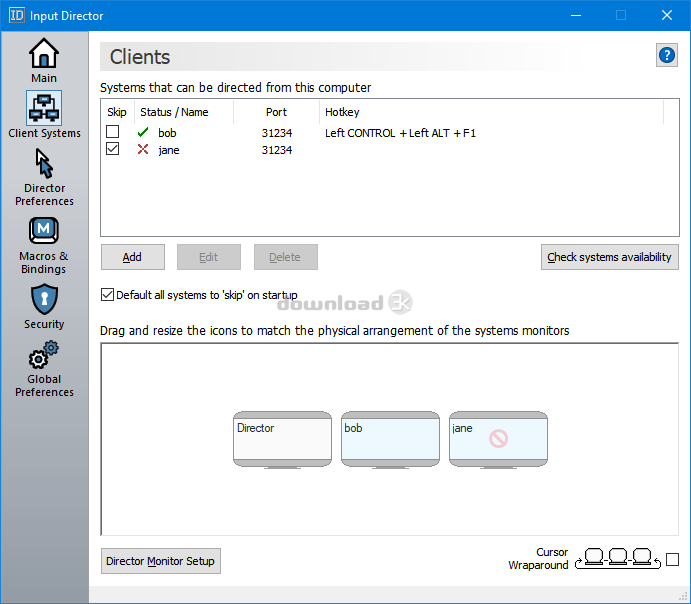
Input Director is designed for those folks that have two (or more) Windows systems set up at home. Using Input Director, you can position the monitors of your systems side-by-side and then control all of them via one keyboard/mouse. To transition which system you're controlling is as simple as moving the cursor off the screen on one system and it'll pop up on the next screen (similar to a multi-monitor setup) or via a hotkey combo.Input Director also lets you share clipboard contents, so you can copy from one machine, switch over to another and then paste. This also works for files that are in network shared directories.
New features include:
* Can now disable/enable bindings from the application and by right-clicking the ID icon and selecting the option from the pop-up menu.
* Macros can now be played to a Client system prior to logging into it
* Hotkeys can now be set to use either of the ctrl, shift, or alt keys instead of needing to specify a left or right version
* Shared Clipboard improvements and bug fixes
* Can now hide IP Addresses displayed by Input Director (VLogger Mode)
* Macro recording improvements
* Upgraded OpenSSL library to v3.5
* Fixed bug that could stop Input Director from recreating its icon when the Windows Shell restarts
* Fixed bug that could cause cursor wraparound not to work with complex monitor layouts
* Minor bug fixes
* Updated the packaged Microsoft redistributable libraries
What's new in this version: * Can now disable/enable bindings from the application and by right-clicking the ID icon and selecting the option from the pop-up menu. * Macros can now be played to a Client system prior to logging into it * Hotkeys can now be set to use either of the ctrl, shift, or alt keys instead of needing to specify a left or right version * Shared Clipboard improvements and bug fixes * Can now hide IP Addresses displayed by Input Director (VLogger Mode) * Macro recording improvements * Upgraded OpenSSL library to v3.5 * Fixed bug that could stop Input Director from recreating its icon when the Windows Shell restarts * Fixed bug that could cause cursor wraparound not to work with complex monitor layouts * Minor bug fixes * Updated the packaged Microsoft redistributable libraries
Antivirus information
-
Avast:
Clean -
Avira:
Clean -
Kaspersky:
Clean -
McAfee:
Clean -
NOD32:
Clean

Popular downloads in System Utilities
-
 Realtek AC'97 Drivers A4.06
Realtek AC 97 sound driver. -
 Windows 7 Service Pack 1 (SP1) 32-bit & 64-bit (KB976932)
The first service pack for Windows 7. -
 Realtek High Definition Audio Driver for Vista, Win7, Win8, Win8.1, Win10 32-bit R2.82
High definition audio driver from Realtek. -
 .NET Framework 2.0
The programming model of the .NET -
 Driver Cleaner Professional 1.5
Improved version of Driver Cleaner -
 RockXP 4.0
Allows you to change your XP product key -
 Realtek AC'97 Drivers for Vista/Win7 6305
Multi-channel audio CODEC designed for PC. -
 DAEMON Tools Lite 12.3.0.2297
The FREE Virtual CD/DVD-ROM-EMULATOR. -
 AutoCorect 4.1.5
Diacritice la comanda, punctuatie automata. -
 SIW 16.02.0218
SIW - System Information for Windows

-
OS
Win7 x32,Win7 x64,Windows 8,Windows 10, Windows 11 -
License
Freeware -
Price
$0 -
Updated
3/23/2026 -
Downloads
974 (3 last week) -
Size
65.44 MB -
MD5
6e87a9e6a03c1f4358cc110043c782a5 -
SHA1
96fbe5864b9e96782642ec176a8c420118d4ada3 -
Developer
Imperative Software Pty Ltd