Codenizer 2009
Developed by Ivan Radovanovic
-
Windows
-
setup file CodenizerDemo.exe (0.53 MB)
-
Demo
Select a download mirror:
- Developer Link 1 (non https CodenizerDemo.exe)
- Download3k US (CodenizerDemo.exe)
- Download3k EU (CodenizerDemo.exe)
MD5: 6f14a438ff2ccf23c8c15c3dbadcbef7
All files are original. Download3K does not repack or modify downloads in any way. Check MD5 for confirmation.
Developer Description
"Tool for checking PHP scripts for bugs"
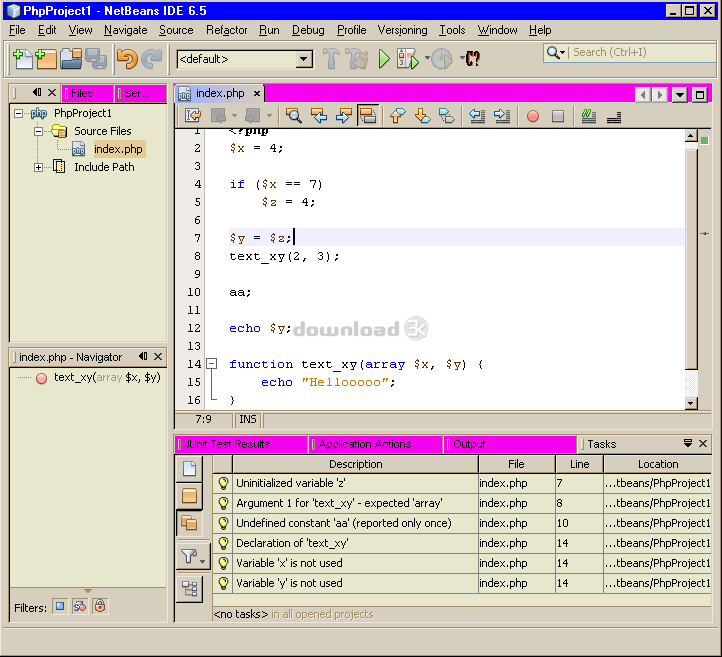
Codenizer is used to pinpoint possible problematic locations which could eventually lead to bugs in the program -- while debuggers are used to eliminate bugs once they are in the program Codenizer is used to prevent bugs from appearing in the program in the first place. This means it can help you detect lot of common programming mistakes and bugs prior to program execution. To use it just type "codenize path_to_your_script" on command prompt after instalalling it. If you ever used Perl you can think of Codenizer as of external "use strict" enforcing tool. Codenizer is setup within seconds without any hassle, and on Codenizer's site you can find more (detailed and very easy to follow) instructions how to configure various editors/IDEs with Codenizer. Using Codenizer requires just one extra step from doing things the old way -- after saving your file just invoke Codenizer from within your IDE and you will be presented with its analysis. Codenizer can save you a lot of time on debugging, allowing you to focus on more complicated aspects of the problems you are working on. Codenizer's ability to assist you in code checking allows you to do more ACTUAL work on your program than before, in the same amount of time. Once you experience benefits Codenizer offers you won’t be able to do PHP programming the same "old" way as before.Antivirus information
Download3K has downloaded and tested Codenizer on 28 Sep 2014 with some of Today's best antivirus engines and you can find below, for your convenience, the scan results:
-
Avast:
Clean -
Avira:
Clean -
Kaspersky:
Clean -
NOD32:
Clean

Popular downloads in Web Authoring
-
 Macromedia Shockwave Player 11.0.0.465
Multimedia on Web using 3D technology. -
 Java JRE 10.0.2 / 11 Build 8 Early Access / 8 Build 451
J7SE Java Runtime Environment (JRE). -
 EasyPHP 17.0
EasyPHP offers the dynamic language PHP. -
 SWiSHmax 4.0
Create professional Flash sites easily -
 MaxMind GeoLite Country Database 2.0
Free version of MaxMind's GeoIP Country. - Javascript Scripter 1.04.4897
Powerful javascript-based scraper. Freeware. -
 Smart Image Server 3.0
Image and Multimedia Searching Server -
 TinyMCE 4.2.7
A web based Javascript HTML WYSIWYG editor. -
 SoftCab Submitter 1.2.3944
Submit your PAD to software acrhives -
 ColorImpact 4.2.5
Interactive color scheme designer for Windows
User rating
0/5 (0 votes)
Your rating

-
OS
WinNT 4.x,Windows2000,WinXP,Windows2003,Windows Vista Starter,Windows Vista Home Basic,Windows Vista -
License
Demo -
Updated
9/28/2014 -
Downloads
131 (9 last week) -
Size
0.53 MB -
MD5
6f14a438ff2ccf23c8c15c3dbadcbef7 -
SHA1
12f9209cfef03ff28587936024965e7724952fbb -
Developer
Ivan Radovanovic