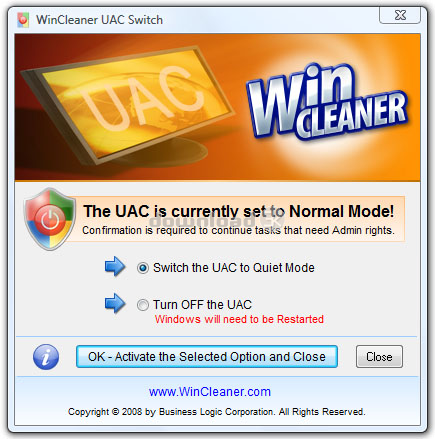
WinCleaner UAC Switch 1.0
Developed by Business Logic Corporation
-
Windows
-
setup file WinCleanerUACSwitchInstall.exe (0.79 MB)
-
Freeware
Select a download mirror:
- Developer Link 1 (non https WinCleanerUACSwitchInstall.exe)
- Download3k US (WinCleanerUACSwitchInstall.exe)
- Download3k EU (WinCleanerUACSwitchInstall.exe)
MD5: abd61bab787326524bc9f4066819b4d7
All files are original. Download3K does not repack or modify downloads in any way. Check MD5 for confirmation.
Developer Description
"Control the behaviour of Windows Vista UAC."
UAC short for User Account Control - also referred to as Admin Approval Mode is a new feature of Windows Vista.Many actions that you normally perform in Windows prior to Vista require Administrator privileges now and so Vista will ask for permission before it will continue with these tasks. The tasks that require Administrator privileges and prompts to continue are as follow:
- Installation and un-installation of applications
- Run applications that require Admin privileges - such as Utility software
- To run windows configurations or change setting - eg. Firewall etc.
- To access certain areas of the Vista File System and others
WinCleaner UAC Switch will allow you to control the behavior of the UAC. UAC Switch will let you set the UAC so that it is less annoying if you do not need it on all the time. Put it in Quiet Mode and it will not bother you with many confirmation prompts, but will continue to provide security when using Internet Explorer.
If you require full control of your Windows as you had in Windows XP, you can let WinCleaner UAC Switch completely turn of the UAC. This is generally not recommened unless you trust the applications that you regularly use and you have good firewall and malware protection for your system.
If you are an experienced user and you have some understanding of how to manage your Windows properly and since the UAC will not protect your Windows against malware, that is the function of anti-malware software, it is generally safe to set the UAC to Quiet Mode. Use WinCleaner UAC Switch and free yourself from the constant annoying permission confirmations.
Requirements: Windows Vista
Antivirus information
Download3K has downloaded and tested WinCleaner UAC Switch on 19 Mar 2026 with some of Today's best antivirus engines and you can find below, for your convenience, the scan results:
-
Avast:
Clean -
Avira:
Clean -
Kaspersky:
Clean -
McAfee:
Clean -
NOD32:
Clean

Popular downloads in System Utilities
-
 Realtek AC'97 Drivers A4.06
Realtek AC 97 sound driver. -
 Windows 7 Service Pack 1 (SP1) 32-bit & 64-bit (KB976932)
The first service pack for Windows 7. -
 Realtek High Definition Audio Driver for Vista, Win7, Win8, Win8.1, Win10 32-bit R2.82
High definition audio driver from Realtek. -
 .NET Framework 2.0
The programming model of the .NET -
 Driver Cleaner Professional 1.5
Improved version of Driver Cleaner -
 RockXP 4.0
Allows you to change your XP product key -
 Realtek AC'97 Drivers for Vista/Win7 6305
Multi-channel audio CODEC designed for PC. -
 DAEMON Tools Lite 12.3.0.2297
The FREE Virtual CD/DVD-ROM-EMULATOR. -
 AutoCorect 4.1.5
Diacritice la comanda, punctuatie automata. -
 SIW 16.08.0603
SIW - System Information for Windows
User rating
5/5 (2 votes)
Excellent
Your rating

-
OS
Windows Vista Starter,Windows Vista Home Basic,Windows Vista Home Premium,Windows Vista Business,Win -
License
Freeware -
Price
$0.00 -
Updated
3/19/2026 -
Downloads
261 (1 last week) -
Size
0.79 MB -
MD5
abd61bab787326524bc9f4066819b4d7 -
SHA1
d62227a7a5aa993a1f4bf3e1a7eebd83c3d24109 -
Developer
Business Logic Corporation