KbdEdit 26.02.0
- Buy $17.4
- Developer Link 1 (non https KbdEditDemo.zip)
- Developer Link 2 (non https KbdEditDemo.zip)
- Developer Link 3 (non https KbdEditDemo.zip)
- Developer Link 4 (non https KbdEditDemo.zip)
- Download3k US (KbdEditDemo.zip)
- Download3k EU (KbdEditDemo.zip)
MD5: 6904c03847440bf9f2b44a0e01bf8905
All files are original. Download3K does not repack or modify downloads in any way. Check MD5 for confirmation.
Review & Alternatives
"Windows Keyboard Layout Editor (32, 64 bit)"
Overview
KbdEdit is a layout editor for the keyboard. The software can be used to create a completely custom layout to replace the standard keyboard layout the Windows was installed with or that was chosen during the Windows installation procedure.
The software lets the user re-assign letters, numbers and characters to other keys on the keyboard. But more than that, this software is also able to assign any virtually key rather than only some of them. Control keys, Alt keys, Shift keys, numeric pad keys, the scroll lock, the caps lock, the numeric lock, plus multimedia and function keys can all be reassigned. This provides much more freedom with key reassignment.
Using the application is also pretty simple because it has a single menu system with few button confirmations needed and the software also accepts drag and drop actions to make things easier still. There is also a multiple undo/redo function which ensures that the user can also rollback to a previous setting. This can provide real peace of mind when making crucial changes to how the keyboard functions!
It is possible to import KLC files made with the Microsoft Keyboard Layout Creator.
Any customized layout created with KbdEdit can be included in the language bar quite easily. Layouts can be saved in the KBE format and then imported into the application on another PC and implemented there too.
Installation
The installation completed without any issues.
There was no adware, toolbars, spyware or malware included with the setup package.
KbdEdit requires Windows 2000, XP, 2003, Vista, 7 or 8 (32-bit or 64-bit).
Interface
The interface looks complicated at first.
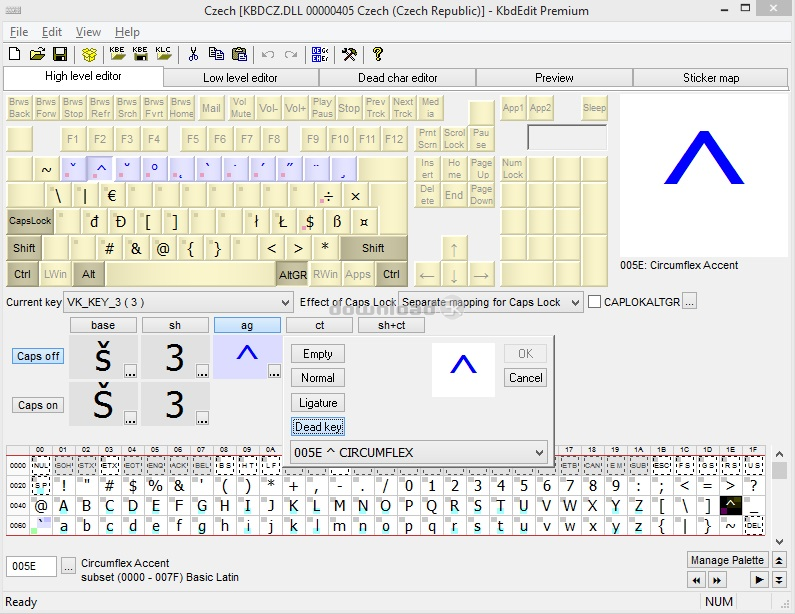
There is a menu system at the top and a row of toolbars below that. The main interface includes several tabs to access different areas like High Level Editor, Low Level Editor, Dead Character Editor, and others.
Keys are shown in the main display area. They have nice shadowing and shading on each key so that they actually look real. This makes it easier to work with the package.
Pros
- Change the key assignments with this keyboard editor
- Reassign any key including control keys, Alt keys, Shift keys, numeric pad keys, the scroll lock, the caps lock, the numeric lock, plus multimedia and function keys
- Save custom layouts as a KBE file
- Import KLC files from Microsoft Keyboard Layout Creator
- Good interface with attractive keys displayed from the keyboard
Cons
- Interface is pretty busy and can be confusing for anyone new to keyboard layout creation software
Alternatives
KeyTweak is a keyboard re-mapper than can also be used to move key assignments around.
Conclusion
KbdEdit is a powerful keyboard layout creator that can access restricted keys that other keyboard layout software usually cannot.

Requirements: Windows Vista/7/8/10/11 32/x64
Antivirus information
-
Avast:
Clean -
Avira:
Clean -
Kaspersky:
Clean -
McAfee:
Clean -
NOD32:
Clean

Popular downloads in System Utilities
-
 Realtek AC'97 Drivers A4.06
Realtek AC 97 sound driver. -
 Windows 7 Service Pack 1 (SP1) 32-bit & 64-bit (KB976932)
The first service pack for Windows 7. -
 Realtek High Definition Audio Driver for Vista, Win7, Win8, Win8.1, Win10 32-bit R2.82
High definition audio driver from Realtek. -
 .NET Framework 2.0
The programming model of the .NET -
 Driver Cleaner Professional 1.5
Improved version of Driver Cleaner -
 RockXP 4.0
Allows you to change your XP product key -
 Realtek AC'97 Drivers for Vista/Win7 6305
Multi-channel audio CODEC designed for PC. -
 DAEMON Tools Lite 12.3.0.2297
The FREE Virtual CD/DVD-ROM-EMULATOR. -
 AutoCorect 4.1.5
Diacritice la comanda, punctuatie automata. -
 SIW 16.08.0603
SIW - System Information for Windows