HydraMouse 3.20
Developed by Novica Paunovic
-
Windows
-
setup file HMsetup.exe (2.78 MB)
-
Shareware
Buy or select mirror:
- Buy $19.95
- Developer Link 1 (non https HMsetup.exe)
- Developer Link 2 (non https HMsetup.exe)
- Download3k US (HMsetup.exe)
- Download3k EU (HMsetup.exe)
MD5: 7d28f2f429a73c62d6be6e835ab51b43
All files are original. Download3K does not repack or modify downloads in any way. Check MD5 for confirmation.
Developer Description
"Assigns actions and macros to mouse buttons"
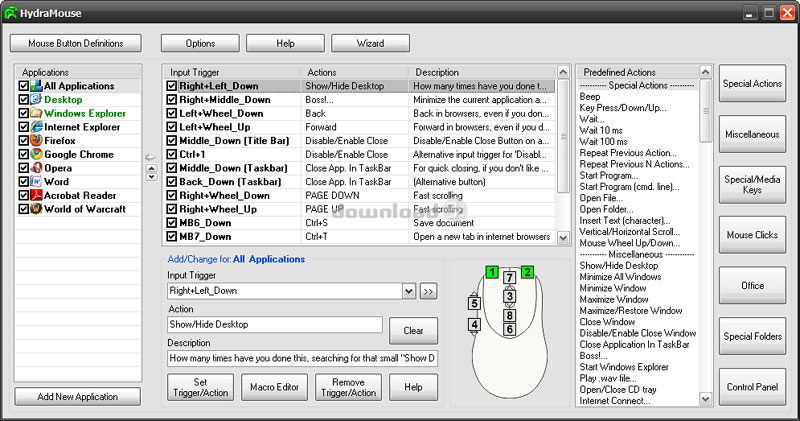
HydraMouse enables you to assign various actions to the buttons of your mouse. It is the only program in the world which can work not only with mice with up to 5 buttons, but also with many models of multi-button mice.Key features of HydraMouse:
* You can assign actions such as hotkeys, some of more than 100 HydraMouse's predefined actions, or macros in the form of: Alt+F, U, Wait 50 ms, TAB, Enter...
* You can assign actions to mouse buttons, combinations of mouse buttons, combinations of keyboard keys and mouse buttons.
* You may use several events for each button: Down, Up, Click, and Double-Click. For instance, you may assign different actions to Left+Right_Down and Left+Right_DblClick...
* You can assign actions for each application individually, or system wide.
* You can assign different actions to different sequences of mouse buttons, e.g., one to Left+Middle and another to Middle+Left.
* You can specify that a mouse button executes alternative actions if it is clicked on an application's Title bar or the Windows Taskbar...
Some of the incredibly useful HydraMouse actions:
* Right+Left: Show/Hide Desktop (how many times have you done this, searching for that small "Show Desktop" icon?).
* Right+Middle: BOSS! (minimize the current application and open some serious document).
* Left+Wheel: Back/Forward in browsers or Windows Explorer (even if you don't have a fancy multi-button mouse).
* Right+Wheel: Page Down/Up (fast scrolling of longer pages).
* Middle (in Windows Explorer): Go to the parent folder.
* Middle (over an application's Titlebar): Disable/Enable Close Button on applications (how many times have you accidentally closed something you didn't intend to?).
* Middle (over the Windows Taskbar): Close Application in Taskbar (for quick closing, if you don't like unnecessary clicking).
Of course, you can do so much more by assigning to mouse buttons your favorite hotkeys in your favorite applications or games.
What's new in this version: In version 3, actions and macros can be assigned to combinations of mouse buttons, or keys and buttons. For each button, HydraMouse now recognizes different events: Down, Up, Click and Double-Click. Different actions can be assigned to button combinations such as Left+Right and Right+Left...
Antivirus information
Download3K has downloaded and tested HydraMouse on 6 May 2024 with some of Today's best antivirus engines and you can find below, for your convenience, the scan results:
-
Avast:
Clean -
Avira:
Clean -
Kaspersky:
Clean -
McAfee:
Clean -
NOD32:
Clean

Popular downloads in System Utilities
-
 Realtek AC'97 Drivers A4.06
Realtek AC 97 sound driver. -
 Windows 7 Service Pack 1 (SP1) 32-bit & 64-bit (KB976932)
The first service pack for Windows 7. -
 Realtek High Definition Audio Driver for Vista, Win7, Win8, Win8.1, Win10 32-bit R2.82
High definition audio driver from Realtek. -
 .NET Framework 2.0
The programming model of the .NET -
 Driver Cleaner Professional 1.5
Improved version of Driver Cleaner -
 RockXP 4.0
Allows you to change your XP product key -
 Realtek AC'97 Drivers for Vista/Win7 6305
Multi-channel audio CODEC designed for PC. -
 DAEMON Tools Lite 12.3.0.2297
The FREE Virtual CD/DVD-ROM-EMULATOR. -
 AutoCorect 4.1.5
Diacritice la comanda, punctuatie automata. -
 SIW 16.08.0603
SIW - System Information for Windows
User rating
0/5 (0 votes)
Your rating

-
OS
Win7 x32,Win7 x64,WinVista,WinVista x64,WinXP -
License
Shareware -
Price
$19.95 Buy -
Updated
5/4/2024 -
Downloads
465 (11 last week) -
Size
2.78 MB -
MD5
7d28f2f429a73c62d6be6e835ab51b43 -
SHA1
40dba559732ce752a8980260fb174cdddb519710 -
Developer
Novica Paunovic