Flexiglass 1.5.2
Developed by Nulana LTD
-
Mac OS
-
setup file Flexiglass.dmg (8.70 MB)
-
Shareware
Buy or select mirror:
- Buy $7.99
- Developer Link 1 (non https Flexiglass.dmg)
- Download3k US (Flexiglass.dmg)
- Download3k EU (Flexiglass.dmg)
MD5: 12bcd6a0e1e466be8b15d2dbe155c003
All files are original. Download3K does not repack or modify downloads in any way. Check MD5 for confirmation.
Developer Description
"Working with Mac windows couldn't be easier."
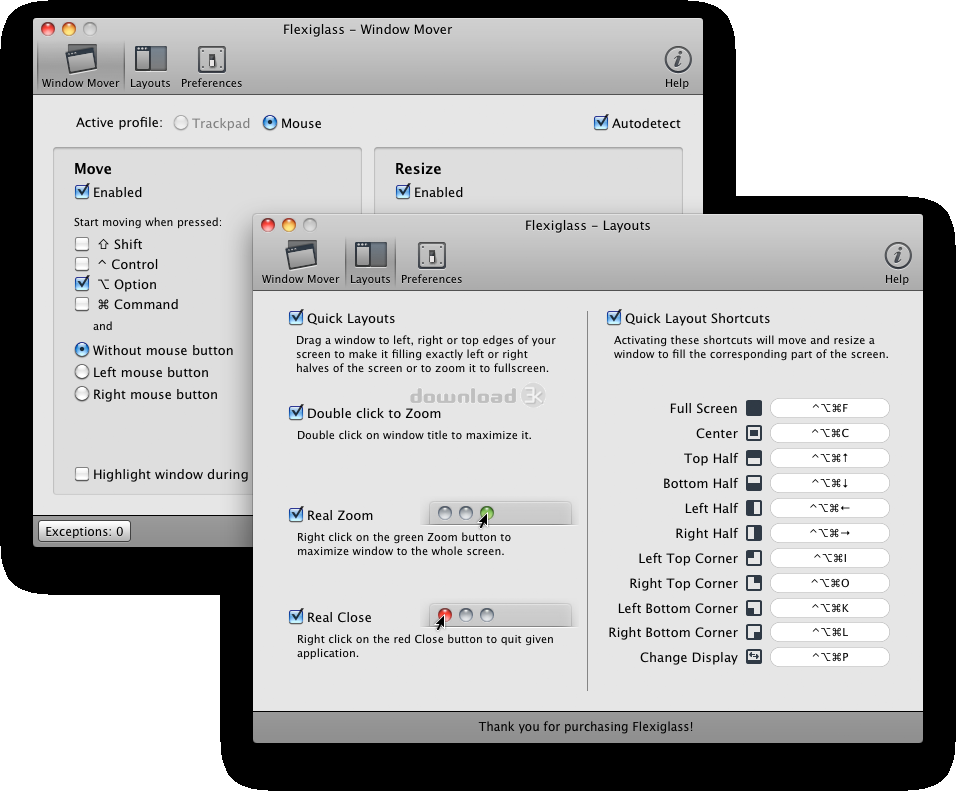
Among the countless number of applications that just lay out windows on your desktop Flexiglass actually offers a convenient way to move, resize, maximize, and close windows on a Mac with a mouse, trackpad and keyboard.* Move & Resize
Usually, when you want to move or resize a window on a Mac you are limited by its title bar or lower-right corner. Flexiglass enables more comfortable window management. To quickly move or resize the active window just place the mouse cursor over it, press definable key and start dragging windows with left or right mouse button. You can even resize Quick Look windows! You can also disable Move, Resize or both options for certain applications or turn them off.
* Multitouch Trackpad and Mouse
You can use finger gestures on your macbook trackpad or Magic trackpad to move and resize.
Flexiglass is able to save different settings for a trackpad and a mouse and automatically change them when you plug or unplug devices.
* Quick Layouts
If you used to work with more than one window at a time Flexiglass will help you to arrange windows on your screen any way you like. Just move a window to the right, left or top, and it will automatically resize and move itself to fill the half of the screen or full screen.
* Quick Layout Shortcuts
User-defined shortcuts allow you to move windows to halves or quarters of the screen and back to original size. You can place a window in the center of the screen or move it from one monitor to another.
* Double-click to Zoom
Double-click on window title bar is the easiest way to expand it to full screen.
* Real Zoom & Real Close
You can change the default behavior of standard Mac OS X buttons. Right-click on the green Zoom button will maximize a window to full screen. Right-click on Close window button will quit the whole application.
Requirements: Mac OS X 10.6 or later, Intel-based Mac
What's new in this version: Quick Layouts fixes for the Google Chrome; Multiple monitors improvements
Antivirus information
Download3K has downloaded and tested Flexiglass on 23 Sep 2014 with some of Today's best antivirus engines and you can find below, for your convenience, the scan results:
-
Avast:
Clean -
Avira:
Clean -
Kaspersky:
Clean -
NOD32:
Clean

Popular downloads in System Utilities
-
 Realtek AC'97 Drivers A4.06
Realtek AC 97 sound driver. -
 Windows 7 Service Pack 1 (SP1) 32-bit & 64-bit (KB976932)
The first service pack for Windows 7. -
 Realtek High Definition Audio Driver for Vista, Win7, Win8, Win8.1, Win10 32-bit R2.82
High definition audio driver from Realtek. -
 .NET Framework 2.0
The programming model of the .NET -
 Driver Cleaner Professional 1.5
Improved version of Driver Cleaner -
 RockXP 4.0
Allows you to change your XP product key -
 Realtek AC'97 Drivers for Vista/Win7 6305
Multi-channel audio CODEC designed for PC. -
 DAEMON Tools Lite 12.3.0.2297
The FREE Virtual CD/DVD-ROM-EMULATOR. -
 AutoCorect 4.1.5
Diacritice la comanda, punctuatie automata. -
 SIW 16.08.0603
SIW - System Information for Windows
User rating
5/5 (1 votes)
Excellent
Your rating

-
OS
Mac OS X -
License
Shareware -
Price
$7.99 Buy -
Updated
9/23/2014 -
Downloads
402 (17 last week) -
Size
8.70 MB -
MD5
12bcd6a0e1e466be8b15d2dbe155c003 -
SHA1
30db576ee4cc7dc71a7798a015762c473d98439d -
Developer
Nulana LTD