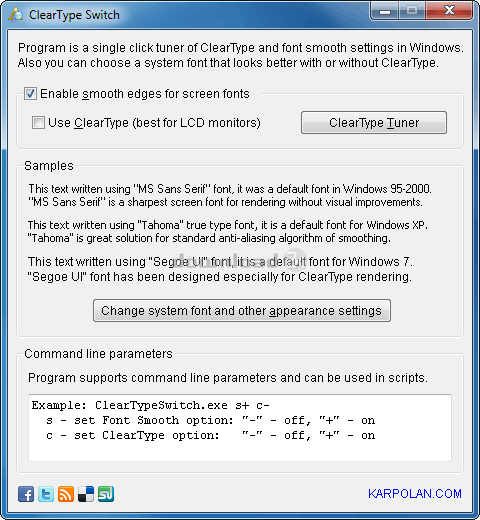
ClearType Switch 1.1
Developed by KARPOLAN
-
Windows
-
setup file cleartype-switch.zip (402.19 KB)
-
Freeware
Select a download mirror:
- Developer Link 1 (non https cleartype-switch.exe)
- Developer Link 2 (non https cleartype-switch.zip)
- Download3k US (cleartype-switch.zip)
- Download3k EU (cleartype-switch.zip)
MD5: 99301c9d558a1d00286023033fc16ccd
All files are original. Download3K does not repack or modify downloads in any way. Check MD5 for confirmation.
Developer Description
"ClearType and text anti-aliasing tunner"
Options for text anti-aliasing ("Smooth edges of screen fonts") and ClearType are located in different places depending on Windows version. This is very annoying and confuses users much!In Windows XP all these options are accessible via "Display properties" -> "Appearance" -> "Effects". Quite logical, isn't it?
In Windows Vista, if you have Aero enabled, you'll have to click on "Open classic appearance properties for more color options" in "Window Color and Appearance" Control Panel applet. A little bit strange...
Windows 7 went even further! You cannot turn off ClearType without completing a useless wizard :) I've wasted about 15 minutes looking for the "smooth font edges" option but wasn't able to find it at all! Only googling helped to solve this quest. The option was separated from ClearType settings and moved to "Control Panel" -> "All Control Panel Items" -> "Performance Information and Tools" -> "Adjust Visual Effects", in a huge list of checkboxes there is a "Smooth edges of screen fonts" item... Insane!
I don't like what Microsoft does with Windows usability. And I don't want to spend my time digging in future versions of their system. So I've created a small program that keeps Smooth edges and ClearType options in a same place. It's ClearType Switcher.
Requirements: none
What's new in this version: Command line parameters added. Some GUI bugs fixed.
Antivirus information
Download3K has downloaded and tested ClearType Switch on 1 May 2016 with some of Today's best antivirus engines and you can find below, for your convenience, the scan results:
-
Avast:
Clean -
Avira:
Clean -
Kaspersky:
Clean -
NOD32:
Clean

Popular downloads in System Utilities
-
 Realtek AC'97 Drivers A4.06
Realtek AC 97 sound driver. -
 Windows 7 Service Pack 1 (SP1) 32-bit & 64-bit (KB976932)
The first service pack for Windows 7. -
 Realtek High Definition Audio Driver for Vista, Win7, Win8, Win8.1, Win10 32-bit R2.82
High definition audio driver from Realtek. -
 .NET Framework 2.0
The programming model of the .NET -
 Driver Cleaner Professional 1.5
Improved version of Driver Cleaner -
 RockXP 4.0
Allows you to change your XP product key -
 Realtek AC'97 Drivers for Vista/Win7 6305
Multi-channel audio CODEC designed for PC. -
 DAEMON Tools Lite 12.3.0.2297
The FREE Virtual CD/DVD-ROM-EMULATOR. -
 AutoCorect 4.1.5
Diacritice la comanda, punctuatie automata. -
 SIW 16.08.0603
SIW - System Information for Windows
User rating
5/5 (1 votes)
Excellent
Your rating

-
OS
WinXP,WinVista,WinVista x64,Win7 x32,Win7 x64,WinServer -
License
Freeware -
Price
$0.00 -
Updated
5/1/2016 -
Downloads
192 (1 last week) -
Size
402.19 KB -
MD5
99301c9d558a1d00286023033fc16ccd -
SHA1
857f32af2e6317c76bbac2400df9e182f1c72ddb -
Developer
KARPOLAN