Beatle John`s DVD Burning Assistant 0.2
Developed by 1960s Today
-
Windows, Wi
-
setup file BJBA_eng.zip (391.54 KB)
-
Freeware
Select a download mirror:
- Developer Link 1 (non https BJBA_eng.zip)
- Developer Link 2 (non https BJBA_eng.zip)
- Developer Link 3 (non https BJBA_eng.zip)
- Developer Link 4 (non https BJBA_eng.zip)
- Download3k US (BJBA_eng.zip)
- Download3k EU (BJBA_eng.zip)
MD5: d7cabd7b9c8dbd0d04a85d21095a578a
All files are original. Download3K does not repack or modify downloads in any way. Check MD5 for confirmation.
Developer Description
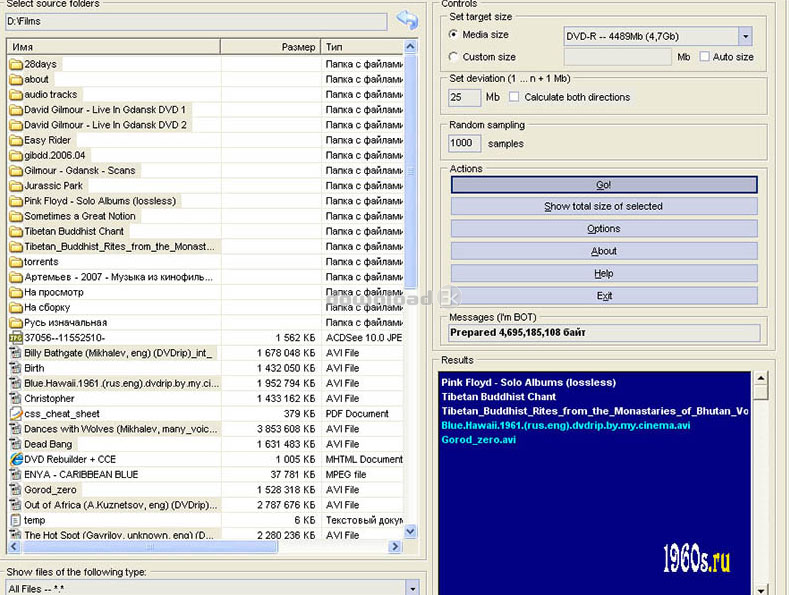
"Scan folders based on the given media size"
Burning Assistant was written with the purpose of automation of the protracted process of selection of folders and files for maximum filling the recordable DVD. For example, you want to burn a DVD film of 3,9Gb disk size. It turns out that remaining 800Mb on a medium will left empty. And it is not good! You can always find what to burn else - music or files, other films - anything that you have on your HDD. You only have to specify a template (CD-R/DVD-R/DVD-DL) and material for burning, and program will count and will pick out from it files exactly on 800Mb. It will save your disk space, your time and even money.First, in the main window, where you see your files and folders on HDD, you have to select one, big file or folder for burning. Also you can select many files and folders containing material that needs burning. After selecting go to Controls-Set target size field and choose a template - a kind of your medium for burning. It can be single or double layer DVD, DVD+R, DVD-R or even CD-R. For the first time, do not make changes in other fields, just press Go! in Action field. After a few moments, which amount directly depends on the speed of your CPU and more or less on the speed of your hard drive, you'll see results in the Results window. That's it - files and folders to burn your medium to its maximum capacity.
Requirements: A PC with Windows installed
What's new in this version: New release
Antivirus information
Download3K has downloaded and tested Beatle John`s DVD Burning Assistant on 10 Jun 2021 with some of Today's best antivirus engines and you can find below, for your convenience, the scan results:
-
Avast:
Clean -
Avira:
Clean -
Kaspersky:
Clean -
McAfee:
Clean -
NOD32:
Clean

Popular downloads in System Utilities
-
 Realtek AC'97 Drivers A4.06
Realtek AC 97 sound driver. -
 Windows 7 Service Pack 1 (SP1) 32-bit & 64-bit (KB976932)
The first service pack for Windows 7. -
 Realtek High Definition Audio Driver for Vista, Win7, Win8, Win8.1, Win10 32-bit R2.82
High definition audio driver from Realtek. -
 .NET Framework 2.0
The programming model of the .NET -
 Driver Cleaner Professional 1.5
Improved version of Driver Cleaner -
 RockXP 4.0
Allows you to change your XP product key -
 Realtek AC'97 Drivers for Vista/Win7 6305
Multi-channel audio CODEC designed for PC. -
 DAEMON Tools Lite 12.3.0.2297
The FREE Virtual CD/DVD-ROM-EMULATOR. -
 AutoCorect 4.1.5
Diacritice la comanda, punctuatie automata. -
 SIW 16.09.0628
SIW - System Information for Windows
User rating
0/5 (0 votes)
Your rating

-
OS
WinXP,Windows2000,Windows2003,Windows Vista Ultimate,Windows Vista Ultimate x64,Win98,WinME,Win95,Wi -
License
Freeware -
Price
$0 -
Updated
6/10/2021 -
Downloads
234 (3 last week) -
Size
391.54 KB -
MD5
d7cabd7b9c8dbd0d04a85d21095a578a -
SHA1
1fcc80a9d0bc080c2cde3beb6485c142dc453a05 -
Developer
1960s Today