LogonUI Boot Randomizer 3.9.60
Developed by UserXP
-
Windows
-
setup file lbrdebug.zip (362.79 KB)
-
Freeware
Select a download mirror:
- Developer Link 1 (non https lbrdebug.zip)
- Download3k US (lbrdebug.zip)
- Download3k EU (lbrdebug.zip)
MD5: 017f808b1e904efc943c445885efe482
All files are original. Download3K does not repack or modify downloads in any way. Check MD5 for confirmation.
Developer Description
"Logon and Boot screens manager for WinXP."
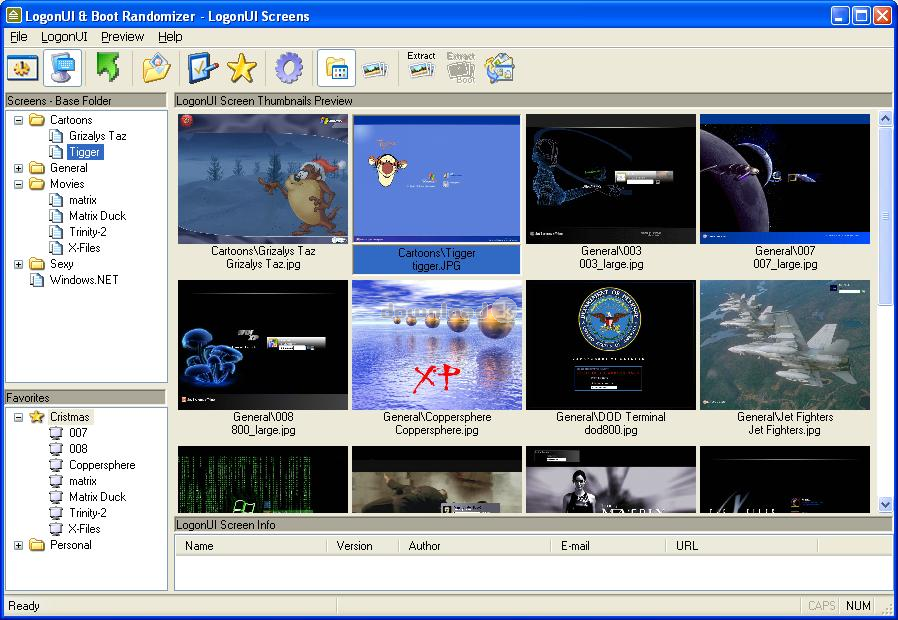
LogonUI Boot RandomizerIt's a Logon and Boot screens manager for WinXP (based on an idea by M. Deepak)Program is designed to interact as little as possible with the user. If you set randomizing to main (base) folder (see How it works), every time you download a new boot/screen folder and put it where you want, there is no need to run the program again. It will include the new screen automatically. Also, if you exclude a category (folder) from randomize (see A Note for Exclude), in order to exclude screens from randomize them, when you download a new one and put it there, there is no need to run the program and update the exclude with the new screen. Program it will excluded automatically.
Key features of LogonUI Boot Randomizer include:
- Changes the Logon and Boot screens in WinXP. Full support for SP1 and SP2 (I mean that you can use any version for boot screen and program will make it compatible with your system). LogonUIBootRandomizer DOES NOT WORK WITH SP3!
- Randomize (3 methods) the Logon and Boot screens. In order to randomize there is NO need to load the program to tray or something like that. If you set randomizing the program will run the appropriate time, randomize the logon/boot screen and then close.
- Full support for zip files. After downloading a screen (the zip file), just put it in any subfolder under the base folder. Program will handle it as a normal screen/folder.
- EXCLUDE some folders (screens) from randomize them (see A Note for Exclude).
- For boot screens, you can set or randomize them with 2 methods: 1) classic (using the exe file you download) or 2) using 3 bitmaps (existing or by extracting them from the exe file on fly and use them). All methods support all known features. Program always remember the position of progress bar.
- Support for extracting boot and/or logon screens directly from zip files. Program can automatically detect the type of screen and extract it to the right folder with out user input.
- Preview (classic or with THUMBNAILS) the Logon and Boot screens, if the new logon/boot screen comes with a .jpg or .bmp file. If not, there is a feature that you can browse and see all the bitmaps in the file. Also you can SAVE that bitmaps in jpg/gif/tiff/png/bmp format. With one click, you can save bitmap 100 (for logon screens) or bitmap 1 (for boot screens), which usually are the bitmaps with the basic picture. Also, support for MULTIPLE extract and save in jpg/gif/tiff/png/bmp format (very helpful for users that have a lot of screens with out a preview picture).
In order to load pictures faster at THUMBNAILS preview, program after detect NEW zip files, will prompt you to search the zip files for pictures. After searching, will extract the picture (if any) and save it to disk under the name "<name of zip file>.zip.jpg". The real format of the picture can be jpg/gif/tiff/png/bmp but after extraction the extension ALWAYS be .jpg
- Support CATEGORIES for the screens (picture)
- Favorites (as many as you want). You can tell the program to randomize in all of yours logon/boot screens OR in any one of the favorites you have create
- Fully resizable - the preview (classic or thumbnails) follows the size of the main screen
- Right click menus - drag and drop for favorites
- Test logon screens with one button (F4)
- Minimize to tray (if user want)
- Load at start up (if user want)
Antivirus information
Download3K has downloaded and tested LogonUI Boot Randomizer on 11 Mar 2012 with some of Today's best antivirus engines and you can find below, for your convenience, the scan results:
-
Avira:
Clean -
Kaspersky:
Clean -
NOD32:
Clean

Popular downloads in System Utilities
-
 Realtek AC'97 Drivers A4.06
Realtek AC 97 sound driver. -
 Windows 7 Service Pack 1 (SP1) 32-bit & 64-bit (KB976932)
The first service pack for Windows 7. -
 Realtek High Definition Audio Driver for Vista, Win7, Win8, Win8.1, Win10 32-bit R2.82
High definition audio driver from Realtek. -
 .NET Framework 2.0
The programming model of the .NET -
 Driver Cleaner Professional 1.5
Improved version of Driver Cleaner -
 RockXP 4.0
Allows you to change your XP product key -
 Realtek AC'97 Drivers for Vista/Win7 6305
Multi-channel audio CODEC designed for PC. -
 DAEMON Tools Lite 12.1.0.2155
The FREE Virtual CD/DVD-ROM-EMULATOR. -
 SIW 14.2.0508
SIW - System Information for Windows -
 AutoCorect 4.1.5
Diacritice la comanda, punctuatie automata.
User rating
3/5 (33 votes)
Good
Your rating

-
OS
Windows XP -
License
Freeware -
Updated
2/21/2009 -
Downloads
4136 (1 last week) -
Size
362.79 KB -
MD5
017f808b1e904efc943c445885efe482 -
SHA1
23506d93091acf0596885655ed74325d2926f1c7 -
Developer
UserXP