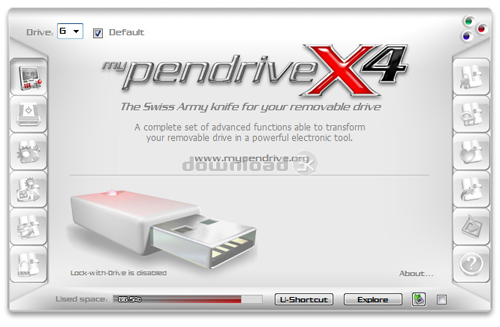
myPendriveX4 4.0
Developed by Associazione Culturale Oltre L'immagine
-
Windows
-
setup file myPendriveX4_eval_setup.exe (8.79 MB)
-
Shareware
Buy or select mirror:
- Buy $33.00
- Developer Link 1 (non https myPendriveX4_eval_setup.exe)
- Download3k US (myPendriveX4_eval_setup.exe)
- Download3k EU (myPendriveX4_eval_setup.exe)
MD5: c257ad4df122f6a2d32c4080e71e2842
All files are original. Download3K does not repack or modify downloads in any way. Check MD5 for confirmation.
Developer Description
"myPendrive enables extended autorun functions"
myPendriveX4 is the Swiss Army knife for all drive types (internal and external hard disks, USB pendrives, Mp3 players, other memory supports like Compact Flash, memory sticks, etc.).myPendriveX4 is a unique software provided with an incredible wide range of tools able to:
- enable extended and powerful Autorun functions, like automatically show a splash image, start multiple programs and documents at drive connection;
- quick access to your favorite portable applications with custom context menus;
- create your custom, independent, stand-alone executable application to be used in your own projects to start programs, presentations, documents and display your logo when a customer plugs the drive. myPendriveX4 will automatically create the proper autorun.inf file, compile the necessary executable and store in the right place all needed files and resources of your project;
- fully customize your removable drives with your favorite icon, name, label;
- transform your pendrive in a full featured MP3 player;
- protect your files encrypting the content of the drives;
- protect the access to your computer with the exclusive "Lock-with-Drive" function;
- protect your privacy with the "Panic Button" function;
- manage your portable password archives;
- bring with you your favorite Internet bookmarks and syncronize them with your PC;
- create Universal Shortcuts that are independent from drive letters;
- ...and much, much more.
Additional functions and features:
- real time drive capacity monitor with graphic informations;
- automatic and univoque identification of drives based on their serial number (and not on drive letter);
- system Tray balloon notification when a drive is connected/disconnected;
- built-in "quick safe drive disconnection";
- built-in installer for the portable version;
- wonderful and state-of-the-art interface design;
- extended quick help tooltips on every control.
Requirements: Most functions works with at least a removable drive (any type)
Antivirus information
Download3K has downloaded and tested myPendriveX4 on 3 Apr 2012 with some of Today's best antivirus engines and you can find below, for your convenience, the scan results:
-
Avira:
Clean -
Kaspersky:
Clean -
NOD32:
Clean

Popular downloads in System Utilities
-
 Realtek AC'97 Drivers A4.06
Realtek AC 97 sound driver. -
 Windows 7 Service Pack 1 (SP1) 32-bit & 64-bit (KB976932)
The first service pack for Windows 7. -
 Realtek High Definition Audio Driver for Vista, Win7, Win8, Win8.1, Win10 32-bit R2.82
High definition audio driver from Realtek. -
 .NET Framework 2.0
The programming model of the .NET -
 Driver Cleaner Professional 1.5
Improved version of Driver Cleaner -
 RockXP 4.0
Allows you to change your XP product key -
 Realtek AC'97 Drivers for Vista/Win7 6305
Multi-channel audio CODEC designed for PC. -
 DAEMON Tools Lite 12.3.0.2297
The FREE Virtual CD/DVD-ROM-EMULATOR. -
 AutoCorect 4.1.5
Diacritice la comanda, punctuatie automata. -
 SIW 16.08.0603
SIW - System Information for Windows
User rating
3.5/5 (17 votes)
Good
Your rating

-
OS
Win7 x32,Win7 x64,WinVista,WinVista x64,WinXP -
License
Shareware -
Price
$33.00 Buy -
Updated
4/3/2012 -
Downloads
3409 (2 last week) -
Size
8.79 MB -
MD5
c257ad4df122f6a2d32c4080e71e2842 -
SHA1
e954988f4be43f02782870799d45507f544368da -
Developer
Associazione Culturale Oltre L'immagine