iMazing 3.1.3.0
- Buy $39.99
- Developer Link 1 (iMazing2forWindows.exe)
- Download3k US (iMazing2forWindows.exe)
- Download3k EU (iMazing2forWindows.exe)
MD5: 00f19c0ce55bfa3bf2f9772428f200b7
All files are original. Download3K does not repack or modify downloads in any way. Check MD5 for confirmation.
Review & Alternatives
"DiskAid iPhone & iPad File Transfer"
Overview
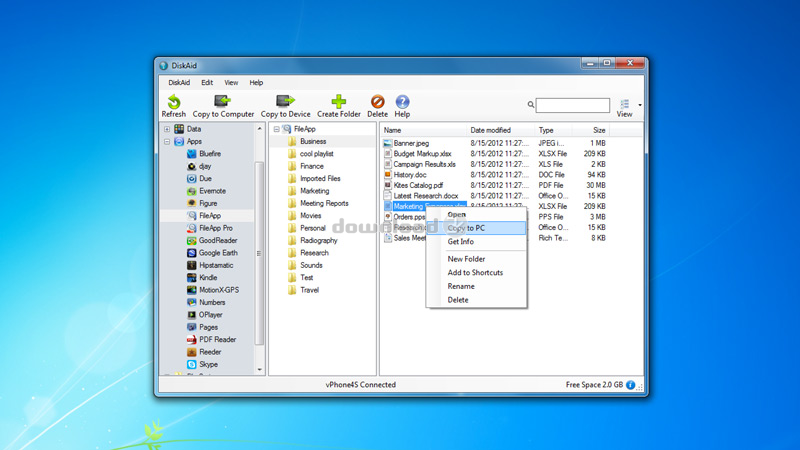
iMazing (formally known as DiskAid) is an interesting piece of software. It is designed to connect the Windows PC to an iOS device like an iPhone, iPad or iPod. From there, it can use the iOS device as a storage device by transferring files back and forth between the Windows PC and the device's storage. The drag and drop interface makes it easier to isolate what the user wants to copy to the iOS device and what to copy from the iOS device to Windows. The software can be used as a backup for contacts, call logs, voicemail, SMS texts and more that are stored on the iOS device. Access all the data that is present in the iCloud account. Transfer music , videos and photos across to iTunes Library or save them to the hard drive on your PC.
Installation
First with the installation you're required to choose your language. The installation then lets you choose the folder where you wish to install the software. The software requires 95.1 MB of available disk space to install correctly. A shortcut icon can then be added. The software has other software dependencies to run including Apple Application Support (33 MB), Apple Bonjour (2.5 MB) and Apple Mobile Device Support (12 MB) which will all need to be downloaded if they are not already installed within Windows.
Once the additional dependencies have been downloaded and installed, the software completes its installation. For the drag and drop feature, the software does request Windows be rebooted to activate it.
The 15-day trial version needs activating before one can proceed.
Interface
The main interface includes a link to current backups and shortcuts, with a large USB logo in the center encouraging the user to connect their device. There is also a menu with a few extra options. Updates are checked automatically for you with the offer to upgrade the version when a new one is released.
The USB connected interface has a line of buttons on the toolbar at the top. These include the option to Refresh, Copy to Windows, Copy to Device, Create folder, and other options. Down the left side is the folder tree showing every folder. When connected to the iOS device, the display can display Data under one expandable list and Apps in another expandable list. Data or App data specifically can be backed up to Windows to save important records for certain apps that you don't wish to lose.
Pros
- File manager and backup utility for iOS devices
- See iOS device files grouped by data type and app names
- Connect to iPhone, iPad or iPod and transfers files between Windows and iOS (or visa versa)
- Use the iOS device as a second storage device for files stored on a Windows machine
- Transfer files across a local network using Wi-Fi mode
- Backup SMS texts, call logs, voicemail, contacts and more over to the PC
Cons
- Some users may get confused whether the software is a file manager or a backup utility (it's actually both).
- 15-trial version is a little short
Alternatives
Similar software worth trying are AnyTrans, iFunBox, and CopyTrans.
Conclusion
iMazing (formerly DiskAid) is a good iOS file manager and backup utility in one. The software can transfer files to the iOS device for safe keeping or act as a backup for iOS data and media files by copying them over to the Windows file system or networked storage.

Requirements: iTunes 10.x
What's new in this version: DiskAid 5.4 Release date: September 13, 2012 New in this Version: Fully iOS 6 and iPhone 5 compatible DiskAid 5.46 Release date: February 25, 2013 New in this Version: Improved check for duplicates in media copy Bug fixes: Fixed button “Next†not working in Media Copy Fixed bug “Attempted to read or write protected memory.†Other bug fixes and stability improvements
Antivirus information
-
Avast:
Clean -
Avira:
Clean -
Kaspersky:
Clean -
McAfee:
Clean -
NOD32:
Clean

Popular downloads in System Utilities
-
 Realtek AC'97 Drivers A4.06
Realtek AC 97 sound driver. -
 Windows 7 Service Pack 1 (SP1) 32-bit & 64-bit (KB976932)
The first service pack for Windows 7. -
 Realtek High Definition Audio Driver for Vista, Win7, Win8, Win8.1, Win10 32-bit R2.82
High definition audio driver from Realtek. -
 .NET Framework 2.0
The programming model of the .NET -
 Driver Cleaner Professional 1.5
Improved version of Driver Cleaner -
 RockXP 4.0
Allows you to change your XP product key -
 Realtek AC'97 Drivers for Vista/Win7 6305
Multi-channel audio CODEC designed for PC. -
 DAEMON Tools Lite 12.3.0.2297
The FREE Virtual CD/DVD-ROM-EMULATOR. -
 AutoCorect 4.1.5
Diacritice la comanda, punctuatie automata. -
 SIW 16.08.0603
SIW - System Information for Windows