O&O UnErase Personal Edition 6.0.1899
- Buy $29.95
- Developer Link 1 (non https OOUnErase6Enu.exe)
- Developer Link 2 (non https OOUnErase664Enu.exe)
- Developer Link 3 (non https OOUnErase6Ger.exe)
- Developer Link 4 (non https OOUnErase664Ger.exe)
- Download3k US (OOUnErase6Enu.exe)
- Download3k EU (OOUnErase6Enu.exe)
MD5: 0739a03e0b085edd0726319233bcc6de
All files are original. Download3K does not repack or modify downloads in any way. Check MD5 for confirmation.
Quick Review
"Recover deleted files."
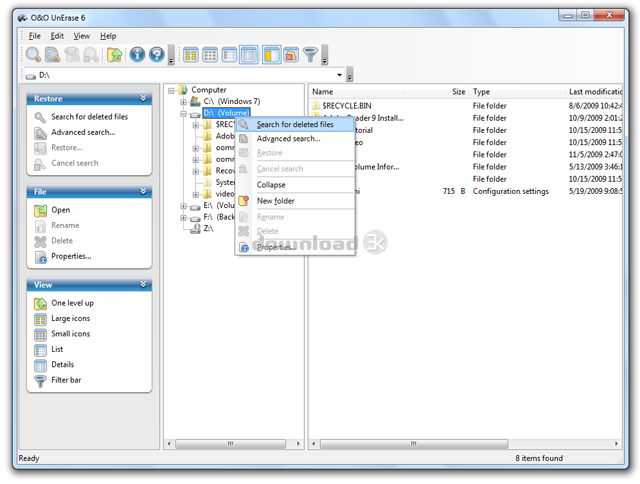
O&O UnErase Personal Edition is a powerful data recovery software designed to help users recover their lost or deleted files quickly and easily. It is a must-have tool for anyone who works with digital files, whether it's important documents, personal photos, or videos. With its easy-to-use interface and powerful recovery capabilities, O&O UnErase can help you restore your lost data in just a matter of seconds.
One of the most impressive features of O&O UnErase is its ability to increase the chances of data recovery. When data is erased, it is often marked as "available" on a hard disk or memory card, which means it can be overwritten at any time. However, O&O UnErase can recover data that has been lost due to unintentional deletion or a system crash. It is recommended that users install O&O UnErase before data loss occurs to ensure that the software is ready for use when trouble strikes.
If data loss does occur, users should immediately close all programs and avoid saving any new data to increase the chances of recovery. O&O UnErase can then be used to search for the lost data, even if the user is not sure of the drive where the data was deleted. Once the scanning is complete, all the files and folders that have been found will be displayed, and users can select the ones they want to restore.
The interface of O&O UnErase is user-friendly, making it easy for even novice users to recover their lost data. The software also provides a step-by-step guide to help users through the recovery process. Furthermore, it supports all Windows-compatible disks, which means it can be used on a wide range of devices.
Overall, O&O UnErase Personal Edition is an excellent data recovery software that can help users recover their lost or deleted files quickly and easily. Its powerful recovery capabilities and user-friendly interface make it a valuable tool for anyone who works with digital files. Whether you've accidentally deleted an important document or lost personal photos, O&O UnErase can help you recover your data and get back to work in no time.
Requirements: 512 MB RAM, 30 MB free harddisk space
What's new in this version: Restoration on network drives (Shares and UNC) , Enhanced search algorithm for texts within files, non-Ansi texts can also be recognized.,Compatible with Windows ® 7 and Windows® Server 2008 R2
Antivirus information
-
Avira:
Clean -
Kaspersky:
Clean -
NOD32:
Clean

Popular downloads in System Utilities
-
 Realtek AC'97 Drivers A4.06
Realtek AC 97 sound driver. -
 Windows 7 Service Pack 1 (SP1) 32-bit & 64-bit (KB976932)
The first service pack for Windows 7. -
 Realtek High Definition Audio Driver for Vista, Win7, Win8, Win8.1, Win10 32-bit R2.82
High definition audio driver from Realtek. -
 .NET Framework 2.0
The programming model of the .NET -
 Driver Cleaner Professional 1.5
Improved version of Driver Cleaner -
 RockXP 4.0
Allows you to change your XP product key -
 Realtek AC'97 Drivers for Vista/Win7 6305
Multi-channel audio CODEC designed for PC. -
 DAEMON Tools Lite 12.3.0.2297
The FREE Virtual CD/DVD-ROM-EMULATOR. -
 AutoCorect 4.1.5
Diacritice la comanda, punctuatie automata. -
 SIW 16.09.0628
SIW - System Information for Windows

-
OS
Win2000,Win7 x32,Win7 x64,WinServer,WinVista,WinVista x64,WinXP -
License
Commercial -
Price
$29.95 Buy -
Updated
3/11/2011 -
Downloads
688 (3 last week) -
Size
5.79 MB -
MD5
0739a03e0b085edd0726319233bcc6de -
SHA1
dc66d19603353ebc80af8b84687c3efc071cd71e -
Developer
O&O Software GmbH