NikSaver 1.63
Developed by Kurkov Software
-
Windows
-
setup file niksaver_setup.exe (1.97 MB)
-
Shareware
Buy or select mirror:
- Buy $19.95
- Developer Link 1 (non https niksaver_setup.exe)
- Developer Link 2 (non https niksaver_setup.exe)
- Download3k US (niksaver_setup.exe)
- Download3k EU (niksaver_setup.exe)
MD5: fb7784197e27555f90db34f9bafa6b93
All files are original. Download3K does not repack or modify downloads in any way. Check MD5 for confirmation.
Developer Description
"Copy applications along with all their data"
A modern software application may contain hundreds of configuration options and store a lot of your valuable info in its data files. Do you know where these configuration options and data files are located on your disks? Most users have no idea where even such a popular application as MS IE stores its configuration, bookmarks, cached pages, saved passwords, etc. Other applications are no different. Unfortunately, Windows has no mechanism to force software developers to follow consistent rules. There are some Microsoft recommendations that are usually ignored by the developers, but that's about it.This is why you normally cannot just move an installed and configured program from one computer to another, or restore a program with its options already set from a backup. This is why you need to re-install and re-configure the same program again and again on every new computer or with every system crash.
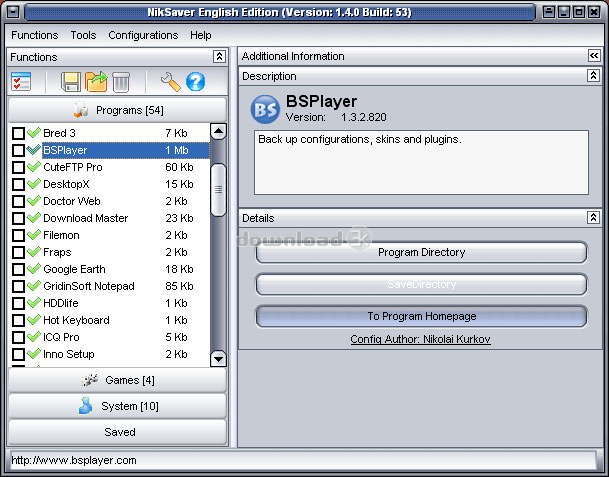
Is there a solution? We've made a search and some quick tests and found that there is only one program that provides a truly automated solution. NikSaver from Kurkov Software uses its unique artificial intelligence to determine the locations of configuration options and data files for each application installed on your computer. The program provides you with a list of installed applications. You can make a snapshot of an application by simply clicking the Save button. The snapshot can be used to transfer the application along with all its preferences and data to another computer or as a backup copy.
Hate guessing? Don't believe in artificial intelligence? Not a problem. The program provides ready-made verified scripts for about 500 of the most popular applications. The database of scripts is updated on a regular basis. In addition, there is a built-in script editor for advanced users.
Requirements: 233 MHz processor, 5MB free disk space, 128 RAM
What's new in this version: 1. Added script editor. Added GUI script editor, which allows a user to add new programs. 2. Optimized program code. NikSaver now works faster and more stable. 3. Fixed previously discovered bugs. Fixed bugs in settings saving and loading functions. 4. Added over 200 new programs and games.
Antivirus information
Download3K has downloaded and tested NikSaver on 11 Apr 2012 with some of Today's best antivirus engines and you can find below, for your convenience, the scan results:
-
Avira:
Clean -
Kaspersky:
Clean -
NOD32:
Clean

Popular downloads in System Utilities
-
 Realtek AC'97 Drivers A4.06
Realtek AC 97 sound driver. -
 Windows 7 Service Pack 1 (SP1) 32-bit & 64-bit (KB976932)
The first service pack for Windows 7. -
 Realtek High Definition Audio Driver for Vista, Win7, Win8, Win8.1, Win10 32-bit R2.82
High definition audio driver from Realtek. -
 .NET Framework 2.0
The programming model of the .NET -
 Driver Cleaner Professional 1.5
Improved version of Driver Cleaner -
 RockXP 4.0
Allows you to change your XP product key -
 Realtek AC'97 Drivers for Vista/Win7 6305
Multi-channel audio CODEC designed for PC. -
 DAEMON Tools Lite 12.3.0.2297
The FREE Virtual CD/DVD-ROM-EMULATOR. -
 AutoCorect 4.1.5
Diacritice la comanda, punctuatie automata. -
 SIW 16.08.0603
SIW - System Information for Windows
User rating
3/5 (1 votes)
Good
Your rating

-
OS
Win98,WinME,WinXP,Windows2000,Windows2003 -
License
Shareware -
Price
$19.95 Buy -
Updated
11/27/2011 -
Downloads
343 (8 last week) -
Size
1.97 MB -
MD5
fb7784197e27555f90db34f9bafa6b93 -
SHA1
6247576dedf701ad04332ed5aab7232990e724c2 -
Developer
Kurkov Software