Keyboard Manager Deluxe 2.20
Developed by Galloway Software
-
Windows, Other
-
setup file kmdlxdem2_setup.exe (0.78 MB)
-
Shareware
Buy or select mirror:
- Buy $29.95
- Developer Link 1 (non https kmdlxdem2_setup.exe)
- Developer Link 2 (kmdlxdem2_setup.exe)
- Download3k US (kmdlxdem2_setup.exe)
- Download3k EU (kmdlxdem2_setup.exe)
MD5: 20c242aefb1b9f0b2abc2113d1f0ee4b
All files are original. Download3K does not repack or modify downloads in any way. Check MD5 for confirmation.
Developer Description
"Assign shortcuts, text and objects to hotkeys"
Keyboard Manager Deluxe provides you with the power to assign shortcuts, text, and objects to over 350 keyboard hotkeys or key combinations for automatic, click-free activation and pasting.You can create shortcut functionality for drives, folders, programs and other file types, the control panel, printers, DOS applications, Internet webpages, and other items. You can press hotkeys to run programs, or applications, such as the calculator program, to open files or folders, such as the Documents folder, or to access your favorite Internet webpages.
With text functionality, you can assign plain text to key combinations for pasting. You can press hotkeys to paste instantly assigned text into window text boxes and documents.
Object functionality enables you to assign entire files, folders, images, sounds, formatted text, and other objects to key combinations for pasting. You can press hotkeys to paste these objects into active windows. For example, you can press key combinations to paste assigned images into other images, within photo-editing programs. You can press hotkeys to copy assigned files into desired folders.
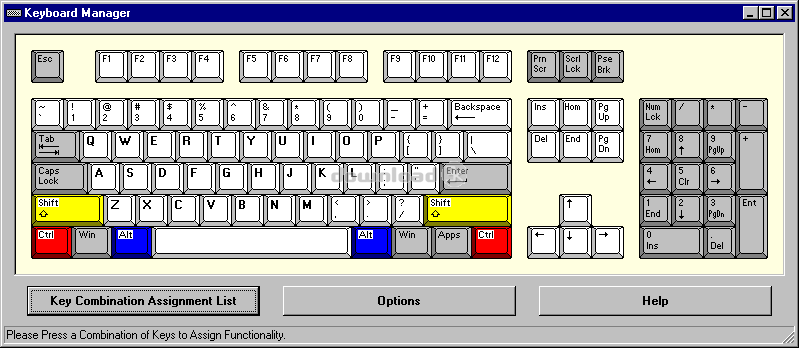
Keyboard Manager includes a main, keyboard window, which contains a standard keyboard layout. Here, you can select key combinations for functionality assignment creation and editing. An assignment list window provides a quick-reference to existing combination assignments.
Each hotkey or key combination consists of one primary key, and, optionally, one or two companion keys. The primary keys include function keys (F1 through F12), letter keys, number keys, the space key, punctuation keys, directional keys, and editing keys. The companion keys are the Shift, Ctrl, and Alt keys. Examples are F9, Alt + Q, and Shift + Ctrl + Backspace. Keyboard Manager represents key combinations in two formats: graphical and text.
The Keyboard Manager Network version empowers multiple users to share the same hotkey assignments.
Requirements: Pentium-based processor, 16MB RAM, 5MB HD space
What's new in this version: Improved compatibility for newer Windows versions
Antivirus information
Download3K has downloaded and tested Keyboard Manager Deluxe on 15 Aug 2015 with some of Today's best antivirus engines and you can find below, for your convenience, the scan results:
-
Avast:
Clean -
Avira:
Clean -
Kaspersky:
Clean -
NOD32:
Clean

Popular downloads in System Utilities
-
 Realtek AC'97 Drivers A4.06
Realtek AC 97 sound driver. -
 Windows 7 Service Pack 1 (SP1) 32-bit & 64-bit (KB976932)
The first service pack for Windows 7. -
 Realtek High Definition Audio Driver for Vista, Win7, Win8, Win8.1, Win10 32-bit R2.82
High definition audio driver from Realtek. -
 .NET Framework 2.0
The programming model of the .NET -
 Driver Cleaner Professional 1.5
Improved version of Driver Cleaner -
 RockXP 4.0
Allows you to change your XP product key -
 Realtek AC'97 Drivers for Vista/Win7 6305
Multi-channel audio CODEC designed for PC. -
 DAEMON Tools Lite 12.3.0.2297
The FREE Virtual CD/DVD-ROM-EMULATOR. -
 AutoCorect 4.1.5
Diacritice la comanda, punctuatie automata. -
 SIW 16.08.0603
SIW - System Information for Windows
User rating
0/5 (0 votes)
Your rating

-
OS
Win2000,Win7 x32,Win7 x64,Win98,WinOther,WinServer,WinVista,WinVista x64,WinXP,Other -
License
Shareware -
Price
$29.95 Buy -
Updated
8/15/2015 -
Downloads
203 (34 last week) -
Size
0.78 MB -
MD5
20c242aefb1b9f0b2abc2113d1f0ee4b -
SHA1
c15fb7092121349cc4e2932885abf114d2f720bd -
Developer
Galloway Software