Batchrun 4.3
Developed by Outertech
-
Windows
-
setup file btrun442.exe (1.17 MB)
-
Freeware
Select a download mirror:
- Developer Link 1 (non https batchrun.exe)
- Developer Link 2 (non https batchrun.exe)
- Download3k US (btrun442.exe)
- Download3k EU (btrun442.exe)
MD5: a29fa06fbaef800edf4cdf41ac9bbacc
All files are original. Download3K does not repack or modify downloads in any way. Check MD5 for confirmation.
Developer Description
"Launch multiple programs at once"
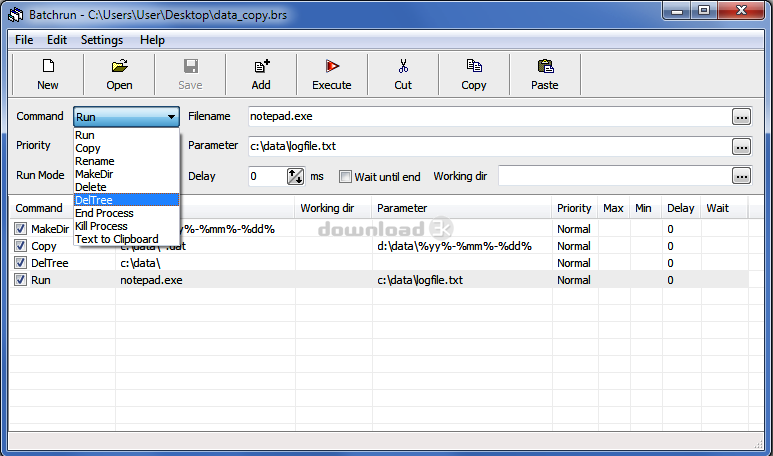
With Batchrun you can create a batch file using a graphical interface. A batch file lets you run several Windows commands together, in whatever order you choose. For example, you can launch multiple Windows applications with a click. Start Batchrun, add the applications you would like to run together or one after another, then select "File | Save to Desktop" and you have just created your first batch file. Double-clicking this batch file on the Desktop will start all the programs you have selected. This is only Batchrun's most basic function. In addition to "Run" you get several other batch commands, including Copy and Rename, Makedir (to create folders), End Process (to quit a running application), or Text to Clipboard to copy a specific text. You can also save batch files so that they are executed when your computer boots (File Menu).How can the Text to Clipboard function be useful? Here's an example. You can create a batch file to copy the login password of an online game like World of Warcraft or Rift to the clipboard and start the game. You can then paste the password into the login window without having to type it, achieving a faster logon time.
Batchrun feature list:
* Launch files of any filetype
* Internal commands: Run, Copy, Rename, Makedir, Delete, DelTree, End Process, Kill Process, Text to Clipboard
* Wildcard (e.g. *.jpg) support for Copy, Delete and DelTree
* Makedir nested folder creation (e.g. create c:\data\myfolder even if c:\data does not exist yet)
* Drag and Drop between Explorer and Batchrun
* Environment variables (e.g. %programfiles%) can use used in batch files
* Support for date and time tags
* Command line parameters can be passed to Batchrun script files
* Save batch files directly to Startup and Desktop
Requirements: Windows (any)
What's new in this version: Environment variables (e.g. %programfiles%) can use used in batch files, Improved 64bit support
Antivirus information
Download3K has downloaded and tested Batchrun on 17 May 2026 with some of Today's best antivirus engines and you can find below, for your convenience, the scan results:
-
Avast:
Clean -
Avira:
Clean -
Kaspersky:
Clean -
McAfee:
Clean -
NOD32:
Clean

Popular downloads in System Utilities
-
 Realtek AC'97 Drivers A4.06
Realtek AC 97 sound driver. -
 Windows 7 Service Pack 1 (SP1) 32-bit & 64-bit (KB976932)
The first service pack for Windows 7. -
 Realtek High Definition Audio Driver for Vista, Win7, Win8, Win8.1, Win10 32-bit R2.82
High definition audio driver from Realtek. -
 .NET Framework 2.0
The programming model of the .NET -
 Driver Cleaner Professional 1.5
Improved version of Driver Cleaner -
 RockXP 4.0
Allows you to change your XP product key -
 Realtek AC'97 Drivers for Vista/Win7 6305
Multi-channel audio CODEC designed for PC. -
 DAEMON Tools Lite 12.3.0.2297
The FREE Virtual CD/DVD-ROM-EMULATOR. -
 AutoCorect 4.1.5
Diacritice la comanda, punctuatie automata. -
 SIW 16.08.0603
SIW - System Information for Windows
User rating
0/5 (0 votes)
Your rating

-
OS
WinXP,WinVista,WinVista x64,Win7 x32,Win7 x64,Windows2000 -
License
Freeware -
Price
$0 -
Updated
5/10/2026 -
Downloads
749 (1 last week) -
Size
1.17 MB -
MD5
a29fa06fbaef800edf4cdf41ac9bbacc -
SHA1
1212b034e00f32a06f5439a5f59d33b0864c8ffd -
Developer
Outertech