Secure Password Manager Free 2.5.0.5
Developed by SecureKit.net
-
Windows
-
setup file spm2.exe (2.12 MB)
-
Freeware
Select a download mirror:
- Developer Link 1 (non https spm2.exe)
- Download3k US (spm2.exe)
- Download3k EU (spm2.exe)
MD5: b9f172b6e0e153ea353bb847d0d6ee17
All files are original. Download3K does not repack or modify downloads in any way. Check MD5 for confirmation.
Developer Description
"Secure Password Manager- Passwords Management"
Too many passwords?Do you have too many passwords, which expire on different dates, are subject to different rules, or are managed with different tools? This complexity creates problems, like forget your passwords.
Secure Password Manager is the right solution to manage your passwords. It spares you the trouble of filling in your logins, passwords, and other personal data manually.
Secure Password Manager is well designed to let you store and track names, passwords, credit cards, software serial numbers and confidential notes in an encrypted form securely and easily. It can autofill in your login information in any application (IE, Netscape, Opera, ICQ, MSN...).
-------------------------------------------------
Editor's Review
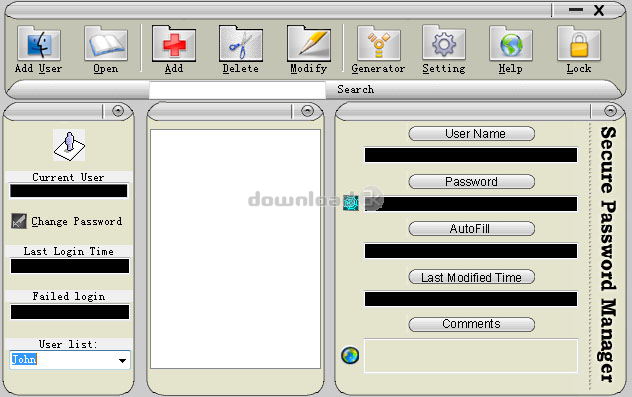
Don't let this password manager's busy interface scare you away. There's method to the madness, and Secure Password Manager proved easy to use. At first glance, the cluttered, compact interface is overwhelming. Packed with information, it sports a big toolbar over three panes. With the logical arrangement of the toolbar, though, most testers didn't need to refer to the Help file to get started.
You can easily create multiple user accounts, each with its own password protection. Once a user is set up, the Add button allows for quick setup of folders to organize log-in information and to add specific accounts. Unlike similar programs, Secure Password Manager doesn't have a field for the account's URL. Instead, the app's autofill option uses a hot-key trigger to enter your user ID and password once you open the site.
A password generator has a satisfying range of easily set options to set length, include numbers, and mixed-case letters. While we aren't fans of options to copy sensitive information to the clipboard, one of Secure Password Manager's default settings is to clear the clipboard on program close.
-------------------------------------------------
For more information, please visit http://www.securekit.net .
Requirements: Windows 95/98/ME/2000/NT/XP 32MB of RAM 20MB of available hard-disk space
What's new in this version: Minor Updates
Antivirus information
Download3K has downloaded and tested Secure Password Manager Free on 8 Mar 2013 with some of Today's best antivirus engines and you can find below, for your convenience, the scan results:
-
Avira:
Clean -
Kaspersky:
Clean -
NOD32:
Clean

Popular downloads in Security
-
 Freegate Professional 7.90
Anti-censorship software. -
 MessenPass 1.42
Recovers instant messenger passwords -
 Hotspot Shield 12.9.7
Secure your wi-fi connection from hackers -
 Asterisk Key 10.0 Build 3538
Uncover passwords hidden behind asterisks. -
 CmosPwd 5.0
A cmos/bios password recovery application -
 Windows Installer CleanUp Utility 2.5.0.1
Remove Windows Installer settings. -
 Protected Storage PassView 1.63
recovers the Protected Storage passwords. -
 Cain & Abel 4.9.56
Password recovery tool. - Hide Window Plus 4
Hide programs from taskbar and tray -
 Asterisk Logger 1.04
Reveals the passwords behind asterisks.
User rating
3/5 (1 votes)
Good
Your rating

-
OS
Win7 x32,Win7 x64,WinVista,WinVista x64,WinXP -
License
Freeware -
Price
$0 -
Updated
3/7/2013 -
Downloads
807 (3 last week) -
Size
2.12 MB -
MD5
b9f172b6e0e153ea353bb847d0d6ee17 -
SHA1
1f724c1181e703bcee4ac65b131b82b65a585621 -
Developer
SecureKit.net