RedHand 1.9.4
Developed by soma-zone
-
Mac OS
-
setup file RedHand_1.9.4.dmg (1.46 MB)
-
Shareware
Buy or select mirror:
- Buy $5
- Developer Link 1 (non https RedHand_1.9.4.dmg)
- Download3k US (RedHand_1.9.4.dmg)
- Download3k EU (RedHand_1.9.4.dmg)
MD5: 6368e24987587ca02f8a2730d2c42fb3
All files are original. Download3K does not repack or modify downloads in any way. Check MD5 for confirmation.
Developer Description
"Lock your Mac and track intrusion attempts"
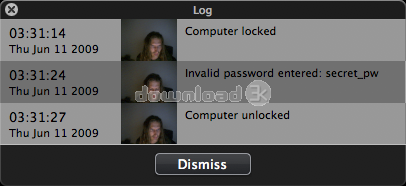
RedHand locks your computer. Manually via global hot key, menu bar or dock. Automatically after a period of inactivity (much like a screensaver), depending on the presence of a Bluetooth device, or whenever your computer goes to sleep.Whenever someone tries to gain access to your computer, RedHand takes a photo and informs you about it. You even get to know the passwords the intruder tried.
You don't have to think about locking your computer. You don't even have to remember your password. Use your phone as the key! Just tell RedHand to look for a specific Bluetooth device. If you leave the room your computer will be locked. As soon as you are back you'll find it unlocked. Unlocking via password still works…just in case your mobile ran out of juice.
With its ability to execute scripts (AppleScript or anything you could launch via command line) RedHand lets you perform any action you want: send an email or play an audio file when an invalid password was entered. Perform maintenance tasks when the computer was locked. Its up to you. The scripts can access the photo taken.
What's new in this version: Fix: Improved stability
Antivirus information
Download3K has downloaded and tested RedHand on 9 Dec 2016 with some of Today's best antivirus engines and you can find below, for your convenience, the scan results:
-
Avast:
Clean -
Avira:
Clean -
Kaspersky:
Clean -
NOD32:
Clean

Popular downloads in Security
-
 Freegate Professional 7.90
Anti-censorship software. -
 MessenPass 1.42
Recovers instant messenger passwords -
 Hotspot Shield 12.9.7
Secure your wi-fi connection from hackers -
 Asterisk Key 10.0 Build 3538
Uncover passwords hidden behind asterisks. -
 CmosPwd 5.0
A cmos/bios password recovery application -
 Windows Installer CleanUp Utility 2.5.0.1
Remove Windows Installer settings. -
 Protected Storage PassView 1.63
recovers the Protected Storage passwords. -
 Cain & Abel 4.9.56
Password recovery tool. - Hide Window Plus 4
Hide programs from taskbar and tray -
 Asterisk Logger 1.04
Reveals the passwords behind asterisks.