KeyboardLocker 3.6
Developed by DataMystic
-
Windows
-
setup file keyboardlocker2.exe (3.00 MB)
-
Shareware
Buy or select mirror:
- Buy $9.99
- Developer Link 1 (non https keyboardlocker.exe)
- Developer Link 2 (non https keyboardlocker2.zip)
- Download3k US (ver 3.6, keyboardlocker2.exe)
- Download3k EU (ver 3.6, keyboardlocker2.exe)
MD5: 8c3569cf6aac606fbf12e57cfa24acc7
All files are original. Download3K does not repack or modify downloads in any way. Check MD5 for confirmation.
Developer Description
"Disables keyboard until exit phrase, mouse ok"
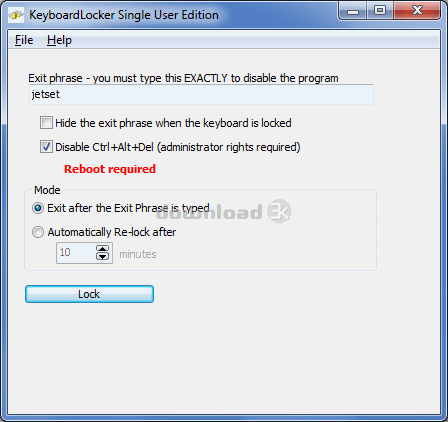
Disables the keyboard, leaving the mouse active. An exit phrase must be entered before the keyboard is reactivated. Can be used to secure dedicated servers or kiosks, or to show a DVD to a small child without them destroying your computer! Use with Skype to prevent toddlers pressing keys during a callOnce KeyboardLocker is enabled, you can ONLY use the keyboard to type in the Exit Phrase. You can use the mouse to start your DVD movie playing.
You can also copy the short cut for KeyboardLocker into the StartUp folder so that your computer is automatically locked when it boots up!
KeyboardLocker can absolutely disable Control+Alt+Del (CAD) to prevent your photo kiosk from being hacked!
Use KeyboardLocker...
- to secure photo kiosks
- to secure dedicated servers (such as university print servers)
- to prevent both USB and PS/2 keyboard input on Internet and Photo kiosks
- to protect running processes when the keyboard is cleaned by janitors
- to stop keyboard input when desktop macros are running
- in a home user environment, e.g. to show a DVD to a small child without them destroying your computer.
There are several ways you can start KeyboardLocker:
"c:\Program Files\KeyboardLocker\KeyboardLocker.exe" [/START]
Starts KeyboardLocker in interactive mode. If /START is specified, KeyboardLocker locks immediately.
"c:\Program Files\KeyboardLocker\KeyboardLocker.exe" /NEWPWD=new password [/START]
Starts KeyboardLocker in interactive mode, but with a new default password. If /START is specified, KeyboardLocker locks immediately.
"c:\Program Files\KeyboardLocker\KeyboardLocker.exe" /OLDPWD=old password /NEWPWD=new password
If KeyboardLocker is currently running, it changes the unlock phrase from old password to new password. KeyboardLocker then terminates.
"c:\Program Files\KeyboardLocker\KeyboardLocker.exe" /STOP=password
Unlocks KeyboardLocker if it is currently running and password is correct. KeyboardLocker then terminates.
Requirements: 2 MB free memory
What's new in this version: Fixed install error under x32.
Antivirus information
Download3K has downloaded and tested KeyboardLocker on 19 Jul 2019 with some of Today's best antivirus engines and you can find below, for your convenience, the scan results:
-
Avast:
Clean -
Avira:
Clean -
Kaspersky:
Clean -
McAfee:
Clean -
NOD32:
Clean

Popular downloads in Security
-
 Freegate Professional 7.90
Anti-censorship software. -
 MessenPass 1.42
Recovers instant messenger passwords -
 Hotspot Shield 12.9.7
Secure your wi-fi connection from hackers -
 Asterisk Key 10.0 Build 3538
Uncover passwords hidden behind asterisks. -
 CmosPwd 5.0
A cmos/bios password recovery application -
 Windows Installer CleanUp Utility 2.5.0.1
Remove Windows Installer settings. -
 Protected Storage PassView 1.63
recovers the Protected Storage passwords. -
 Cain & Abel 4.9.56
Password recovery tool. - Hide Window Plus 4
Hide programs from taskbar and tray -
 Asterisk Logger 1.04
Reveals the passwords behind asterisks.
User rating
0/5 (0 votes)
Your rating

-
OS
WinXP,Windows2000,Windows2003,Windows Vista Ultimate,Windows Vista Ultimate x64,Win98,WinME,WinNT 3. -
License
Shareware -
Price
$9.99 Buy -
Updated
1/24/2022 -
Downloads
709 (7 last week) -
Size
3.00 MB -
MD5
8c3569cf6aac606fbf12e57cfa24acc7 -
SHA1
1b4d9041eb6a74c4d74523684cd7c0f347130385 -
Developer
DataMystic