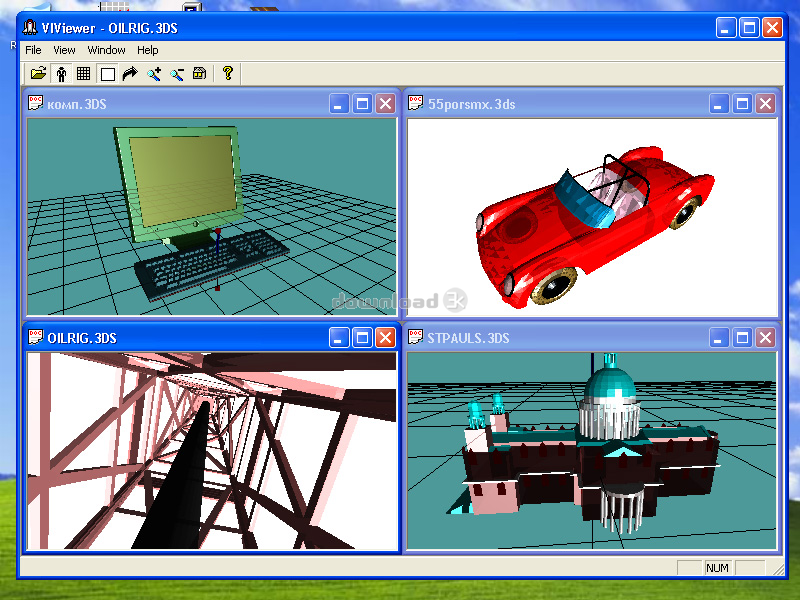
VIViewer 1.1
Developed by Valeri Vlassov
-
Windows
-
setup file Setup_VIViewer.zip (4.62 MB)
-
Demo
Buy or select mirror:
- Buy $14
- Developer Link 1 (non https Setup_VIViewer.zip)
- Download3k US (Setup_VIViewer.zip)
- Download3k EU (Setup_VIViewer.zip)
MD5: 8f373f500621d517359631e2c16fa4e1
All files are original. Download3K does not repack or modify downloads in any way. Check MD5 for confirmation.
Developer Description
"The Viewer for 3ds files."
The Viewer for 3ds files with possibility to walk around objects.- You can open a lot of 3ds files together.
- You can scale and rotate the 3ds-objects.
- You can walk around and inside the 3ds-objects.
- Simply use 4 arrow buttons for rotate or walk around the object.
- Use "plus" and "minus" buttons on numpad for scale the object.
- Use "Man" button on toolbar for switching "walk" or "look" mode.
Usefull Keyboard buttons:
Home - for look from start (home) point (also 5 on numpad)
+ - on numpad for more zoom (zoom in)
- - on numpad for less zoom (zoom out)
R - autorotate the object (on / off)
W - white background (on / off)
N - coordinate net (on / off)
A - coordinate axies (on / off)
9 - on numpad for increase rotation speed
3 - on numpad for decrease rotation speed
"Look" mode:
Left arrow - rotate the scene to left
Right arrow - rotate the scene to right
Up arrow - rotate the scene forwards.
Down arrow - rotate the scene backwards.
"Walk" mode:
Left arrow - turn to left (also 4 on numpad)
Right arrow - turn to right (also 6 on numpad)
Up arrow - go forward.
Down arrow - go back.
Shift + Left arrow - shift to left
Shift + Right arrow - shift to right
Shift + Up arrow - rise upwards (also Page Up)
Shift + Down arrow - lowered downwards (also Page Down )
Ctrl + Shift + Arrows - move slowly.
Ctrl + Up arrow - bend forward (also 8 on numpad)
Ctrl + Down arrow - bend backward (also 2 on numpad)
F2 - look forward.
You can use VIViewer for viewing "single" 3ds files, without additional files (textures etc).
For acceleration of walking, representation of 3ds files is lowered.
What's new in this version: No changes
Antivirus information
Download3K has downloaded and tested VIViewer on 29 Aug 2023 with some of Today's best antivirus engines and you can find below, for your convenience, the scan results:
-
Avast:
Clean -
Avira:
Clean -
Kaspersky:
Clean -
McAfee:
Clean -
NOD32:
Clean

Popular downloads in Photo & Graphic
-
 Bandicam Screen Recorder 8.3.1.2537
Best Game, Video, Screen Recording Software -
 PhotoScape 3.7
A fun and easy photo editing software. -
 Magic Photo Editor 7.5
Easilly blend photo onto another picture. -
 SketchUp Make 16.1.1450 32-bit / 17.2.2555 64-bit
An easy-to-learn 3D modeling program. -
 jAlbum 39.6
Highly customizable web galleries for any site. -
 Shipping Container House Plans 1.1
Shipping Container House Plans Software -
 Corel PaintShop Pro 2023 25.2.0.58 Update 2
All you need to create fantastic photos! -
 Just Color Picker 6.2
Free colour picker and colour-editing tool. - JR Split File 1.2
Split a large file into smaller files -
 progeCAD Smart! free DWG CAD 9.0.28.8
progeCAD Smart! free personal CAD software
User rating
2.5/5 (3 votes)
Medium
Your rating

-
OS
Win98,WinME,Windows2000,WinXP,Windows2003,Windows Vista Home Basic -
License
Demo -
Price
$14 Buy -
Updated
8/29/2023 -
Downloads
597 (4 last week) -
Size
4.62 MB -
MD5
8f373f500621d517359631e2c16fa4e1 -
SHA1
d328dddf259a109c22b2bd11e2f04fb1f2a9fc51 -
Developer
Valeri Vlassov