VIMap 1.2
Developed by Valeri Vlassov
-
Windows
-
setup file Setup_VIMap.zip (4.56 MB)
-
Demo
Buy or select mirror:
- Buy $12
- Developer Link 1 (non https Setup_VIMap.zip)
- Download3k US (Setup_VIMap.zip)
- Download3k EU (Setup_VIMap.zip)
MD5: 2ff450377bfdb4f4c901676cdfd1e1d3
All files are original. Download3K does not repack or modify downloads in any way. Check MD5 for confirmation.
Developer Description
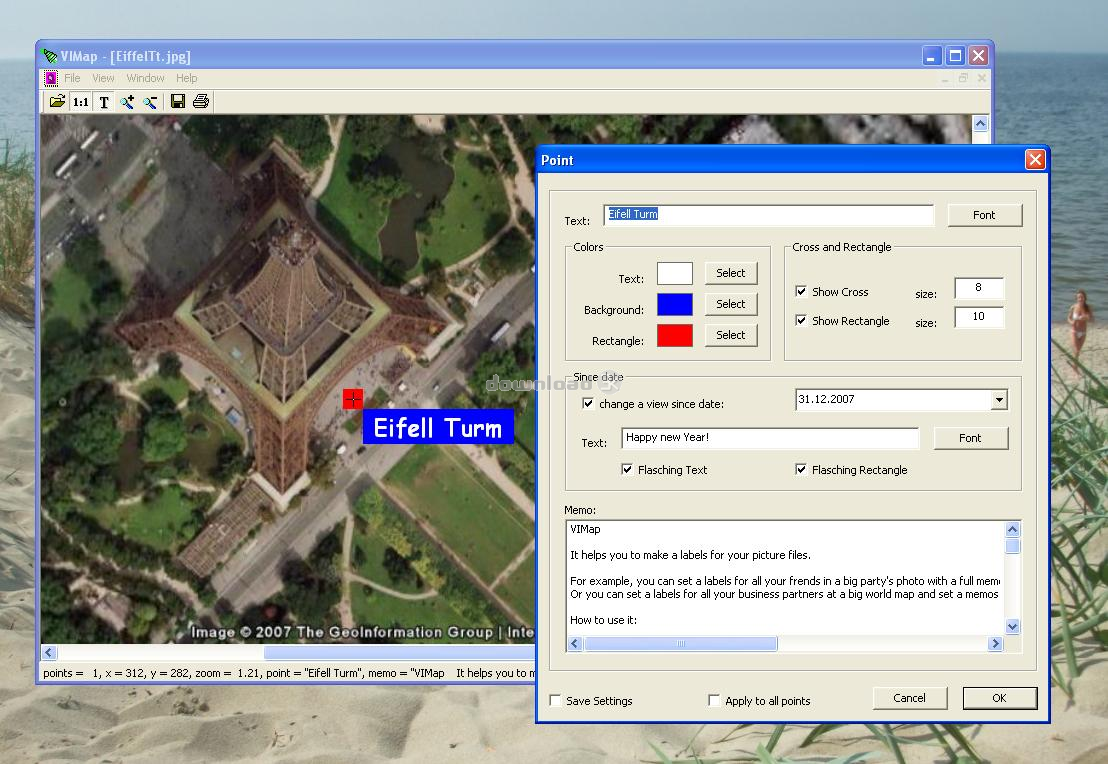
"Labels maker for your photos and pictures"
It helps you to make a labels for your picture files.For example, you can set a labels for all your frends in a big party's photo with a full memos for every one and with a flasched text at every one's birthday.
Or you can set a labels for all your business partners at a big world map and set a memos for all of them (phones, addresses etc), and remaining texts since needed dates for every one.
How to use it:
- open any picture file (jpg, bmp, etc): a map from Google Earth, a scool-frends photo, a scanned country or world map etc
- change piture-window's size to adjust the picture or press "1:1" button to see the picture in a full size
- double click at a desired point
- you will see the "Point" Dialog
- set up text, font, colors, cross and rectangle for that point
- add a memo text for that Point
- you can set a new text with a new font since any date in the Future (text and rectangle can be shown flasched or not)
- you can apply font and colors settings for all entered Points at ones
- you can save font, colors, cross and rectangle settings for next time
- press OK and the new label will be shown at a picture
- your original picture files will be not changed, only a small new files *.map will be created for every picture file with a labels
- make the same for any other points in a picture
- next time, when you open that picture file, all setted labels will be shown again
- save or print a picture with added labels
- you can open many pictures together
Hints:
- use left mouse double click at a label-cross to change settings for an existing label
- use right mouse double click at a label-cross to remove an existing label
- drag any label by label-cross to change a placement of a label
- change the picture's window size to adjust a printing size of a picture
Requirements: None
What's new in this version: No changes
Antivirus information
Download3K has downloaded and tested VIMap on 30 Aug 2023 with some of Today's best antivirus engines and you can find below, for your convenience, the scan results:
-
Avast:
Clean -
Avira:
Clean -
Kaspersky:
Clean -
McAfee:
Clean -
NOD32:
Clean

Popular downloads in Photo & Graphic
-
 Bandicam Screen Recorder 8.3.0.2533
Best Game, Video, Screen Recording Software -
 PhotoScape 3.7
A fun and easy photo editing software. -
 Magic Photo Editor 7.5
Easilly blend photo onto another picture. -
 SketchUp Make 16.1.1450 32-bit / 17.2.2555 64-bit
An easy-to-learn 3D modeling program. -
 jAlbum 39.6
Highly customizable web galleries for any site. -
 Shipping Container House Plans 1.1
Shipping Container House Plans Software -
 Corel PaintShop Pro 2023 25.2.0.58 Update 2
All you need to create fantastic photos! -
 Just Color Picker 6.2
Free colour picker and colour-editing tool. - JR Split File 1.2
Split a large file into smaller files -
 progeCAD Smart! free DWG CAD 9.0.28.8
progeCAD Smart! free personal CAD software
User rating
0/5 (0 votes)
Your rating

-
OS
Win98,WinME,Windows2000,WinXP,Windows2003,Windows Vista Home Basic -
License
Demo -
Price
$12 Buy -
Updated
8/30/2023 -
Downloads
470 (7 last week) -
Size
4.56 MB -
MD5
2ff450377bfdb4f4c901676cdfd1e1d3 -
SHA1
d13252e7c5c1a57cd18c9e6a9d77a94e7a7e973d -
Developer
Valeri Vlassov