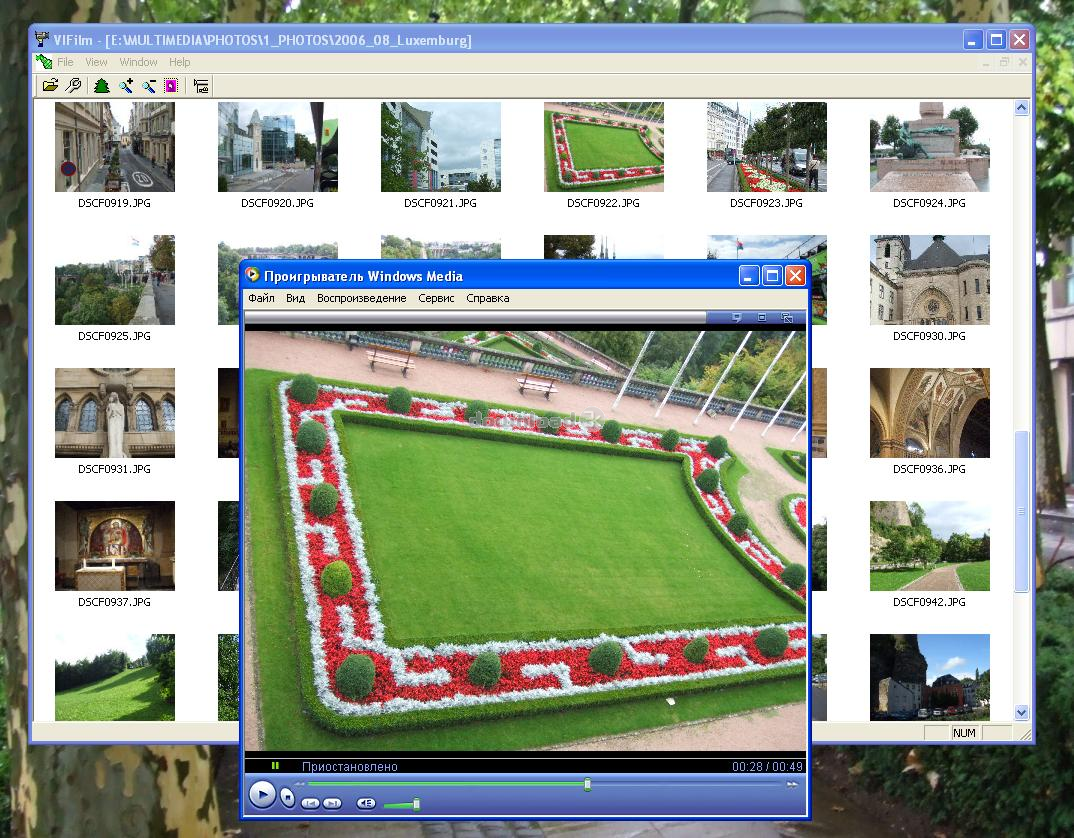
VIFilm 1.2
Developed by Valeri Vlassov
-
Windows
-
setup file Setup_VIFilm.zip (4.56 MB)
-
Demo
Buy or select mirror:
- Buy $19
- Developer Link 1 (non https Setup_VIFilm.zip)
- Download3k US (Setup_VIFilm.zip)
- Download3k EU (Setup_VIFilm.zip)
MD5: 422b436d4e2dd0481b9832d5d64a4684
All files are original. Download3K does not repack or modify downloads in any way. Check MD5 for confirmation.
Developer Description
"Film maker for your photos and pictures"
- you can collect all your photos or pictures to only one film file (movie-file in avi format)- then you can show this film using any of your movie players
- the photo file formats can be: jpg, bmp, gif, tif, png, wmf, emf, cur, ico
- you can show all photo files from selected directory as a mosaic
- you can select a needed photos and make a film for them
How to use the program:
- simply open one of the picture files (menu File / Open)
- all picture files from this directory will be shown as a mosaic
- use mouse double click or key Enter to show a picture in a separate window
- use keyboard keys '+' or '-' to make the size of pictures more or less (or use buttons "Zoom plus", "Zoom minus")
- use keyboard key Ctrl+A to select all pictures in mosaic (or use a button "Select all Photos")
- use keyboard key "Delete" to remove the not desired pictures from mosaic (it will not remove a real files from your HDD!)
- use keyboard key 'P' to open a Properties Dialog (or use a button "Show Properties")
- change default avi-file name if you need
- change default frames per second value if you need
- use keyboard key 'F' to start a film creation (or use a button "Make Film")
- the avi file will be made from selectd pictures
Hints:
- to make a film from the photos placed in a miscellaneous directories, copy all needed photos to a temporary directory and then open that directory in VIFilm
- select all pictures in a window (Ctrl+A) and then use Ctrl+click to unselect the not needed pictures
- use for the Film only the photos (pictures) with identical size (the program was tested with the photos 3Mb, 2048 x 1536 pixels)
- you can open more than one mosaic at ones and make a films for every of them
- you can open more than one pictures in a separate windows at ones
What's new in this version: No changes
Antivirus information
Download3K has downloaded and tested VIFilm on 29 Aug 2023 with some of Today's best antivirus engines and you can find below, for your convenience, the scan results:
-
Avast:
Clean -
Avira:
Clean -
Kaspersky:
Clean -
McAfee:
Clean -
NOD32:
Clean

Popular downloads in Photo & Graphic
-
 Bandicam Screen Recorder 8.3.1.2537
Best Game, Video, Screen Recording Software -
 PhotoScape 3.7
A fun and easy photo editing software. -
 Magic Photo Editor 7.5
Easilly blend photo onto another picture. -
 SketchUp Make 16.1.1450 32-bit / 17.2.2555 64-bit
An easy-to-learn 3D modeling program. -
 jAlbum 39.6
Highly customizable web galleries for any site. -
 Shipping Container House Plans 1.1
Shipping Container House Plans Software -
 Corel PaintShop Pro 2023 25.2.0.58 Update 2
All you need to create fantastic photos! -
 Just Color Picker 6.2
Free colour picker and colour-editing tool. - JR Split File 1.2
Split a large file into smaller files -
 progeCAD Smart! free DWG CAD 9.0.28.8
progeCAD Smart! free personal CAD software
User rating
3.5/5 (10 votes)
Good
Your rating

-
OS
Win98,WinME,Windows2000,WinXP,Windows2003,Windows Vista Home Basic -
License
Demo -
Price
$19 Buy -
Updated
8/29/2023 -
Downloads
1590 (2 last week) -
Size
4.56 MB -
MD5
422b436d4e2dd0481b9832d5d64a4684 -
SHA1
b0bef99aa6b1a0d930056821a7e0e97e9ea746a6 -
Developer
Valeri Vlassov