Super Capture Screen 2.8
Super Screen Capture Software
| Details |
View: screenshot
Size: 1.54 MB
License: Shareware
OS: Win95,Win98,WinME,WinNT 3.x,WinNT 4.x,Windows2000,WinXP,Windows2003
Price: $39.95 - Buy full version
Publisher: ZeallSoft
|
Date added: 6/2/2006
Date updated: 6/3/2006
Total Downloads: 611
Downloads - Last Week: 3
|
|
Super Capture Screen 2.8 Publisher's description
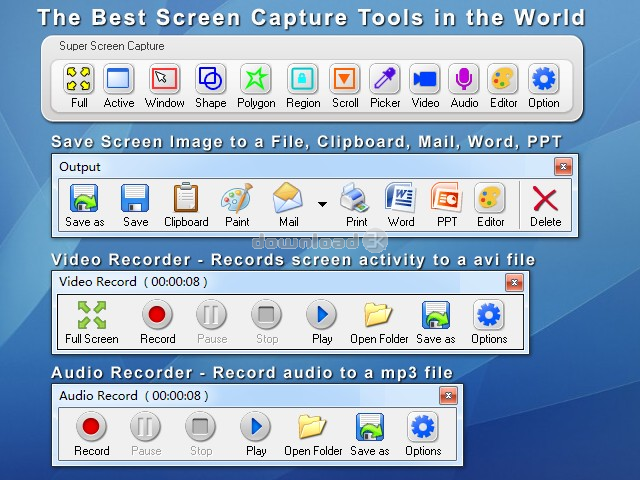
Super Screen Capture is an all-in-one software for free screen capture. You can capture screen in many ways, including full screen capture, region capture, window capture, scroll capture, directx capture, video screen capture, sound record and etc. You can choose many kinds of output ways, including clipboard, printer, email, editor tool, temp folder, and all popular formats. Super Screen Capture has an easy-to-use and intuitive interface. Whatever you can see on your screen, Super Screen Capture will easily and fastest capture for your immediate use. Edge Effects are special effects that you place around the outside edge of your capture. You can add these effects either as a filter after capturing.
Requirements: 500MHZ 128RAM 10MHARD
What's new in this version: You can use it to capture any screen or photo.
|
| Antivirus information |
| Download3K has downloaded and tested Super Capture Screen on 27 Mar 2009 with some of Today's best antivirus engines and you can find below, for your convenience, the scan results: |
| Bitdefender: |
Clean |
| NOD 32: |
Clean |
| Avira: |
Clean |
| Kaspersky: |
Clean |
|
| Complete antivirus report |
|
|
|
| Related press releases |
A mouseless screen capture utility addresses cropping accuracy and users with di... [2007-04-27 07:41:35]
At the recent WritersUA conference in Long Beach, California, IntuitiveTools introduced IT Screen Capture Pro 3.0, a professional screen capture utility that does not require a mouse. This utility may...
|
|
Extra Screen Capture Free can record screen activities into video files [2009-09-16 21:12:06]
Extra Screen Capture Free is an easy to use, powerful and lightweight screen recording program. It can capture screen activities and sounds to standard AVI video file or EXE file. If you move the curs...
|
|
Renovation Software releases Capture Assistant 1.0, convenient and easy to use t... [2008-01-24 16:29:05]
Capture Assistant helps to save your time and increases your productivity.
Capture Assistant allows you to capture:
- text
- font information (font face, size and color)
- passwords hidden behin...
|
|
Screen Shot Maker - is a powerful screen capture application thatprints screen a... [2006-02-16 00:00:00]
Screen Shot Maker - is a powerful screen capture application that prints screen and grabs screen shot from Windows desktop. If you want to capture desired desktop screen pictures at will and select ca...
|
|
Screen Shot Maker [2006-05-02 00:00:00]
Screen Shot Maker - is a powerful screen capture application that prints screen and grabs screen shot from Windows desktop. If you want to capture desired desktop screen pictures at will and select ca...
|
|
Screen Printing Powerhouse Includes Editing Tools & Image Database [2005-03-02 00:00:00]
Etrusoft has released !Quick Screen Capture v. 2.1, an affordable, versatile screen capture application for Windows that makes it easy to grab screen data, enhance and add text to the image, and manag...
|
|
Belltech Systems Releases CaptureXT 2.0, a Software for Capturing and Editing Co... [2006-05-05 00:00:00]
SEATTLE, WA -- May 19, 2006 -- Belltech Systems LLC
(www.belltechsystems.com), a provider of software solutions, today announced the release of CaptureXT 3.0 (www.capturext.com). Belltech's new screen...
|
|
Use Gadwin PrintScreen to save time and enhance your screen shots! [2005-09-22 00:00:00]
Gadwin PrintScreen 3.1 is a 990k download that allows much more flexibility with that Print Screen button at the top of your keyboard. Usually when you hit the Print Screen button it loads the current...
|
|
New PlayClaw Delivers More Powerful Screen-Grabbing Features for Games [2009-06-14 01:15:06]
The newest version of the screen-grabbing tool for games captures direct audio in Windows Vista in the multichannel mode, offers better performance of video codecs and enhanced visualization of Teamsp...
|
|
Mindgems launches 5 best tools to manage the pictures and files in your PC [2009-01-31 00:31:30]
PR web, January 2009 - “Privacy is very important when it comes to using your personal computer. However, there are situations where you will have to hide whatever is displaying in your monitor, wit...
|
|
|
|
| Beneton Movie GIF |
Beneton Movie GIF is a complete GIF editing tool. It supports over 48 file formats such as BMP, GIF, JPG, and PNG. Drag-and-drop allows to move frames quickly, and multiple frames selecting makes it easy to delete, copy, cut, paste, or move frames. |
|
| SnapaShot |
Smallest free screen capture tool, SnapaShot is great for taking screenshots of different size. Just open Snapa, resize its window to fit the area you want to save, and press "save it" button. |
|
| Contenta Converter PREMIUM |
Batch convert your photos. Optimize photos for internet, batch rename and organize in subfolders. Practical tool to prepare email attachments. Optimized for multi-core processors. Speed up your conversions by using 100% of your CPU. |
|
| Jalbum |
Create web albums from your digital photos, just the way you want it. Use ?skins? to customize the appearance and functionality of your album. Download new free skins, publish on any site and share your albums on Jalbum.net. |
|
| FotoTagger |
FotoTagger can annotate images and image areas, grab and organize images. Add tags pointing to specific objects. Display tags in a form of balloons. Upload/download images to/from Flickr. Publish to blog and HTML. Search, hide notes. Organize images |
|
| AlbumMe |
AlbumMe is a software that is easy to use to create flash slideshow from your digital photos, complete with ready-to-use animated templates, stunning transition effect, text captions, music etc. |
|
| Capture Professional |
Captures images and video from anywhere on your screen. Its assistant guides you through the capture process. Its built-in editor uses 60+ effects and operations, drawing tools (w/ colors, textures, gradients, effects) and macros. |
|
|