Easy Screen Capture And Annotation 2.5.0.0
Developed by MindGems Inc.
-
Windows, Other
-
setup file EasyScreenCaptureAA.exe (3.77 MB)
-
Shareware
Buy or select mirror:
- Buy $29.95
- Developer Link 1 (non https EasyScreenCaptureAA.exe)
- Download3k US (EasyScreenCaptureAA.exe)
- Download3k EU (EasyScreenCaptureAA.exe)
MD5: 5670506d4e0b7465bd8f0925c16ce68d
All files are original. Download3K does not repack or modify downloads in any way. Check MD5 for confirmation.
Developer Description
"Easily capture images and add annotations"
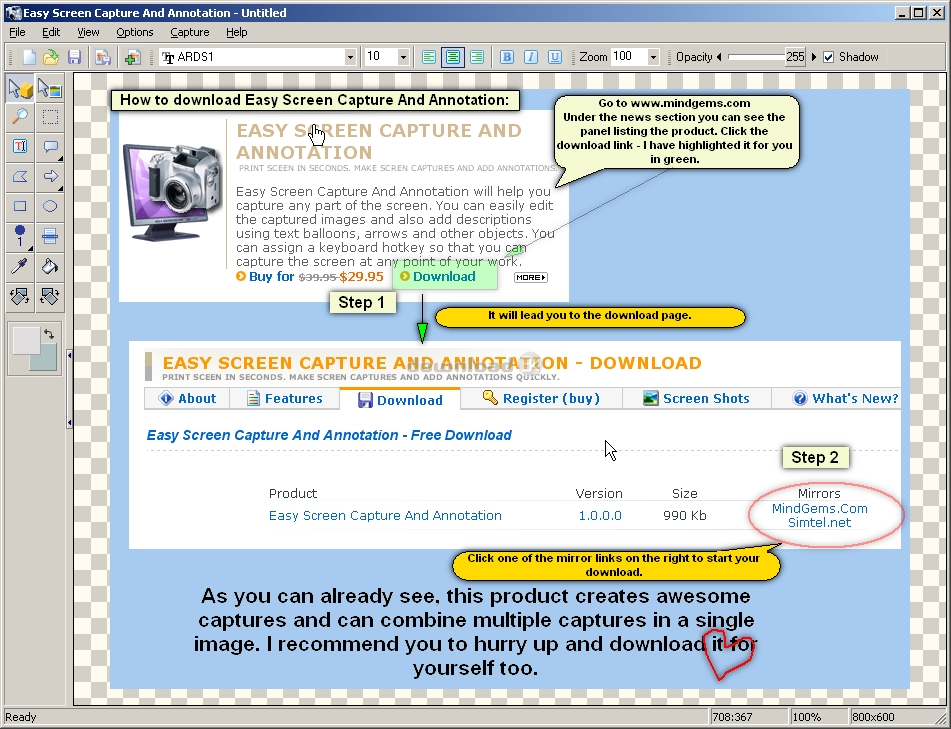
Easy Screen Capture and Annotation lets you capture and annotate any part of the screen. The main goal of the product is to speed up the capture and editing process saving you valuable time by automating repetitive tasks. Selecting a region directly on the screen or pointing only a menu, window or control at the moment of capture is just one of those features that will accelerate your workflow. You can easily create explicit and stylish captures by editing the captured images and also adding descriptions using text balloons (callouts), arrows and other objects. The assignable keyboard hotkeys let you capture the screen instantaneously at any point of your work. A rich and intuitive interface provides you with the common features available in the leading image processing products. Those include cropping, resizing, painting, drawing shapes, filling with colors, different image effects, transparency, shadows and many more. You have the power of image processing software and a screen capture utility in a single lightweight product. It will help you to create dazzling captures with as little effort as possible and save them in all known popular image formats. The product is easy for the novice users, and yet powerful enough for the advanced ones.Supports huge ammount of image formats:
JPEG Bitmap (*.jpg;*.jpeg;*.jpe)
Compuserve Bitmap (*.gif)
Portable Network Graphics (*.png)
TIFF Bitmap (*.tif;*.tiff;*.fax;*.g3n;*.g3f)
JPEG2000 Files (*.jp2)
JPEG2000 Code Stream (*.j2k;*.jpc;*.j2c)
Targa (*.tga;*.targa;*.vda;*.icb;*.vst;*.pix)
Paintbrush (*.pcx)
Windows Bitmap (*.bmp;*.dib;*.rle)
Windows Metafile (*.wmf)
Enhanced Windows Metafile (*.emf)
Windows Icon (*.ico)
Windows Cursor (*.cur)
Wireless Bitmap (*.wbmp)
Portable Pixmap (*.pxm;*.ppm)
Requirements: Pentium-133 or better 32 Mb Ram 2 mb Hdd space Hi-Color display
What's new in this version: Layer Save As option - including transparency, Restore original layer size option in context menu, Shadow effect for layers, Capture round windows in Windows XP, Vista, Windows 7, Warning on new project if current project is modified, CTRL+R and edit menu action to invert selection, Move Layers/Obje
Antivirus information
Download3K has downloaded and tested Easy Screen Capture And Annotation on 22 Nov 2024 with some of Today's best antivirus engines and you can find below, for your convenience, the scan results:
-
Avast:
Clean -
Avira:
Clean -
Kaspersky:
Clean -
McAfee:
Clean -
NOD32:
Clean

Popular downloads in Photo & Graphic
-
 Bandicam Screen Recorder 8.3.0.2533
Best Game, Video, Screen Recording Software -
 PhotoScape 3.7
A fun and easy photo editing software. -
 Magic Photo Editor 7.5
Easilly blend photo onto another picture. -
 SketchUp Make 16.1.1450 32-bit / 17.2.2555 64-bit
An easy-to-learn 3D modeling program. -
 jAlbum 39.5
Highly customizable web galleries for any site. -
 Shipping Container House Plans 1.1
Shipping Container House Plans Software -
 VEGAS Pro 22.0.0 Build 248
Provide the ultimate all-in-one environment -
 Corel PaintShop Pro 2023 25.2.0.58 Update 2
All you need to create fantastic photos! -
 Just Color Picker 6.2
Free colour picker and colour-editing tool. - JR Split File 1.2
Split a large file into smaller files
User rating
3.5/5 (5 votes)
Good
Your rating

-
OS
Win2000,Win7 x32,Win7 x64,Win98,WinOther,WinServer,WinVista,WinVista x64,WinXP,Other -
License
Shareware -
Price
$29.95 Buy -
Updated
11/22/2024 -
Downloads
602 (1 last week) -
Size
3.77 MB -
MD5
5670506d4e0b7465bd8f0925c16ce68d -
SHA1
57e784044b694259dc4c1738034880f5e08f7f8b -
Developer
MindGems Inc.