dwgPlotX 2.2.1
Developed by KarvamSoft
-
Windows
-
setup file setup_dwgPlotXdemo.exe (7.26 MB)
-
Shareware
Buy or select mirror:
- Buy $39.95
- Developer Link 1 (non https setup_dwgPlotXdemo.exe)
- Download3k US (setup_dwgPlotXdemo.exe)
- Download3k EU (setup_dwgPlotXdemo.exe)
MD5: 1059358f406d3ad08f45afda81046a0b
All files are original. Download3K does not repack or modify downloads in any way. Check MD5 for confirmation.
Developer Description
"AutoCAD Batch Plotter and Scripter."
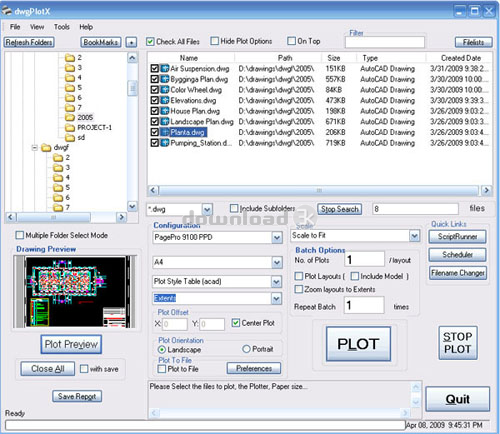
dwgPlotX is an AutoCAD batch plot and script tool, which is designed to make your AutoCAD sessions faster and more productive.It features an easy-to-use interface with sub-folder search, multiple folder selection, file filter and file list manager to enable you choose drawings in many ways. File/folder can be dragged and dropped onto the File view and important folders can be saved and recalled in Bookmarks.
For full version, dwgPlotX features a script-free batch plotter, which operates on both dwg and dxf file types. All the plotting parameters like Plotter, Paper size, Plot Style table, Plot orientation and plot offset are automatically scanned from the system and made available for the user to choose - just like in AutoCAD. What to Plot (Display/Extents/Limits) and plotting scale can also be selected from the interface. You can also choose whether to plot layouts, the number of times each file to be plotted and the number of times the whole batch has to be repeated.
All the selected settings eg. plotter,paper selection etc get saved so that you don't have to set them all over again.
The program features a ScriptRunner interface to create, generate, save and run batch scripts. In AutoCAD, Scripts can be made to perform almost any kind of operation on drawings like plotting, purging, exporting etc, and dwgPlotX taps their power by running them on many files at a time. The ScriptRunner features Command Capture to script, line by line script runner for de-bugging, and Tags manager for inserting user and system tags to ease a successful script creation.
ScriptRunner works as an AutoCAD LT batch plotter by using the PLOT.scr script that is bundled in.
dwgPlotX also features a comprehensive batch file renaming utility to rename files of any kind, and a scheduler to preset script/task run time.
Requirements: AutoCAD/AutoCAD LT.
What's new in this version: bulk name replacement feature added, minor fixes.
Antivirus information
Download3K has downloaded and tested dwgPlotX on 5 Apr 2017 with some of Today's best antivirus engines and you can find below, for your convenience, the scan results:
-
Avast:
Clean -
Avira:
Clean -
Kaspersky:
Clean -
McAfee:
Clean -
NOD32:
Clean

Popular downloads in Photo & Graphic
-
 Bandicam Screen Recorder 8.3.1.2537
Best Game, Video, Screen Recording Software -
 PhotoScape 3.7
A fun and easy photo editing software. -
 Magic Photo Editor 7.5
Easilly blend photo onto another picture. -
 SketchUp Make 16.1.1450 32-bit / 17.2.2555 64-bit
An easy-to-learn 3D modeling program. -
 jAlbum 39.6
Highly customizable web galleries for any site. -
 Shipping Container House Plans 1.1
Shipping Container House Plans Software -
 Corel PaintShop Pro 2023 25.2.0.58 Update 2
All you need to create fantastic photos! -
 Just Color Picker 6.2
Free colour picker and colour-editing tool. - JR Split File 1.2
Split a large file into smaller files -
 progeCAD Smart! free DWG CAD 9.0.28.8
progeCAD Smart! free personal CAD software
User rating
2.5/5 (3 votes)
Medium
Your rating

-
OS
Win2000,WinXP,Win7 x32,Win7 x64,Windows 8,Windows 10,WinServer,WinOther,Windows2000,Windows2003,Wind -
License
Shareware -
Price
$39.95 Buy -
Updated
4/4/2017 -
Downloads
395 (2 last week) -
Size
7.26 MB -
MD5
1059358f406d3ad08f45afda81046a0b -
SHA1
c0a150986d9840f474e0be96f0918e6b972b77d3 -
Developer
KarvamSoft