Novagraph Chartist Flowchart 5.2
Developed by Novagraph
-
Windows
-
setup file wcharp52.msi (3.43 MB)
-
Shareware
Buy or select mirror:
- Buy $24.50
- Developer Link 1 (non https wcharp52.msi)
- Download3k US (wcharp52.msi)
- Download3k EU (wcharp52.msi)
MD5: 585f5249944142570de95a7b1ecd147b
All files are original. Download3K does not repack or modify downloads in any way. Check MD5 for confirmation.
Developer Description
"A comprehensive application for flowcharting."
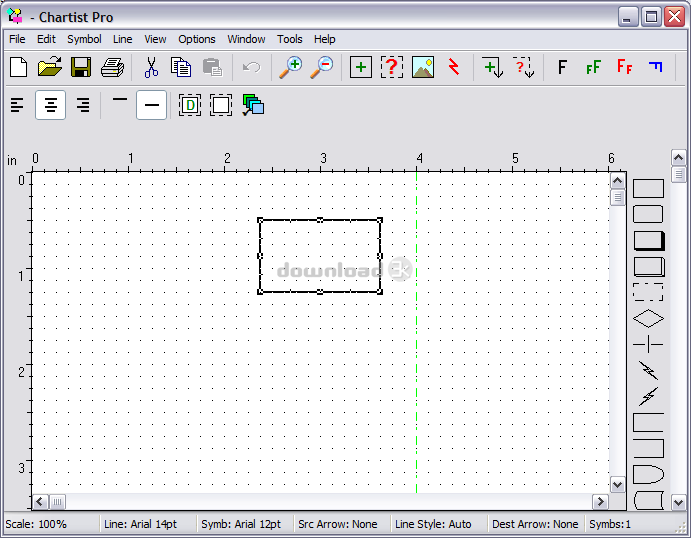
Chartist is an interactive flowchart application. With Chartist you can create, edit, and print flow charts, organization charts, or other charts that use similar components. Through the use of the Windows Clipboard, you may also paste all or part of the charts you create into other documents, providing the application can read Clipboard bitmaps or metafile pictures. Chartist supports the OLE feature of Windows, allowing other applications to link or embed Chartist information. Supports multiple documents. Data may be exchanged among Chartist documents, using the Clipboard or drag and drop. Chartist supports the text, graphics and color capabilities of your display and printer. Text in a Chartist document may use any number of the fonts available from your printer. A Chartist document is one or more pages in size. The orientation of pages depends upon the settings for your printer. Within a Chartist document there may as many as 4000 symbols. A symbol is a polygonal shape with optional text or graphics inside it. The text inside a symbol may be in any of the fonts available from your printer. Multiple fonts may be used for the text inside a symbol. Lines may be drawn between symbols. The lines are routed automatically, with influence from the user as to symbol entry and exit points. Lines may be drawn with or without arrowheads, in different thicknesses, with solid, dotted or dashed pen styles, and with three different routing styles (straight, curved, square turns). When symbols are moved around the document, any associated lines are rerouted and redrawn as necessary. Lines may also be labeled with text.Requirements: Windows 2000, XP, Vista. Microsoft Installer 2.0 or later.
What's new in this version: 1. Corrected graphics rendering for legacy graphics export formats. 2. Fixed a bug interactiing with Word 2002 and later. 3. Corrected problem with File Open dialog in Vista. 4. Added Printer configuration button to Print dialog. 5. Added Vista securtiy manifest to avoid virtualization.
Antivirus information
Download3K has downloaded and tested Novagraph Chartist Flowchart on 12 Dec 2025 with some of Today's best antivirus engines and you can find below, for your convenience, the scan results:
-
Avast:
Clean -
Avira:
Clean -
Kaspersky:
Clean -
McAfee:
Clean -
NOD32:
Clean

Popular downloads in Photo & Graphic
-
 Bandicam Screen Recorder 8.3.0.2533
Best Game, Video, Screen Recording Software -
 PhotoScape 3.7
A fun and easy photo editing software. -
 Magic Photo Editor 7.5
Easilly blend photo onto another picture. -
 SketchUp Make 16.1.1450 32-bit / 17.2.2555 64-bit
An easy-to-learn 3D modeling program. -
 jAlbum 39.5
Highly customizable web galleries for any site. -
 Shipping Container House Plans 1.1
Shipping Container House Plans Software -
 VEGAS Pro 22.0.0 Build 248
Provide the ultimate all-in-one environment -
 Corel PaintShop Pro 2023 25.2.0.58 Update 2
All you need to create fantastic photos! -
 Just Color Picker 6.2
Free colour picker and colour-editing tool. - JR Split File 1.2
Split a large file into smaller files
User rating
2.5/5 (2 votes)
Medium
Your rating

-
OS
Windows2000,WinXP,Windows2003,Windows Vista Starter,Windows Vista Home Basic,Windows Vista Home Prem -
License
Shareware -
Price
$24.50 Buy -
Updated
10/31/2025 -
Downloads
372 (2 last week) -
Size
3.43 MB -
MD5
585f5249944142570de95a7b1ecd147b -
SHA1
fd559439c30d48f54a94ce2c1121a29ae341b8a2 -
Developer
Novagraph