ClipSize 2.6
- Developer Link 1 (clipsize2.exe)
- Developer Link 2 (clipsize2.zip)
- Download3k US (ver 2.6, clipsize2.exe)
- Download3k EU (ver 2.6, clipsize2.exe)
MD5: c3ff351aa6358a2a078acd76cf5d22d0
All files are original. Download3K does not repack or modify downloads in any way. Check MD5 for confirmation.
Quick Review
"Monitor Your Clipboard Usage"
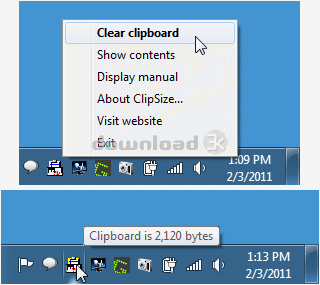
ClipSize is a little system tray Windows application to display how much memory is being used presently by the Windows clipboard. This can be helpful especially with older systems that have a very restricted amount of memory like 2MB or 4MB and run into issues when Windows applications use too much in the general running of the operating system. The application runs as a tiny system tray app. Mousing over the icon in the system tray automatically displays the size of the clipboard presently. There are menu options which allow for viewing of the full clipboard contents or clearing the clipboard entirely.
ClipSize Key Features:
- System tray app which can display the amount of memory being used by the current clipboard
- View the full contents of the current clipboard
- Delete the current clipboard
- Revised for Windows 7
ClipSize is a Windows clipboard utility to manage its memory usage, view the contents and delete them.
Requirements: 8MB memory
What's new in this version: Updated for Windows 7
Antivirus information
-
Avast:
Clean -
Avira:
Clean -
Kaspersky:
Clean -
McAfee:
Clean -
NOD32:
Clean

Popular downloads in System Utilities
-
 Realtek AC'97 Drivers A4.06
Realtek AC 97 sound driver. -
 Windows 7 Service Pack 1 (SP1) 32-bit & 64-bit (KB976932)
The first service pack for Windows 7. -
 Realtek High Definition Audio Driver for Vista, Win7, Win8, Win8.1, Win10 32-bit R2.82
High definition audio driver from Realtek. -
 .NET Framework 2.0
The programming model of the .NET -
 Driver Cleaner Professional 1.5
Improved version of Driver Cleaner -
 RockXP 4.0
Allows you to change your XP product key -
 Realtek AC'97 Drivers for Vista/Win7 6305
Multi-channel audio CODEC designed for PC. -
 DAEMON Tools Lite 12.3.0.2297
The FREE Virtual CD/DVD-ROM-EMULATOR. -
 AutoCorect 4.1.5
Diacritice la comanda, punctuatie automata. -
 SIW 16.09.0628
SIW - System Information for Windows

-
OS
WinXP,WinVista,WinVista x64,Win7 x32,Win7 x64,Win2000,WinOther,WinServer,Win98 -
License
Freeware -
Price
$0 -
Updated
3/17/2026 -
Downloads
631 (4 last week) -
Size
0.74 MB -
MD5
c3ff351aa6358a2a078acd76cf5d22d0 -
SHA1
a1551b4e81190d3aebbd84863deee5ab07973948 -
Developer
DataMystic