GConvert 5.1.0
Developed by G.D.G. Software SARL
-
Windows
-
setup file gconvset.exe (3.30 MB)
-
Shareware
Buy or select mirror:
- Buy $25
- Developer Link 1 (non https gconvset.exe)
- Developer Link 2 (non https gconvset.exe)
- Download3k US (gconvset.exe)
- Download3k EU (gconvset.exe)
MD5: b9f2da5ab3a56c7f9d5dff5d50a20a83
All files are original. Download3K does not repack or modify downloads in any way. Check MD5 for confirmation.
Developer Description
"Icon software to convert, edit, manage icons"
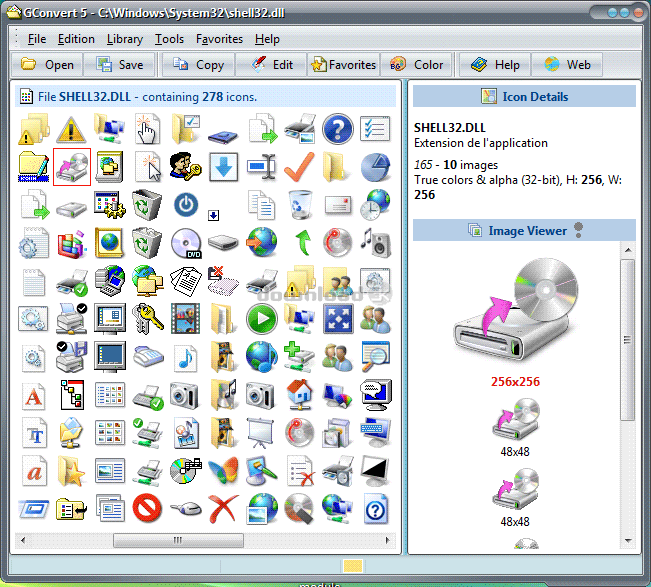
GConvert is a full-featured icon toolkit that lets you extract, create, edit, manage, compile and convert icons. It reads any icon resource file (EXE, DLL, ICL, OCX, NIL, CPL, SCR, RSRC, ICNS...) and then allows you to save extracted icons in other image formats (ICO, BMP, PNG, GIF, Photoshop PSD, JPG and more thanks to plug-ins), copy them to the clipboard or use the enhanced drag/drop support for inserting icon images directly in your documents, Web pages or applications.GConvert offers you more flexibility and functionality than other standard icon extractors:
- extract any icon with all of its images (any size and color depth, including 32-bit XP, Vista icons with PNG compression, MacOS X icons; and in 256x256 and 512x512 formats).
- create, modify and manage icon libraries in .ICL files (icon library), Zip archives and compiled DLL files.
- includes a powerful icon editor to manage the images of your icons. Only import one picture and all other icon images can be created in some clicks.
- enhanced support for 32-bit alpha-blended icons (from Windows XP, Vista and Macintosh Mac OS X). GConvert draws these icons correctly even if not running XP, saves them as they would appear under XP and can also keep the alpha channel when converting icons to PNG or PSD.
- convert image files (BMP, PNG, PSD, GIF, JPG, ICNS...) into icons that can be used with desktop shortcuts. Customize your desktop or create unique themes!
- search for hidden icons on your computer.
- recognizes Macintosh icons stored in ICNS and RSRC files.
- supports batch operations to convert/create several icons.
- save your icon and icon folder favorites.
- export icons as 32-bit DLL files recognized by Windows.
- create Windows cursors (CUR) from icons, modify icons in EXE and DLL files...
- integrates Windows Explorer (context menu) to open icon files.
Finally it offers an intuitive and easy-to-use skinned interface, a context-sensitive help file, a FAQ, a sample icon library...
Requirements: Microsoft Windows Installer 2.01 or higher.
What's new in this version: New color tools (like screen color picker, HTML color code support) and several improvements.
Antivirus information
Download3K has downloaded and tested GConvert on 7 Feb 2026 with some of Today's best antivirus engines and you can find below, for your convenience, the scan results:
-
Avast:
Clean -
Avira:
Clean -
Kaspersky:
Clean -
McAfee:
Clean -
NOD32:
Clean

Popular downloads in Photo & Graphic
-
 Bandicam Screen Recorder 8.3.0.2533
Best Game, Video, Screen Recording Software -
 PhotoScape 3.7
A fun and easy photo editing software. -
 Magic Photo Editor 7.5
Easilly blend photo onto another picture. -
 SketchUp Make 16.1.1450 32-bit / 17.2.2555 64-bit
An easy-to-learn 3D modeling program. -
 jAlbum 39.5
Highly customizable web galleries for any site. -
 Shipping Container House Plans 1.1
Shipping Container House Plans Software -
 VEGAS Pro 22.0.0 Build 248
Provide the ultimate all-in-one environment -
 Corel PaintShop Pro 2023 25.2.0.58 Update 2
All you need to create fantastic photos! -
 Just Color Picker 6.2
Free colour picker and colour-editing tool. - JR Split File 1.2
Split a large file into smaller files
User rating
0/5 (0 votes)
Your rating

-
OS
Win98,WinME,Windows2000,WinXP,Windows2003,Windows Vista Starter,Windows Vista Home Basic,Windows Vis -
License
Shareware -
Price
$25 Buy -
Updated
2/7/2026 -
Downloads
573 (1 last week) -
Size
3.30 MB -
MD5
b9f2da5ab3a56c7f9d5dff5d50a20a83 -
SHA1
f59fb3fc319e693cddf02f13e7774361551d1b79 -
Developer
G.D.G. Software SARL