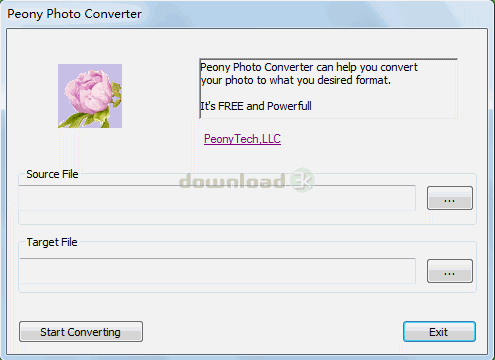
Peony Photo Converter 1.0
Developed by PeonyTech,LLC
-
Windows
-
setup file setup.exe (1.28 MB)
-
Freeware
Select a download mirror:
- Developer Link 1 (non https setup.exe)
- Download3k US (setup.exe)
- Download3k EU (setup.exe)
MD5: 196338a4f4f0305b6b553f88504e7e28
All files are original. Download3K does not repack or modify downloads in any way. Check MD5 for confirmation.
Developer Description
"Peony Photo Converter, free image converter!"
Peony Photo Converter is a professional image converter for graphic files, photos, images of any type. Up-to-date technology makes it possible to create a easy to use graphic interface. It supports -, 4-, 8-, 16, 24- and 32-bit images, as well as integer, real and complex images.33 image formats are supported!More important, It's FREE!Ease of use
The program has been designed to be extremely simple in use. Our aim is: make difficult things simple instead of simple things difficult.
Color conversion
Converter provides many functions to convert a bitmap from one bitdepth to another. The library supports 1-, 4-, 8-, 16, 24- and 32-bit images, as well as integer, real and complex images.
Support for High Dynamic Range images
Converter supports RGB float images as well a 48-bit HDR images and provides tone mapping operators to convert these images to 24-bit LDR images.
Metadata support
Parse common metadata models attached to your bitmap. FreeImage supports Comments, Exif (including GPS and maker notes), IPTC, Adobe XMP and GeoTIFF metadata models.
Image Formats:
BMP files [reading, writing]
DDS files [reading]
EXR files [reading, writing]
Raw Fax G3 files [reading]
GIF files [reading, writing]
HDR files [reading, writing]
ICO files [reading, writing]
IFF files [reading]
JNG files [reading]
JPEG/JIF files [reading, writing]
JPEG-2000 File Format [reading, writing]
JPEG-2000 codestream [reading, writing]
KOALA files [reading]
Kodak PhotoCD files [reading]
MNG files [reading]
PCX files [reading]
PBM/PGM/PPM files [reading, writing]
PFM files [reading, writing]
PNG files [reading, writing]
Macintosh PICT files [reading]
Photoshop PSD files [reading]
RAW camera files [reading]
Sun RAS files [reading]
SGI files [reading]
TARGA files [reading, writing]
TIFF files [reading, writing]
WBMP files [reading, writing]
XBM files [reading]
XPM files [reading, writing]
Requirements: Visual C++ 2010 Runtime Libraries
What's new in this version: First version released.
Antivirus information
Download3K has downloaded and tested Peony Photo Converter on 8 Mar 2013 with some of Today's best antivirus engines and you can find below, for your convenience, the scan results:
-
Avira:
Clean -
Kaspersky:
Clean -
NOD32:
Clean

Popular downloads in Photo & Graphic
-
 Bandicam Screen Recorder 8.3.1.2537
Best Game, Video, Screen Recording Software -
 PhotoScape 3.7
A fun and easy photo editing software. -
 Magic Photo Editor 7.5
Easilly blend photo onto another picture. -
 SketchUp Make 16.1.1450 32-bit / 17.2.2555 64-bit
An easy-to-learn 3D modeling program. -
 jAlbum 39.6
Highly customizable web galleries for any site. -
 Shipping Container House Plans 1.1
Shipping Container House Plans Software -
 Corel PaintShop Pro 2023 25.2.0.58 Update 2
All you need to create fantastic photos! -
 Just Color Picker 6.2
Free colour picker and colour-editing tool. - JR Split File 1.2
Split a large file into smaller files -
 progeCAD Smart! free DWG CAD 9.0.28.8
progeCAD Smart! free personal CAD software
User rating
0/5 (0 votes)
Your rating

-
OS
Win2000,Win7 x32,Win7 x64,Win98,WinServer,WinVista,WinVista x64,WinXP -
License
Freeware -
Price
$0 -
Updated
3/8/2013 -
Downloads
123 (1 last week) -
Size
1.28 MB -
MD5
196338a4f4f0305b6b553f88504e7e28 -
SHA1
eb36c4fcddeb431cf38ee383bfd236b734b147c5 -
Developer
PeonyTech,LLC