Any Image 4.1
Image File Format Batch Converter
| Details |
View: screenshot
Size: 0.84 MB
License: Shareware
OS: Win95,Win98,WinME,WinNT 3.x,WinNT 4.x,Windows2000,WinXP,Windows2003,Windows Vista Starter,Windows Vi
Price: $39.95 - Buy full version
Publisher: FMJ-Software
|
Date added: 6/18/2005
Date updated: 12/5/2008
Total Downloads: 401
Downloads - Last Week: 0
|
|
Any Image 4.1 Publisher's description
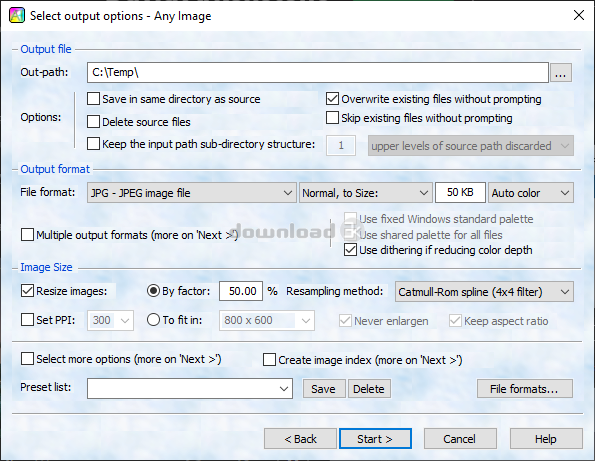
Image File Format Batch Converter
- Converting large batches of files is as easy as converting a single file.
- Just as easily convert to multiple output formats in a single batch run.
- Many different image file formats are supported.
- Optionally do high-quality image processing operations (e.g. Image resizing, framing, un-dithering, sharpness, saturation, contrast, gamma control, rotation, mirroring).
- Highest quality color depth reduction: Write images with 2, 4, 8, 16, 32, 64, 128, 256, 32K, or 16M optimized colors.
- Alpha plane, transparency color, and text fields are converted for all formats that supports it.
- Options useful for web or game graphics, e.g. "Set alpha plane from second file" and "Use optimal shared palette for all files".
- Unique option to compress JPEG's to a target file size as an alternative to the usual 'quality' parameter.
- 'Super optimize' option for PGN's produces the smallest 8 or 24-bit PNG files that we've seen.
- Automatically create HTML image tables for image galleries or thumbnail indexes.
- Command line interface for doing unattended conversions.
Requirements: None.
What's new in this version: New in v4.1: Pattern renaming and improved index creation.
|
| Antivirus information |
| Download3K has downloaded and tested Any Image on 5 Dec 2008 with some of Today's best antivirus engines and you can find below, for your convenience, the scan results: |
| Bitdefender: |
Clean |
| NOD 32: |
Clean |
| Kaspersky: |
Clean |
|
| Complete antivirus report |
|
|
|
| Related press releases |
VintaSoftImaging.NET Library v2.1 has been released. [2009-03-12 08:13:01]
VintaSoftImaging.NET is a powerful and easy to use imaging toolkit for .NET developers. Library allows to load, view, process, annotate, print and save images, work with multipage TIFF files directly,...
|
|
Convert DMG file to ISO image - PowerISO [2009-06-10 20:34:06]
Are you looking for the tool that can convert DMG file to ISO image? Yes, PowerISO can help you.
PowerISO is a ISO CD/DVD image file creating/editing/converting tool , it can directly edit the CD/D...
|
|
GIRDAC releases new version of Image Converter that Runs on Windows 7 [2009-10-20 23:30:44]
GIRDAC releases new version of Image Converter that Runs on Windows 7.
GIRDAC Image Editor and Converter 2.0 is new enterprise application for converting images from one to other format. It has man...
|
|
Protect Web Image Resources From Unwanted Copying [2005-11-21 00:00:00]
FOR IMMEDIATE RELEASE
For further information contact:
Hao Woo
Phone: +86-591-88921878
Protect Web Image Resources From Unwanted Copying
Corsac Software, Inc. has released version 1.0 of Web Image ...
|
|
Bolide Software Releases Image Comparer 2.2 [2005-08-01 00:00:00]
Got twin images? Image Comparer will find them!
While there are quite a few software applications that compare images in order to find duplicates, there is only one solution that has own unique c...
|
|
Advanced PSD Repair 1.2 has been released! [2006-03-16 00:00:00]
Advanced PSD Repair(APSR) is a powerful tool to recover corrupt Photoshop image(PSD, PDD) files. It uses advanced technologies to scan the corrupt or damaged Photoshop image files and recover your dat...
|
|
Quick-PDF Software Releases PDF to IMAGE 2.2 [2009-07-23 13:02:33]
July 23, 2009 - Quick-PDF Software today announces PDF to IMAGE ver.2.2, a new version of the converter for quick export of Adobe PDF documents to JPEG, GIF, PNG, BMP image files.
PDF to Image is a...
|
|
VintaSoftImaging.NET Library v2.2 has been released. [2009-04-17 05:14:18]
VintaSoftImaging.NET is a powerful and easy to use imaging toolkit for .NET developers. Library allows to load, view, process, annotate, print and save images, work with multipage TIFF files directly,...
|
|
Quick-PDF Software Releases PDF to IMAGE 2.1 and Announces a 30% Discount on Its... [2009-03-10 04:59:47]
March 10, 2009 - Quick-PDF Software today announces PDF to IMAGE ver.2.1, a new version of the converter for quick export of Adobe PDF documents to JPEG, GIF, PNG, BMP image files.
PDF to Image is ...
|
|
Make ISO Image - MagicISO [2006-03-25 00:00:00]
Are you looking for the tools that has the ability to make ISO image? yes, MagicISO can help you do that.
MagicISO Maker is a powerful CD/DVD-image-file editor, CD burner, and CD/DVD-backup tool. It...
|
|
|
|
| Capture Professional |
Captures images and video from anywhere on your screen. Its assistant guides you through the capture process. Its built-in editor uses 60+ effects and operations, drawing tools (w/ colors, textures, gradients, effects) and macros. |
|
| Makeup Guide |
Did you forget to tint the lips or eyelids? You're not pleased with the eye color? Don't worry. Now you can correct it directly on the photos! Your virtual makeup bag offers these tools: Lipstick, Powder, Rouge, Eye Color, Eye Shadow and Eye Pencil. |
|
| Proxel Lens Corrector |
With this Photoshop plugin you can improve the pictures from any digital camera or camera/lens combination you own. Removing distortion and converting fish eye pictures into rectilinear pictures, with a quality of much more expensive lenses. |
|
| 3GP Player 2008 |
3GP Player 2008 is a free 3gp player for your PC. Play all of your phone 3GP videos on your Pc supports 3GPP,3GPP2 MP4, MOV, AVI . |
|
| Proxel EXIF Tool |
Photoshop plugin that shows EXIF info |
|
| SnapaShot |
Smallest free screen capture tool, SnapaShot is great for taking screenshots of different size. Just open Snapa, resize its window to fit the area you want to save, and press "save it" button. |
|
| Fix Any Color |
Fix Any Color lets you selectively adjust colors in your digital images. It combines sophisticated L*C*h* color processing with an easy-to-use interface. Simply click on the color to fix, then adjust lightness, saturation and hue of that color. |
|
|