WM Capture 7.4
Developed by Applian Technologies
-
Windows
-
setup file install_wmcap.exe (25.51 MB)
-
Shareware
Buy or select mirror:
- Buy $39.95
- Developer Link 1 (non https install_wmcap.exe)
- Download3k US (install_wmcap.exe)
- Download3k EU (install_wmcap.exe)
MD5: bc53180340e5f1a99f8795140fdc8ddd
All files are original. Download3K does not repack or modify downloads in any way. Check MD5 for confirmation.
Developer Description
"High Quality Video & DVD Capture Recorder"
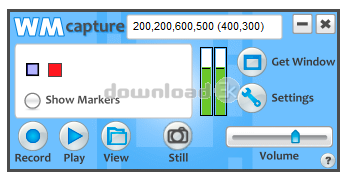
Make professional quality videos from ANY online source with WM Capture. WM Capture uses a unique high speed capture technology to create a near perfect reproduction of what you see on screen. WM Capture records video from ANY Web site, regardless of format. It even records DVD's playing on your PC. If you can watch it you can save it. WM Capture does not circumvent DRM (Digital Rights Management) or any copy protection technology so it's 100% legal world-wide.WM Capture offers a revolutionary feature - "background mode". Unlike other screen capture programs, WM Capture can screen capture from hidden or minimized windows. Additionally, because it is capturing from hidden windows, the program uses less processing power than other screen capture programs, so you can use WM Capture on an older PC using "background mode" and still get incredible results. "Background mode" also allows WM Capture to capture in HD.
WM Capture also offers "invisible mode" - you can load the program onto a thumb drive and use it on other PCs without leaving a trace. All recordings are saved onto the thumb drive. It's a great feature for people who are traveling and want to capture live streams like webinars or training sessions.
While WM Capture offers a lot of wonderful advanced features, it is very easy to use. The program offers "recommended settings" making it a snap set up the program optimally for your particular PC and for the type of recording you would like to do. Save to MPEG, WMV, AVI, DVD-ISO and more.
WM Capture is truly revolutionary. There is no screen-capture program that can do what it can do. Try it today!
Requirements: Windows 8, 7, Vista and XP
What's new in this version: Added Virtual-Audio driver as a supplement to the Sound-Capture. Added WM Browser for Background Mode. Added a warning message for BCK mode. Now it runs without elevation on regular user accounts - no longer requires admin password. Removed the Universal Driver. Misc. bug fixes.
Antivirus information
Download3K has downloaded and tested WM Capture on 24 Aug 2014 with some of Today's best antivirus engines and you can find below, for your convenience, the scan results:
-
Avast:
Clean -
Avira:
Clean -
Kaspersky:
Clean -
NOD32:
Clean

Popular downloads in MP3 Audio Video
-
 Realtek High Definition Audio Driver for 2000/XP/2003 32/64-bit R2.74
High definition audio driver from Realtek. -
 3GP Player 2013 1.4
Free 3GP Player for Pc -
 iTunes 12.13.7.1
Manage and play your music collection. -
 Windows Media Player 11
One of the best media player -
 Total Video Converter 3.72
Total Video Converter -
 TVexe TV HD 6.0
Watch free live TV on your PC now+ Radio -
 K-Lite Codec Pack Full 18.9.0
A collection of codecs and related tools. -
 Windows Media Player 9 Codecs Pack
The latest Windows Media codecs -
 VLC media player 3.0.21
A portable app of VLC media player. -
 KMPlayer 4.2.3.21 x86 / 2025.1.21.12 x64
A movie and audio player.
User rating
4/5 (2 votes)
Very good
Your rating

-
OS
WinXP,Win7 x32,Win7 x64,Windows Vista Ultimate,Windows Vista Ultimate x64,Windows Vista Starter,Wind -
License
Shareware -
Price
$39.95 Buy -
Updated
8/24/2014 -
Downloads
747 (9 last week) -
Size
25.51 MB -
MD5
bc53180340e5f1a99f8795140fdc8ddd -
SHA1
728755ae52b9a204d2f723e66cee6b695c4da756 -
Developer
Applian Technologies